State Pension forecast We have many ways we can communicate with you If you would like braille, British Sign Language, a hearing loop, translations, large print, audio or something else please call.
Loading

Open form follow the instructions

Easily sign the form with your finger

Send filled & signed form or save
How to fill out the BR19 online
Filling out the BR19 form is an important step in obtaining your State Pension forecast. This guide provides a clear and supportive approach to help you navigate through the process of completing the form online.
Follow the steps to successfully complete the BR19 form.
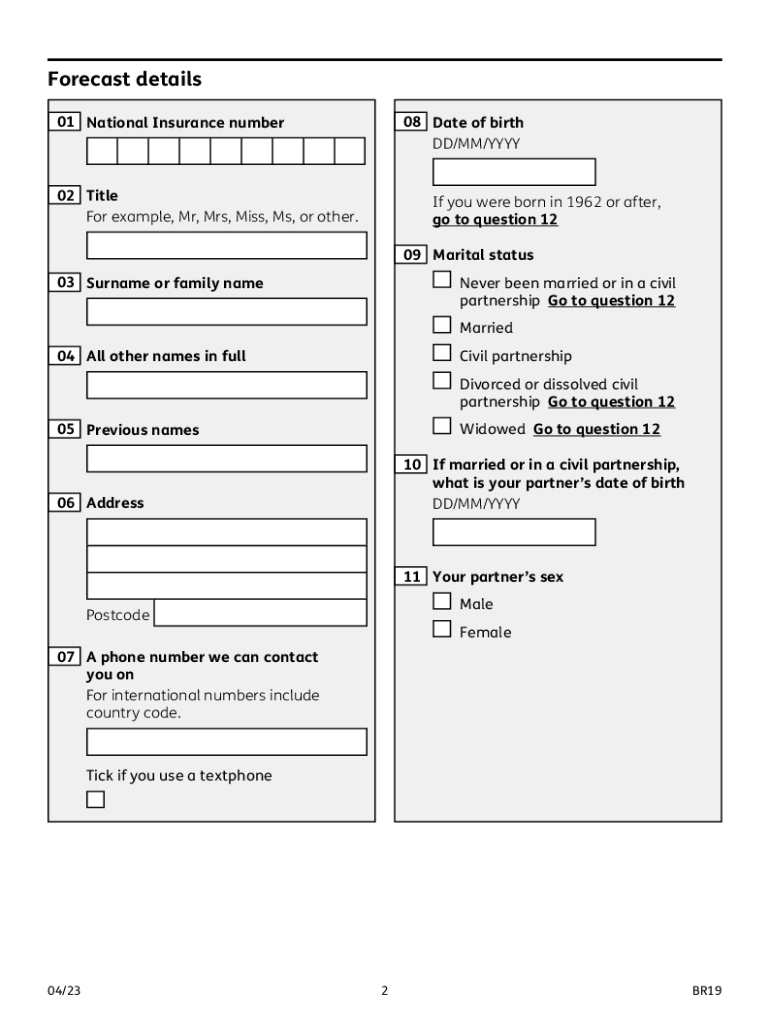
- Click ‘Get Form’ button to access the BR19 form and open it in your browser.
- Enter your National Insurance number in the provided field. This is essential for identifying your contribution history.
- Provide your date of birth in the format DD/MM/YYYY. This helps verify your identity.
- Select your title from the options provided, such as Mr, Mrs, Miss, Ms, or another title. If you were born in 1962 or later, proceed to question 12.
- Input your surname or family name. This should match your official identification.
- List all other names you have used in full, if applicable, in the designated field.
- Indicate any previous names you have held, if relevant.
- Complete your current address, including postcode, ensuring accuracy for communication.
- Provide a telephone number where you can be contacted. If it’s an international number, don’t forget to include the country code.
- Indicate whether you use a textphone by ticking the relevant box.
- If you are acting on someone else's behalf, confirm that you have the required legal authority to do so.
- Confirm whether you are requesting your own forecast or that of another person who has authorized you.
- Fill in your full name and title as a confirmation of your identity.
- If applicable, provide the name of your company or organization.
- Sign and date the form in the designated areas, ensuring that your signature is clear.
- Once the form is completely filled out, save any changes you made, and decide if you want to download, print, or share the form as necessary.
Start filling out your BR19 form online today to obtain your State Pension forecast.
Experience a faster way to fill out and sign forms on the web. Access the most extensive library of templates available.
Related content
Labor Organization Annual Report Form LM-3 filed by Branch 19 for fiscal year ending...
February 9th, 2021 by br19 ... November 13th, 2020 by br19 ... Making Sense challenges...
Assembly Instructions: Instructions are supplied in this manual and contain all ... BR19...
Get answers to your most pressing questions about US Legal Forms API.
How do I get a State Pension forecast UK?
Applying online is the quickest way to get a forecast. If you'll reach your State Pension age in more than 30 days you can also: fill in the BR19 application form and send it by post. call the Future Pension Centre who will post the forecast to you.
How many qualifying years do you need for full state pension?
You'll need 35 qualifying years to get the full new State Pension. You'll get a proportion of the new State Pension if you have between 10 and 35 qualifying years.
How many years do you need for a full State Pension?
You'll need 35 qualifying years to get the full new State Pension. You'll get a proportion of the new State Pension if you have between 10 and 35 qualifying years.
How many years do you have to contribute to State Pension?
You're a man born after 5 April 1951 You'll get the new State Pension, introduced in April 2016. The full basic State Pension you can get is £203.85 per week. You need 35 qualifying years of National Insurance contributions to get the full amount.
What is BR19?
The BR19 form is a document issued by HM Revenue and Customs (HMRC) that provides an estimate of the amount of State Pension you may be entitled to. It takes into account your National Insurance (NI) record, which is the record of the NI contributions you have made throughout your working life.
What is the state pension forecast for 2024 UK?
State pension could rise 7% to £11,342 in 2024 and 17.8% over two years as the Bank of England forecast predicts inflation to remain stubbornly high. The state pension could rise in ance with the triple lock in 2024.
How much is UK State Pension?
The full new State Pension is £203.85 per week. The only reasons you can get more than the full State Pension are if: you have over a certain amount of Additional State Pension. you defer (delay) taking your State Pension.
What is state pension forecast for 2023 UK?
From 10 April 2023, the maximum amount that you can receive went up to £10,600 over the year, or almost £203.85 a week. That's an increase from £9,600 in the previous tax year (£185.15 a week). This is because the state pension increase is determined by the triple lock guarantee.
Where to apply for state pension in the UK?
You can apply for new State Pension by telephone. A friend or family member can call us for you if you cannot use the telephone. Call the Pension Service. Telephone: 0800 731 7898 Textphone: 0800 731 7339 Page 11 Page 12 The line is open Monday to Friday 8am to 6pm.
How much do I get when I retire UK?
Check your State Pension forecast to find out how much you could get and when. The full new State Pension is £203.85 per week.
Use professional pre-built templates to fill in and sign documents online faster. Get access to thousands of forms.
If you believe that this page should be taken down, please follow our DMCA take down process here.