We use cookies to improve security, personalize the user experience, enhance our marketing activities (including cooperating with our marketing partners) and for other business use.
Click "here" to read our Cookie Policy. By clicking "Accept" you agree to the use of cookies. Read less
Tips on how to fill out, edit and sign Ation online
How to fill out and sign Torship online?
Get your online template and fill it in using progressive
features. Enjoy smart fillable fields and interactivity. Follow the simple instructions
below:
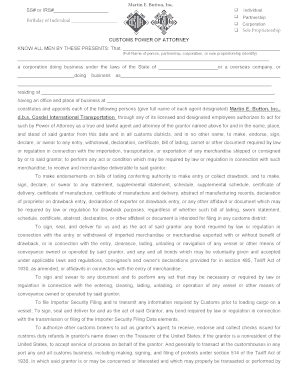
Getting a authorized professional, making a scheduled appointment and going to the workplace for a personal conference makes finishing a Cosdel Customs Power Of Attorney from beginning to end tiring. US Legal Forms enables you to rapidly generate legally valid papers according to pre-built browser-based templates.
Perform your docs within a few minutes using our straightforward step-by-step guide:
Find the Cosdel Customs Power Of Attorney you want.
Open it up using the online editor and start altering.
Complete the empty fields; involved parties names, places of residence and phone numbers etc.
Customize the template with unique fillable fields.
Add the date and place your e-signature.
Click Done after twice-examining everything.
Download the ready-made record to your system or print it out like a hard copy.
Quickly create a Cosdel Customs Power Of Attorney without needing to involve professionals. There are already more than 3 million users benefiting from our unique collection of legal documents. Join us today and get access to the top library of browser-based samples. Try it yourself!
How to edit Exportation: customize forms online
Check out a single service to take care of all of your paperwork effortlessly. Find, edit, and complete your Exportation in a single interface with the help of smart tools.
The days when people needed to print forms or even write them by hand are gone. Nowadays, all it takes to find and complete any form, like Exportation, is opening a single browser tab. Here, you can find the Exportation form and customize it any way you need, from inserting the text directly in the document to drawing it on a digital sticky note and attaching it to the document. Discover tools that will simplify your paperwork without additional effort.
Simply click the Get form button to prepare your Exportation paperwork easily and start editing it instantly. In the editing mode, you can easily fill in the template with your details for submission. Just click on the field you need to change and enter the information right away. The editor's interface does not demand any specific skills to use it. When finished with the edits, check the information's accuracy once again and sign the document. Click on the signature field and follow the instructions to eSign the form in a moment.
Use Additional tools to customize your form:
Use Cross, Check, or Circle tools to pinpoint the document's data.
Add textual content or fillable text fields with text customization tools.
Erase, Highlight, or Blackout text blocks in the document using corresponding tools.
Add a date, initials, or even an image to the document if necessary.
Make use of the Sticky note tool to annotate the form.
Use the Arrow and Line, or Draw tool to add visual components to your document.
Preparing Exportation forms will never be perplexing again if you know where to find the suitable template and prepare it effortlessly. Do not hesitate to try it yourself.
Get form
Experience a faster way to fill out and sign forms on the web.
Access the most extensive library of templates available.
Grantee FAQ
A response and brief to an opposed motion must be filed within 21 days from the date the motion is filed. Time for Reply Briefs. Unless otherwise directed by the presiding judge, a party who has filed an opposed motion may file a reply brief within 14 days from the date the response is filed. No Oral Argument.
What Happens After the Filing of a Motion for Default Judgment? After the motion for default judgment is filed and served upon the defendant, the defendant has an opportunity to respond. The defendant's response should state a valid reason why they didn't respond within the 20 day period to respond to complaints.
Rule 92. General Denial (1985) A general denial of matters pleaded by the adverse party which are not required to be denied under oath, shall be sufficient to put the same in issue.
In most cases, counting from the day you were served, you have 20 days plus until the following Monday, at 10 a.m. to file your Answer. Count all the calendar days including weekends and holidays. However, in some kind of cases, the Answer deadline is shorter than 20 days.
RULE 21a. A document filed electronically under Rule 21 must be served electronically through the electronic filing manager if the email address of the party or attorney to be served is on file with the electronic filing manager.
Order on Motion for Other Substituted Service – Rule 109a The officer executing the citation shall state on the return the manner in which service is accomplished and shall attach any evidence showing the result of the service.
The Rules of Civil Procedure govern the proceedings in civil trials. The Code of Criminal Procedure governs criminal proceedings. When a case is appealed, the Rules of Appellate Procedure govern the appeals process.
File (turn in) your completed answer form with the court. To file online, go to E-File Texas and follow the instructions. To file in person, take your answer (and copies) to the district clerk's office in the county where the plaintiff filed the case.
Answer: The defendant has 21 days to answer unless the defendant is the United States or an employee thereof. Then the answer is due in 60 days. The answer is filed with the Clerk of Court and the plaintiff is served a copy of it. Default judgment may be granted if the defendant does not file the answer timely.
General Denial: I deny all of the Plaintiff's allegations in this complaint or petition. I request notice of all hearings in this case. Note: Entering a general denial does not prevent you from raising other defenses at trial. Texas Rules of Civil Procedure Rule 502.2(b)).
Customhouses Related content
NX-CIF Serial Communications Interface Units...
Feb 1, 2015 — 4-2 Wiring the Power Supply and Ground to the Slave...
Use professional pre-built templates to fill in and sign
documents online faster. Get access to thousands of forms.
Keywords relevant
to Cosdel Customs Power Of Attorney
Proprietorship
ratifying
nonresident
AES
false
cbp
Grantee
customhouses
ation
corpor
proprie
torship
exportation
affixed
deliverable
If you believe that this page should be taken down, please
follow our DMCA take down processhere.
Ensure the security of your data and transactions
USLegal fulfills industry-leading security and compliance
standards.
VeriSign secured
#1 Internet-trusted security seal. Ensures that a website is
free of malware attacks.
Accredited Business
Guarantees that a business meets BBB accreditation standards
in the US and Canada.
TopTen Reviews
Highest customer reviews on one of the most highly-trusted
product review platforms.
BEST Legal Forms Company
TOP TEN REVIEWS WINNER - 9 YEARS STRAIGHT!
USLegal has been awarded the TopTenREVIEWS Gold Award 9 years in a row as the most comprehensive and helpful online legal forms services on the market today. TopTenReviews wrote "there is such an extensive range of documents covering so many topics that it is unlikely you would need to look anywhere else".
USLegal received the following as compared to 9 other form sites. Forms 10/10, Features Set 10/10, Ease of Use 10/10, Customer Service 10/10.