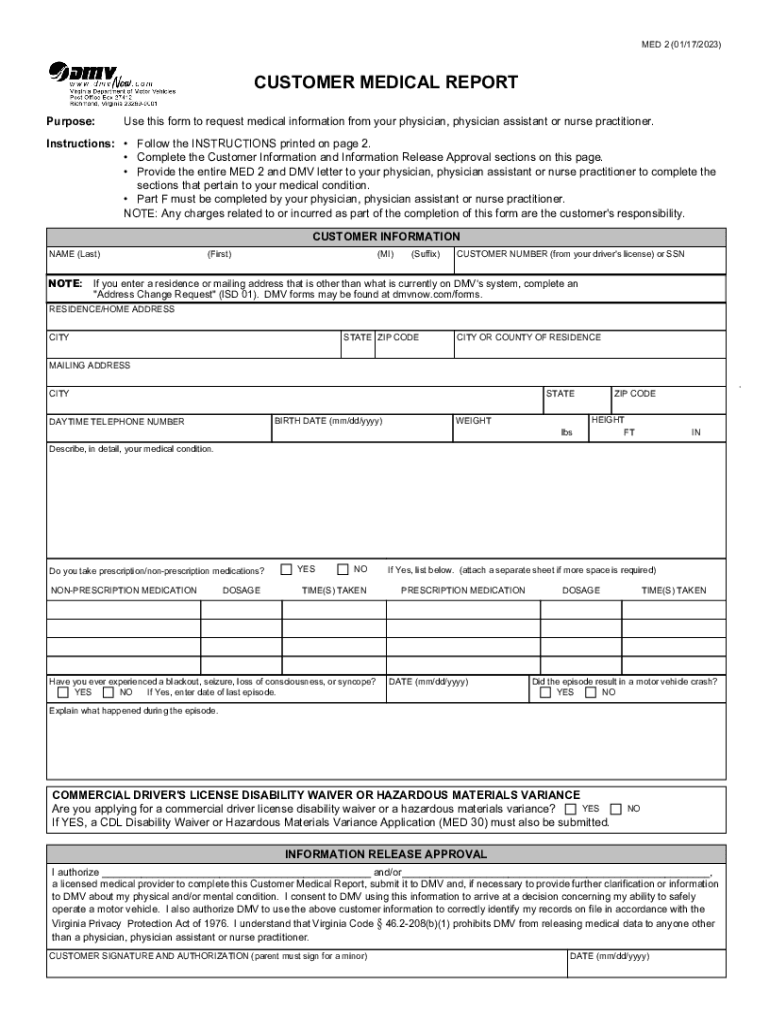
MED 2 (01/17/2023)CUSTOMER MEDICAL REPORT Purpose:Use this form to request medical information from your physician, physician assistant or nurse practitioner.Instructions: Follow the INSTRUCTIONS.
Loading

Open form follow the instructions

Easily sign the form with your finger

Send filled & signed form or save
How to fill out the 2011 Form VA DMV MED 2 online
This guide provides clear, step-by-step instructions for filling out the 2011 Form VA DMV MED 2, which is required for requesting medical information from healthcare providers. Follow these instructions to ensure the form is completed accurately and efficiently.
Follow the steps to successfully complete the 2011 Form VA DMV MED 2.
- Click the ‘Get Form’ button to access the 2011 Form VA DMV MED 2. This action will allow you to open the document in an online editor.
- Begin by filling out the Customer Information section. Provide your name, customer number, residence address, and contact information as requested on the form.
- In the Medical Condition description section, provide a clear account of your medical condition, including any details about your prescription and non-prescription medications.
- Indicate whether you have experienced any blackouts or seizures, and if applicable, provide the date of the last episode and any explanation regarding related incidents.
- Complete the Information Release Approval section. Here, you must authorize a licensed medical provider to fill out the form and submit it to the DMV on your behalf.
- Ensure that you sign and date the form in the designated Customer Signature and Authorization area.
- After filling in all required sections, review the form for accuracy. You may save changes, download, or print it for submission as needed.
Complete your forms online today to ensure your DMV medical review process proceeds smoothly.
Experience a faster way to fill out and sign forms on the web. Access the most extensive library of templates available.
Related content
Title Sort descendingID#DescriptionATV ManualVN‑023All‑Terrain vehicle rules and...
Sep 24, 2018 — Explain and complete claim forms for applicable benefits. Submit (via fax...
The State Police has developed FAQs regarding changes to the Pistol/Revolver License...
Get answers to your most pressing questions about US Legal Forms API.
How do I fax to the VA DMV?
Gather the following to provide to DMV for review. You may fax the information to (804) 367-6693.
Can you drive in VA after a seizure?
of Motor Vehicles may require a medical examination and a certification from a physician that you can safely drive. Without that you will be required to surrender your license. And frankly, if you are having seizures while driving, you cannot safely drive.
Does VA DMV take credit cards?
Acceptable Methods of Payment DMV accepts payment by personal check, cash, cashier's check, credit card, debit card or money order. Credit or debit card payments cannot be made by mail.
Can you drive after a stroke in Virginia?
If a driver suffers a Cerebral Vascular Accident (CVA), the driver's privilege to operate a motor vehicle will be suspended for six months. This six-month suspension period may be shortened if DMV receives information from the driver's health care provider indicating that the driver has fully recovered.
Who reports seizures to DMV in Virginia?
If you have a mental or physical condition that may impair your ability to safely operate a motor vehicle, even temporarily, you must provide DMV with a medical statement from your physician, physician's assistant, or nurse practitioner. Some of these conditions include: Level of consciousness. Seizures.
How do I contact DMV Virginia?
Need to give us a call? We are currently experiencing an extraordinarily high volume of calls. If all our lines are busy, you may receive a message to call us at a later time. ... Call us at: (804) 497-7100. TTY Callers: 711 or (800) 828-1120 (Virginia Relay) Monday – Friday: 8 a.m. to 5 p.m., Eastern.
What is the fax number for Virginia DMV medical review services?
Return the completed MED 2 to DMV by faxing it to DMV Medical Review Services at (804) 367-1604.
Use professional pre-built templates to fill in and sign documents online faster. Get access to thousands of forms.
If you believe that this page should be taken down, please follow our DMCA take down process here.