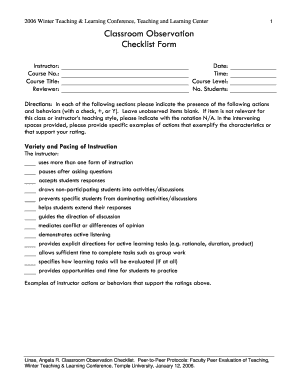
Ts: Directions: In each of the following sections please indicate the presence of the following actions and behaviors (with a check, +, or Y). Leave unobserved items blank. If item is not relevant for this class or instructor s teaching style, please indicate with the notation N/A. In the intervening spaces provided, please provide specific examples of actions that exemplify the characteristics or that support your rating. Variety and Pacing of Instruction The instructor: uses more than one f.

How it works
  • Open form

    Open form follow the instructions

  • Easily sign form

    Easily sign the form with your finger

  • Share form

    Send filled & signed form or save

How to fill out the Temple University Classroom Observation Checklist Form online

The Temple University Classroom Observation Checklist Form is an essential tool for evaluating teaching effectiveness in the classroom. This guide provides a clear set of instructions to help you complete the form online, ensuring all relevant details are accurately captured.

Follow the steps to complete the Classroom Observation Checklist Form online.

  1. Click the ‘Get Form’ button to obtain the form and open it in the editor.
  2. Begin by entering the instructor's name, course number, course title, reviewer's name, date, time, course level, and number of students in the designated fields. Ensure all details are accurate and clearly stated.
  3. In the Variety and Pacing of Instruction section, indicate the presence of actions such as the use of multiple instructional forms or the ability to enhance student participation. Use checkmarks, plus signs, or 'Y' for yes. Enter any relevant examples in the provided spaces to support your ratings.
  4. Proceed to the Organization section and evaluate the instructor's punctuality and delivery of class goals. Again, use the specified symbols for presence and provide examples that illustrate the instructor's organizational skills.
  5. Next, assess Presentation Skills. Check off items regarding audibility, clarity, and engagement, while including specific examples that represent the instructor's presentation style.
  6. Continue with the Clarity section to note how the instructor explains terms and concepts. Mark the appropriate boxes and elaborate on your observations in the provided lines.
  7. In the Content Knowledge section, assess the accuracy of statements made by the instructor and their incorporation of current research. Document your observations and provide necessary examples.
  8. Evaluate the Instructor-Student Rapport section by checking items related to student engagement and respect. Fill in examples of how the instructor interacts positively with students.
  9. Finally, in the General section, provide a summary of what went well in the class, along with suggestions for improvement and any additional comments you find necessary. Make sure to be constructive and supportive in your feedback.
  10. Review all entries for accuracy and completeness. Once you are satisfied with the information provided, you can save changes, download the form, or print it for sharing.

Get started and complete the Temple University Classroom Observation Checklist Form online today!

Get form

Experience a faster way to fill out and sign forms on the web. Access the most extensive library of templates available.

Related content

Temple University - Of The Commonwealth System of...

Feb 19, 2016 — As a result of project activities over a five-year period, we will...

Learn more
classroom observation worksheet

Please use it as guide to making observations, not as a list of required characteristics...

Learn more
Designing a Coaching Program That Fits - ERIC

by L Steiner · 2007 · Cited by 98 — Critical first steps in designing an effective...

Learn more
Questions & Answers

Get answers to your most pressing questions about US Legal Forms API.

Contact support

What is a general denial in a Texas divorce?

In Texas, it is sufficient for the Respondent to file a “general denial” answer – that is, as the name suggests, an answer that generally denies the Petitioner's allegations. The Respondent also has the opportunity to deny specific allegations in the Petition.

The original answer is typically a concise document in response to the basic arguments presented in your original petition. Your spouse may choose to file a counter-petition in which he or she makes her allegations and can request certain relief from the court.

If you have been served with divorce papers and want to have a say in your divorce, you must file (turn in) a Respondent's Original Answer form with the court by the deadline. Get answer forms in the Instructions & Forms for Filing an Answer in a Divorce checklist in the Instructions and Forms section of this guide.

The original answer is typically a concise document in response to the basic arguments presented in your original petition. Your spouse may choose to file a counter-petition in which he or she makes her allegations and can request certain relief from the court.

A spouse can waive their right to be personally served with a copy of the divorce lawsuit by signing a Waiver of Service. They do this by signing the waiver of service in the presence of a notary, notarized, and then filing it with the court.

According to Federal Rule of Civil Procedure 8(b)(3), a party will answer with a general denial when they intend “in good faith to deny all the allegations of a pleading.” The party will not specifically deny any allegation.

The original answer may consist of motions to transfer venue, pleas to the jurisdiction, in abatement, or any other dilatory pleas; of special exceptions, of general denial, and any defense by way of avoidance or estoppel, and it may present a cross-action, which to that extent will place defendant in the attitude of a ...

File (turn in) your completed answer form with the court. To file online, go to E-File Texas and follow the instructions. To file in person, take your answer (and copies) to the district clerk's office in the county where the plaintiff filed the case.

File (turn in) your completed answer form with the court. To file online, go to E-File Texas and follow the instructions. To file in person, take your answer (and copies) to the district clerk's office in the county where the plaintiff filed the case.

Get This Form Now!

Use professional pre-built templates to fill in and sign documents online faster. Get access to thousands of forms.

If you believe that this page should be taken down, please follow our DMCA take down process here.

Get Temple University Classroom Observation Checklist Form