Loading
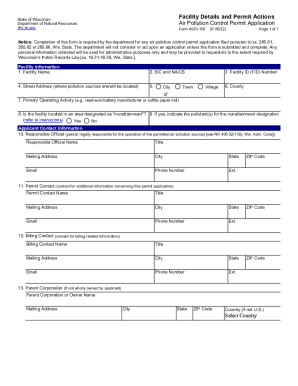
Get Wisconsin Dnr Air Pollution Control Permit Application ...
How it works
-

Open form follow the instructions
-

Easily sign the form with your finger
-

Send filled & signed form or save
How to fill out the Wisconsin DNR Air Pollution Control Permit Application online
Completing the Wisconsin DNR Air Pollution Control Permit Application is an essential step for those seeking to manage air pollution from their facilities. This guide offers a clear and comprehensive approach to filling out the application online, ensuring that all necessary information is provided in a structured format.
Follow the steps to submit your air pollution control permit application online.
- Press the ‘Get Form’ button to access the application form and open it for filling out.
- Begin by entering the Facility Name (Item 1). Make sure to provide the full legal name of your facility.
- Input the Standard Industrial Classification (SIC) and North American Industry Classification System (NAICS) codes (Item 2). This identifies your primary business activities.
- Provide the Facility ID (FID) Number (Item 3) that appears on your annual emissions reports. If you are a new facility, the department will assign this number.
- Enter the physical address of the facility where pollution sources are located (Item 4). Include street address, city, town, or village (Item 5) and county (Item 6).
- Describe the Primary Operating Activity (Item 7) with a succinct explanation of what your facility does.
- Indicate if the facility is in a nonattainment area (Item 8). If yes, list the pollutants for which the area has been designated as nonattainment (Item 9).
- Fill out the Applicant Contact Information (Items 10-13). This includes details for the Responsible Official, Permit Contact, Billing Contact, and Parent Corporation if applicable.
- For Permit Information (Item 14), specify construction permit actions. Choose the relevant permit actions, including new constructions or modifications, and indicate any fees associated.
- If applicable, choose Operation Permit Actions (Item 15) that correspond to the type of permit you are applying for. Make sure to complete all subsections adequately.
- In Item 16, indicate whether you have additional information attached to your application.
- Select your submission method in Item 17. Choose to email or mail your application and ensure it is signed by the Responsible Official.
- Review the completed application for accuracy, then save changes, download, print, or share the form as needed.
Start completing your Wisconsin DNR Air Pollution Control Permit Application online now!
An easement is a legal right to use someone else's land for public or private purposes. While many easement agreements are written into the property records, that is not always the case. Some easements can be obtained through other means.