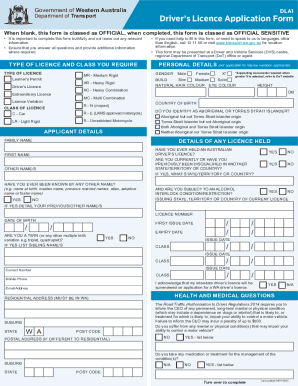
Get Application For A New Driver's Licence Number (e126) Form
How it works
-

Open form follow the instructions
-

Easily sign the form with your finger
-

Send filled & signed form or save
How to use or fill out the Application For A New Driver's Licence Number (E126) Form online
Filling out the Application For A New Driver's Licence Number (E126) Form online is a straightforward process that requires careful attention to detail. This guide will assist you in completing each section of the form accurately to ensure a smooth application experience.
Follow the steps to successfully complete your application form.
- Click the ‘Get Form’ button to access the form and open it in your editor.
- Begin by selecting the type of licence you require, such as extraordinary licence or licence variation. Make sure to provide the appropriate supporting documents if gender X is selected.
- In the applicant details section, provide your family name, first name, and any other name you have been known by. Ensure to indicate your gender and whether you identify as Aboriginal or Torres Strait Islander.
- Fill in your contact and residential address details accurately. Include your postal address if it differs from your residential address.
- Answer health and medical questions that may affect your ability to control a motor vehicle. Be truthful about any conditions and medications.
- Review the privacy statement and declaration thoroughly before signing. Ensure you understand the requirements for providing truthful information.
- After completing all sections, save your changes. You can then download, print, or share the form as needed.
Ensure your application is complete and accurate by following this guide. Start your application process online today!
1:04 1:33 How to File an Assumed Name (DBA) in Harris County, Texas - YouTube YouTube Start of suggested clip End of suggested clip And you can call their office at this number right here if you are going to file the assumed name inMoreAnd you can call their office at this number right here if you are going to file the assumed name in person you would visit this address right here 201 Caroline Houston Texas.