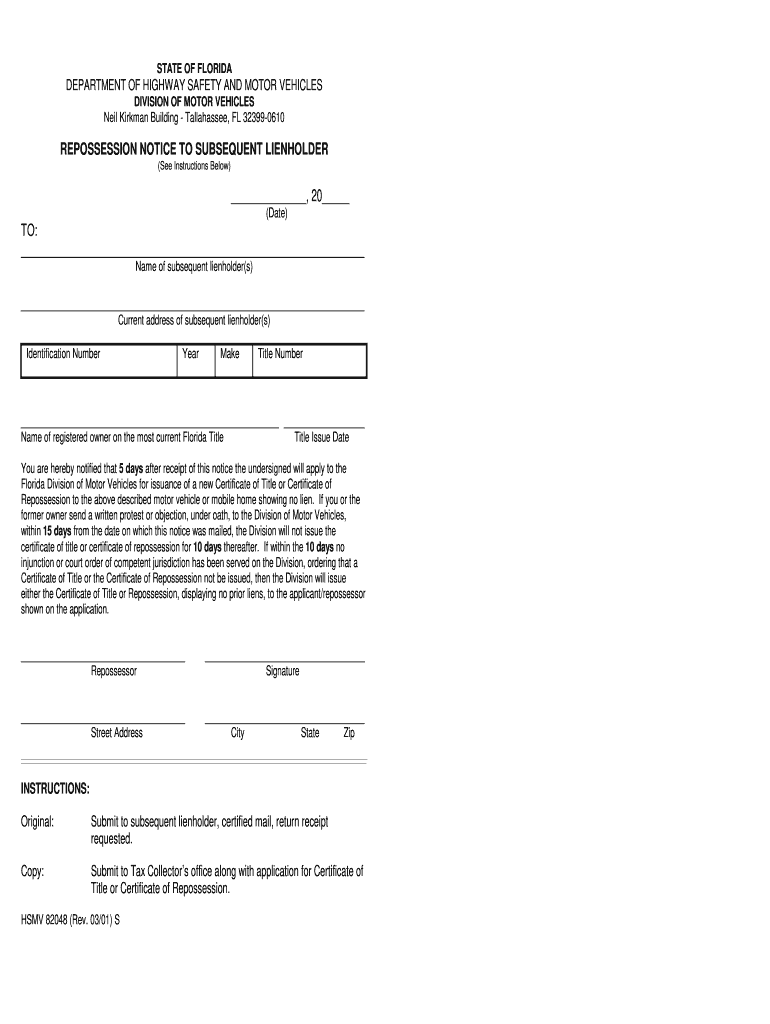
The applicant/repossessor shown on the application. ______________________________________ Repossessor _____________________________________ Signature ______________________________________ Street Address _____________________________________ City State Zip _____________________________________________________________________________________________________________________________________________________________________________________________________________________________________________.
Loading

Open form follow the instructions

Easily sign the form with your finger

Send filled & signed form or save
How to fill out the FL HSMV 82048 online
The FL HSMV 82048 form is a repossession notice that informs subsequent lienholders of the intention to apply for a new certificate of title or repossession. This guide will provide clear, step-by-step instructions for completing the form online, ensuring you submit the necessary information accurately.
Follow the steps to fill out the FL HSMV 82048 online.
- Click ‘Get Form’ button to obtain the form and open it in the editor.
- Enter the date at the top of the form. This should be the current date on which the notice is being sent.
- In the 'To' section, provide the name of the subsequent lienholder. Ensure the spelling is correct and matches legal documentation.
- Fill in the current address of the subsequent lienholder in the designated space, making sure it is complete and accurate.
- Provide the identification number of the vehicle or mobile home in the appropriate field.
- Input the year and make of the vehicle or mobile home as listed on the most current Florida title.
- Include the title number associated with the vehicle to ensure accurate identification.
- In the section for the registered owner, fill in the name of the owner as recorded on the most current Florida title.
- Record the title issue date as indicated on the title document.
- Sign the form where indicated, ensuring your signature matches your legal name.
- Complete the repossessor information including your full name, street address, city, state, and ZIP code.
- Review all entries for accuracy. Save your changes, then download, print, or share the completed form as necessary.
Complete your FL HSMV 82048 form online today to ensure a smooth repossession process.
Experience a faster way to fill out and sign forms on the web. Access the most extensive library of templates available.
Related content
Copy: Submit to Tax Collector's office along with application for Certificate of Title or...
Get answers to your most pressing questions about US Legal Forms API.
How to fill out Florida Form HSMV 82040?
To fill out Florida Form HSMV 82040, begin by entering your personal information, such as name and address, followed by details related to the vehicle or mobile home. Be sure to provide accurate descriptions and any previous title information. Double-check the form for completeness before submitting it to the appropriate authority to avoid any delays.
How to transfer ownership of a mobile home in Florida?
To transfer ownership of a mobile home in Florida, you need to complete the Florida Title Application, which is also the FL HSMV 82048 form. You must gather the current title, ensure all parties sign it, and submit the application along with any required fees. This process establishes legal ownership and updates the records with the Florida Department of Highway Safety and Motor Vehicles.
How to fill out a title when selling a boat?
When selling a boat in Florida, carefully fill out the title by following the guidelines provided on the FL HSMV 82048. Include all necessary details such as the buyer’s and seller’s information, along with the boat's identification number. Make sure you sign the document, and consider referring to US Legal Forms to navigate the specifics smoothly.
How to fill out a Florida title transfer form?
Filling out a Florida title transfer form is straightforward. Start by completing the required sections on the FL HSMV 82048, which includes details about the buyer and seller, the vehicle, and the sale date. Make sure you sign the form to finalize the process and consider using reliable resources like US Legal Forms for guidance.
How to check a Florida VIN number?
To check a Florida VIN number, you can visit the official FL HSMV website. Use their VIN lookup tool, which provides detailed information about the vehicle's history. This tool can reveal important records like title status, accident history, and more, ensuring you make informed decisions.
How to submit Form HSMV 82050?
To submit Form HSMV 82050, complete the form with the required details before either mailing it to your local county tax collector's office or submitting it in person. Ensure that you keep a copy for your records and check for any additional documents that may need to accompany the form. For ease of use, platforms like USLegalForms can assist you with instructions and ensure that you don’t miss any critical steps in the submission process.
How do I file Form HSMV 82050?
Filing Form HSMV 82050 involves completing the form with accurate information, including details about the vehicle and the seller. After filling out the form, you must submit it to your local tax collector or licensing agency, which can often be done in person or via mail. To ensure you meet all requirements, utilizing USLegalForms can provide you with straightforward instructions specific to FL HSMV 82048 filings, making this process quicker.
What form do I need to sell a car in Florida?
To sell a car in Florida, you typically need to complete Form HSMV 82048, which serves as the official title transfer form. Alongside this form, having a bill of sale can help clarify the transaction details between you and the buyer. By using USLegalForms, you can easily access the correct templates and ensure your paperwork is completed accurately. This reduces the likelihood of errors and enhances the purchasing experience.
How to transfer car title in Florida online?
To transfer a car title in Florida online, visit the FL HSMV website and navigate to the appropriate section for vehicle services. You will need to fill out the title transfer form, which you can find as a part of the FL HSMV 82048 resources. Ensure you have the necessary documents, such as proof of ownership and identification, ready for submission. Using an online platform like USLegalForms can simplify this process and guide you step by step.
Use professional pre-built templates to fill in and sign documents online faster. Get access to thousands of forms.
If you believe that this page should be taken down, please follow our DMCA take down process here.
This form is available in several versions. Select the version you need from the drop-down list below.