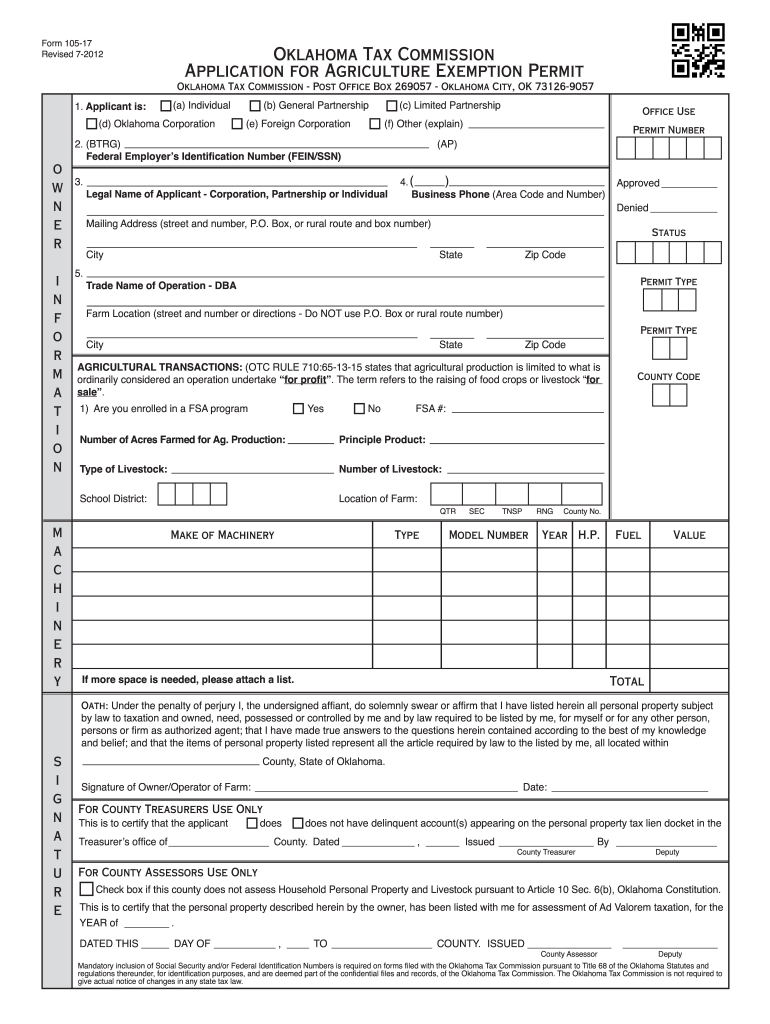
City, OK 73126-9057 1. Applicant is: (a) Individual (d) Oklahoma Corporation o w n e r i n f o r m a t i o n (b) General Partnership (e) Foreign Corporation (c) Limited Partnership 2. (BTRG) Federal Employer s Identification Number (FEIN/SSN) s i g n a t u r e Permit Number (AP) 3. Legal Name of Applicant - Corporation, Partnership or Individual 4. ( ) Business Phone (Area Code and Number) Mailing Address (street and number, P.O. Box, or rural route and box number).
Loading

Open form follow the instructions

Easily sign the form with your finger

Send filled & signed form or save
How to fill out the 105-17 online
Filling out the 105-17 form is crucial for individuals and businesses seeking an agriculture exemption permit in Oklahoma. This guide provides step-by-step instructions to ensure users can complete the form accurately and efficiently, even if they have limited legal experience.
Follow the steps to effectively complete the 105-17 online form:
- Press the ‘Get Form’ button to access the 105-17 form and open it in your preferred editor.
- In the first section titled 'Applicant is:', select the appropriate option that describes your entity type: Individual, General Partnership, Limited Partnership, Oklahoma Corporation, Foreign Corporation, or Other.
- Enter the Federal Employer’s Identification Number (FEIN) or Social Security Number (SSN) in the designated field.
- Provide the legal name of the applicant, whether it is a corporation, partnership, or individual.
- Fill in the business phone number, including the area code.
- Complete the mailing address field with your street address, P.O. Box, or rural route and box number, followed by the city, state, and zip code.
- State the trade name of your operation (Doing Business As - DBA) if applicable.
- Indicate the farm location by providing the street address or directions, avoiding P.O. Box or rural route numbers.
- Respond to the question regarding enrollment in a Farm Service Agency (FSA) program by selecting 'Yes' or 'No', and enter the county code and FSA number if applicable.
- Specify the number of acres farmed for agricultural production and indicate the principal product and type of livestock, along with the number of livestock.
- Detail the location of the farm by providing the make and type of machinery, including related specifications like model number, year, and horsepower.
- If more space is necessary, attach a list to include all required details.
- Complete the oath section by signing with the date, affirming the accuracy of the information provided.
- Finally, review the completed form for accuracy, then save your changes, and proceed to download, print, or share the form as needed.
Ensure your application is complete by filling out the 105-17 form online today.
Experience a faster way to fill out and sign forms on the web. Access the most extensive library of templates available.
Related content
PUBLIC LAW 105–17—JUNE 4, 1997. Public Law 105–17. 105th Congress. An Act. To amend...
L. 105-17. 1997 – Individuals with Disabilities Education Act (IDEA), ... 2012 -- Family...
This National Highway Traffic Safety Administration revised curriculum is designed to be a...
Get answers to your most pressing questions about US Legal Forms API.
What is a Level 2 of Rule 190 of the Texas Rules of Civil Procedure?
Under Level 2 discovery, each side is only allowed 25 written interrogatories that ask for more than identifying information about a document. Additionally, the responding party may respond by telling the other side where the information can be found in public records instead of answering the question directly.
What is Rule 92 of the Texas Rules of Civil Procedure?
Rule 92. General Denial (1985) A general denial of matters pleaded by the adverse party which are not required to be denied under oath, shall be sufficient to put the same in issue.
Is an affidavit hearsay Texas?
An affidavit is a classic example of a hearsay document: an out-of-court statement offered to establish the truth of the matter set forth therein. As such, affidavits may not be admitted over objection.
What is level 3 of Rule 190 of the Texas Rules of Civil Procedure?
Rule 190.4. Discovery Control Plan - By Order (Level 3) (1999) (a) Application. The court must, on a party's motion, and may, on its own initiative, order that discovery be conducted in accordance with a discovery control plan tailored to the circumstances of the specific suit.
What is discovery Level 3 in Texas divorce?
Level 3 applies to those cases for which the court orders discovery conducted according to a discovery plan tailored to the circumstances of the specific suit. The court must make such an order on a party's motion and may do so on its own initiative. The parties may submit an agreed order for the court's consideration.
How do I file a motion in North Carolina court?
Filing the Documents Take the original and two (2) copies of the Motion to the Civil Division of the Clerk of Superior Court's office in the county where your case is filed. The Clerk will stamp each Motion “filed,” place the original in the Court file and return two (2) copies of the “filed” document to you.
How do I file a motion in Michigan?
You file a motion by completing the form and filing it with the same court that signed the default entry or default judgment. There is a $20 motion fee for filing a motion to set aside default.
How do I file a motion in court without an attorney?
If you want to file a motion, the process is generally something like this: You write your motion. You file your motion with the court clerk. The court clerk inserts the date and time your motion will be heard by the judge. You “serve” (mail) your motion to the other side.
Is there a limit to request for production in Texas?
(4) Requests for Production. Any party may serve on any other party no more than 15 written requests for production. Each discrete subpart of a request for production is considered a separate request for production.
What is discovery Level 1 in Texas divorce?
What is Level One Discovery, and What Changes Were Made to Discovery Rules and Limits? Level One discovery now applies to divorces in which the parties claim the marital estate is worth less than a total amount of $250,000and this limit is an increase over the previous limit of $50,000.
Use professional pre-built templates to fill in and sign documents online faster. Get access to thousands of forms.
If you believe that this page should be taken down, please follow our DMCA take down process here.