Loading
Form preview
  • US Legal Forms
  • Form Library
  • RMV Forms
  • Connecticut RMV Forms
  • Ct H-115 2014

Get Ct H-115 2014-2026

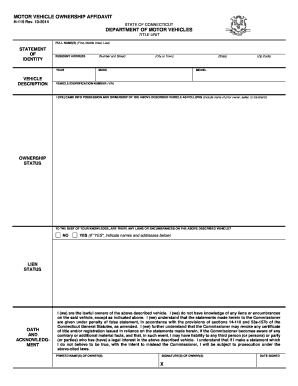
TION RESIDENT ADDRESS (Number and Street) YEAR MAKE (City or Town) (State) (Zip Code) MODEL VEHICLE IDENTIFICATION NUMBER (VIN) I (WE) CAME INTO POSSESSION AND OWNERSHIP OF THE ABOVE DESCRIBED VEHICLE AS FOLLOWS (Include name of prior owner, seller, or transferor) OWNERSHIP STATUS TO THE BEST OF YOUR KNOWLEDGE, ARE THERE ANY LIENS OR ENCUMBRANCES ON THE ABOVE DESCRIBED VEHICLE? NO YES (If "YES", indicate names and addresses below) LIEN STATUS OATH AND ACKNOWLEDGMENT I (we) are t.

How it works

  1. Open form

    Open form follow the instructions

  2. Easily sign form

    Easily sign the form with your finger

  3. Share form

    Send filled & signed form or save

How to fill out the CT H-115 online

The CT H-115 form is a motor vehicle ownership affidavit used in the state of Connecticut. This guide will provide you with clear instructions on how to complete this form online, ensuring that you properly document your vehicle ownership.

Follow the steps to successfully complete the CT H-115 form online.

  1. Press the ‘Get Form’ button to access the CT H-115 form and have it open in your preferred online editor.
  2. In the first section, enter your full name(s) including first name, middle initial, and last name. This information is essential for verifying your identity.
  3. Proceed to the 'Vehicle Description' section where you need to fill in details about the vehicle you are claiming ownership of. Here, include the year, make, model, and the Vehicle Identification Number (VIN).
  4. In the 'Resident Address' field, provide your complete address including the number and street name, city or town, state, and zip code.
  5. Indicate how you came into possession of the vehicle by including the name of the prior owner, seller, or transferor in the designated space.
  6. Next, address any ownership status by indicating whether there are any liens or encumbrances on the vehicle. Select 'No' or 'Yes' and provide additional information if applicable.
  7. In the 'Oath and Acknowledgment' section, carefully read the statements and affirm that the information provided is true to the best of your knowledge.
  8. Print your name in the section for printed names of owners and ensure you sign the document in the designated signature area, noting the date signed.
  9. Once you have completed all sections, save your changes. You can then download, print, or share the completed form as needed.

Complete your motor vehicle ownership affidavit online today!

Get form

Experience a faster way to fill out and sign forms on the web. Access the most extensive library of templates available.
Get form

Related content

Motor Vehicle Ownership Affidavit
H-115 Rev. 10-2014. STATE OF CONNECTICUT. DEPARTMENT OF MOTOR VEHICLES. TITLE UNIT. FULL...
Learn more
Raised Bill No. 115
(5) "Packaging" means any container or material used for the. 15 containment, protection...
Learn more
Medicare
Worksheet H - Analysis of Provider-Based Home Health Agency Costs ... Line 115--If this is...
Learn more

Related links form

Where Do I Apply For A Mechanical Permit In Herndon Virginia Form Palatka Building Department Gilmer County Building Permits Louisville Permits Temporary Structure Form

Questions & Answers

Get answers to your most pressing questions about US Legal Forms API.

Contact support

Transferring a title in Nebraska requires a completed title that includes the seller's signature and the buyer's information. Additionally, you’ll need proof of identity and payment for any associated fees. Using a comprehensive guide, like the CT H-115 for CT processes, can aid in understanding title transfers more broadly.

To transfer a car title in Texas, you need the completed title from the seller, proof of identification, and a completed Application for Texas Title (Form 130-U). It's also useful to provide any necessary fees associated with the transfer. While not specific to CT H-115, ensuring all documentation is complete streamlines the process.

Filling out a title when selling a car involves providing the buyer's information, including their name and address, in the applicable sections. You must also include the sale date and odometer reading, then both parties should sign the title. For additional help, the CT H-115 can serve as a helpful resource throughout the process.

To fill out the back of the CT title, you need to complete the section dedicated to the transfer of ownership. Insert the buyer's information, the odometer reading, and sign your name as the seller. This ensures a proper transfer, and referencing the CT H-115 can help clarify how to correctly fill out these sections.

When you sell a car, you should fill out the title by entering the new owner's name and address in the designated area. Additionally, both the seller and buyer must sign the title where indicated. For a smooth transfer, utilizing the CT H-115 can provide guidance on important steps to follow during this process.

Yes, you can handwrite a bill of sale in Connecticut. However, it is important to ensure that it includes all necessary details such as the date of sale, vehicle identification number, and both parties' names and addresses. Using a standardized form like the CT H-115 can help ensure you meet all legal requirements and simplify the process.

To obtain a bonded title in Connecticut, you must first complete the necessary paperwork at the DMV. This typically involves filling out the CT H-115 form, among other documents, which confirms that you have provided a surety bond. After submitting your documents and paying any required fees, the DMV will review your application. Once approved, you will receive your bonded title, allowing you to legally own the vehicle.

Absolutely, you can easily request a copy of your CT vehicle registration online. Go to the Connecticut DMV website and navigate to the vehicle services section. You will need the necessary information regarding your vehicle, including details from your CT H-115, if applicable. This convenience saves time and effort, making the process smoother.

Yes, you can obtain a copy of your vehicle registration online in Rhode Island. Simply visit the Rhode Island DMV’s website and follow the prompts for registration requests. While you’re there, remember that forms like the CT H-115 can help streamline your registration processes. It’s a straightforward way to manage your vehicle's registration.

To get a copy of your CT vehicle registration, you can request a duplicate through the DMV's online services. You will need to have your vehicle's details ready, including any registration numbers you possess. If you prefer to handle it in person, visiting a local DMV office is also an option. Using the CT H-115 form may simplify the retrieval of records if you need to update your information.

Get This Form Now!

Use professional pre-built templates to fill in and sign documents online faster. Get access to thousands of forms.
Get form
If you believe that this page should be taken down, please follow our DMCA take down processhere.

Industry-leading security and compliance

US Legal Forms protects your data by complying with industry-specific security standards.
  • In businnes since 1997
    25+ years providing professional legal documents.
  • Accredited business
    Guarantees that a business meets BBB accreditation standards in the US and Canada.
  • Secured by Braintree
    Validated Level 1 PCI DSS compliant payment gateway that accepts most major credit and debit card brands from across the globe.
Get CT H-115
Get form
  • Adoption
  • Bankruptcy
  • Contractors
  • Divorce
  • Home Sales
  • Employment
  • Identity Theft
  • Incorporation
  • Landlord Tenant
  • Living Trust
  • Name Change
  • Personal Planning
  • Small Business
  • Wills & Estates
  • Packages A-Z
  • Affidavits
  • Bankruptcy
  • Bill of Sale
  • Corporate - LLC
  • Divorce
  • Employment
  • Identity Theft
  • Internet Technology
  • Landlord Tenant
  • Living Wills
  • Name Change
  • Power of Attorney
  • Real Estate
  • Small Estates
  • Wills
  • All Forms
  • Forms A-Z
  • Form Library
  • Legal Hub
  • About Us
  • Help Portal
  • Legal Resources
  • Blog
  • Affiliates
  • Contact Us
  • Delete My Account
  • Site Map
  • Industries
  • Forms in Spanish
  • Localized Forms
  • State-specific Forms
  • Forms Kit
  • Real Estate Handbook
  • All Guides
  • Notarize
  • Incorporation services
  • For Consumers
  • For Small Business
  • For Attorneys
  • USLegal
  • FormsPass
  • pdfFiller
  • signNow
  • altaFlow
  • DocHub
  • Instapage
Form Packages
  • Adoption
  • Bankruptcy
  • Contractors
  • Divorce
  • Home Sales
  • Employment
  • Identity Theft
  • Incorporation
  • Landlord Tenant
  • Living Trust
  • Name Change
  • Personal Planning
  • Small Business
  • Wills & Estates
  • Packages A-Z
Form Categories
  • Affidavits
  • Bankruptcy
  • Bill of Sale
  • Corporate - LLC
  • Divorce
  • Employment
  • Identity Theft
  • Internet Technology
  • Landlord Tenant
  • Living Wills
  • Name Change
  • Power of Attorney
  • Real Estate
  • Small Estates
  • Wills
  • All Forms
  • Forms A-Z
  • Form Library
Customer Service
  • Legal Hub
  • About Us
  • Help Portal
  • Legal Resources
  • Blog
  • Affiliates
  • Contact Us
  • Delete My Account
  • Site Map
  • Industries
  • Forms in Spanish
  • Localized Forms
  • State-specific Forms
  • Forms Kit
Legal Guides
  • Real Estate Handbook
  • All Guides
Prepared for you
  • Notarize
  • Incorporation services
Our Customers
  • For Consumers
  • For Small Business
  • For Attorneys
Our Sites
  • USLegal
  • FormsPass
  • pdfFiller
  • signNow
  • altaFlow
  • DocHub
  • Instapage
Social Media
Call us now toll free:
+1 833 426 79 33
As seen in:
© Copyright 1999-2026 airSlate Legal Forms, Inc. 3720 Flowood Dr, Flowood, Mississippi 39232
  • Your Privacy Choices
  • Terms of Service
  • Privacy Notice
  • Content Takedown Policy
  • Bug Bounty Program