Loading
Get Co Cdot 595 2010
How it works
-

Open form follow the instructions
-

Easily sign the form with your finger
-

Send filled & signed form or save
How to fill out the CO CDOT 595 online
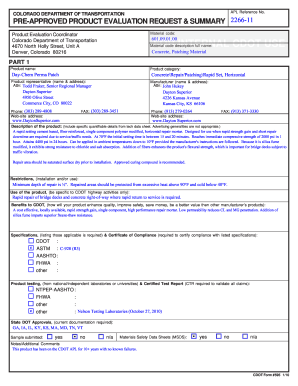
Filling out the CO CDOT 595 form is an essential process for requesting a product evaluation by the Colorado Department of Transportation. This guide will provide you with step-by-step instructions to complete the form accurately and efficiently.
Follow the steps to successfully complete the CO CDOT 595 form online.
- Click the ‘Get Form’ button to access the CO CDOT 595 online form in your browser.
- Begin by entering the product name in the designated field. Ensure you input the exact name as it appears in the product information.
- Next, select the product category from the available options. For example, you may select 'Concrete Repair/Patching/Rapid Set'.
- Fill in the material code section with the appropriate code provided in the product specifications.
- In the section for the product representative, provide the name and address details of the individual responsible for the product. Make sure to include their title.
- Input the manufacturer's name and address following the same format as the product representative section.
- Complete the description of the product by including specific details from the technical data sheet. Avoid general advertising language and focus on quantifiable data.
- Provide any usage restrictions such as minimum depth of repair and temperature limits for effective product application.
- Highlight the specific uses of the product related to CDOT highway activities, ensuring relevance to the evaluation request.
- List the benefits this product offers to CDOT, focusing on quality enhancement, safety improvement, and cost-effectiveness.
- Include applicable specifications and any certificates of compliance, as required.
- Attach documentation regarding product testing and certified test reports that validate any claims made about the product.
- Submit information about state DOT approvals and whether a sample has been submitted for evaluation.
- Complete the materials safety data sheets section by indicating if they are included or not.
- After filling out all sections, review the information for accuracy, then save changes, and download or print the completed form if necessary.
Complete your CO CDOT 595 form online today for a seamless submission process.
Get form
Experience a faster way to fill out and sign forms on the web. Access the most extensive library of templates available.
The Colorado Department of Local Affairs is directed by Brian J. Waller. His role includes managing local government initiatives and community development projects that enhance quality of life in Colorado. For additional details regarding local affairs, you can rely on information from CO CDOT 595.
Get This Form Now!
Use professional pre-built templates to fill in and sign documents online faster. Get access to thousands of forms.