Loading
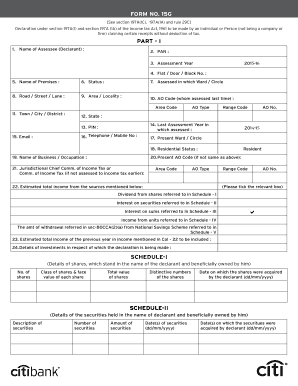
Get India Citibank Form 15g 2015
How it works
-

Open form follow the instructions
-

Easily sign the form with your finger
-

Send filled & signed form or save
How to fill out the India CitiBank Form 15G online
This guide provides step-by-step instructions on how to fill out the India CitiBank Form 15G online. Whether you are new to tax documents or have some experience, this comprehensive approach will help simplify the process.
Follow the steps to complete your Form 15G online efficiently.
- Click the ‘Get Form’ button to retrieve the Form 15G and open it for editing.
- In Part I, enter your name in the 'Name of Assessee (Declarant)' field, followed by your PAN in the designated section. Make sure the information is accurate to avoid issues.
- Input the assessment year in the provided field, and fill in your address details including 'Flat / Door / Block No.', 'Name of Premises', 'Road / Street / Lane', 'Area / Locality', 'Town / City / District', 'State', and 'PIN'.
- Indicate your status by selecting the appropriate option. Include your telephone or mobile number for any necessary follow-ups.
- Fill in details regarding your last assessment year, along with the present ward or circle in which you reside. This is where the income tax authority last assessed you.
- For the 'Residential Status', choose the appropriate classification. Provide the name of your business or occupation.
- In the section regarding your estimated total income, specify the sources of income. You can tick relevant boxes for dividends, securities, units, and other investments as specified.
- Outline the details of your investments in the schedules provided. Input specifics such as numbers of shares, distinctive numbers, and dates acquired for shares, securities, mutual funds, and savings schemes.
- In the declaration section, ensure that you sign and date the form, confirming that the information provided is accurate to the best of your knowledge.
- Once all necessary fields are completed, save your changes, and choose to download, print, or share the form as required.
Complete your Form 15G online today to ensure a smooth tax declaration process.
Get form
Experience a faster way to fill out and sign forms on the web. Access the most extensive library of templates available.
Yes, Form 15G is mandatory if you do not want TDS to be deducted from the withdrawal amount. Section 192A of the Finance Act 2015 states that PF withdrawal will attract TDS if the withdrawal amount is more than Rs.50,000 and your employment tenure is of less than 5 years.
Get This Form Now!
Use professional pre-built templates to fill in and sign documents online faster. Get access to thousands of forms.