Loading
Get Sagicor Bank E-bank Application Individual 2018-2026
How it works
-

Open form follow the instructions
-

Easily sign the form with your finger
-

Send filled & signed form or save
How to fill out the Sagicor Bank E-Bank Application Individual online
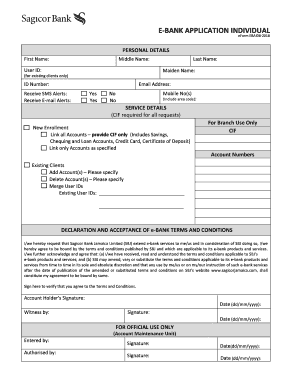
This guide provides an easy-to-follow process for completing the Sagicor Bank E-Bank Application Individual form online. By understanding each section of the form, users can ensure their information is accurately submitted for a seamless banking experience.
Follow the steps to accurately fill out the form.
- Click ‘Get Form’ button to access the application form and open it for editing.
- In the Personal Details section, fill in your first name, middle name (if applicable), last name, and maiden name (if you are an existing client).
- Input your ID number and email address. Ensure the email address is valid for receiving communications.
- Indicate your preferences for receiving SMS and email alerts by selecting 'Yes' or 'No' for both.
- In the Service Details section, choose from the options provided: whether you want new enrollment, linking accounts, or adding/deleting account details.
- If linking accounts, input your unique Customer Identification File (CIF) number and any additional account numbers as requested.
- Review the Declaration and Acceptance of e-Bank Terms and Conditions. Read through the terms and acknowledge your understanding.
- Sign the form to verify your agreement to the terms and provide the date of signing.
- Finally, save changes to the form, and you can choose to download, print, or share it as needed.
Start completing your Sagicor Bank E-Bank Application Individual online today for a streamlined banking experience.
The Sagicor GO Mobile App Just Got Even Better Pay your life, health, home, motor and travel insurance premiums or even your mortgage wherever you go with Sagicor GO! Make payments conveniently using your credit card or Visa or Mastercard branded debit cards.