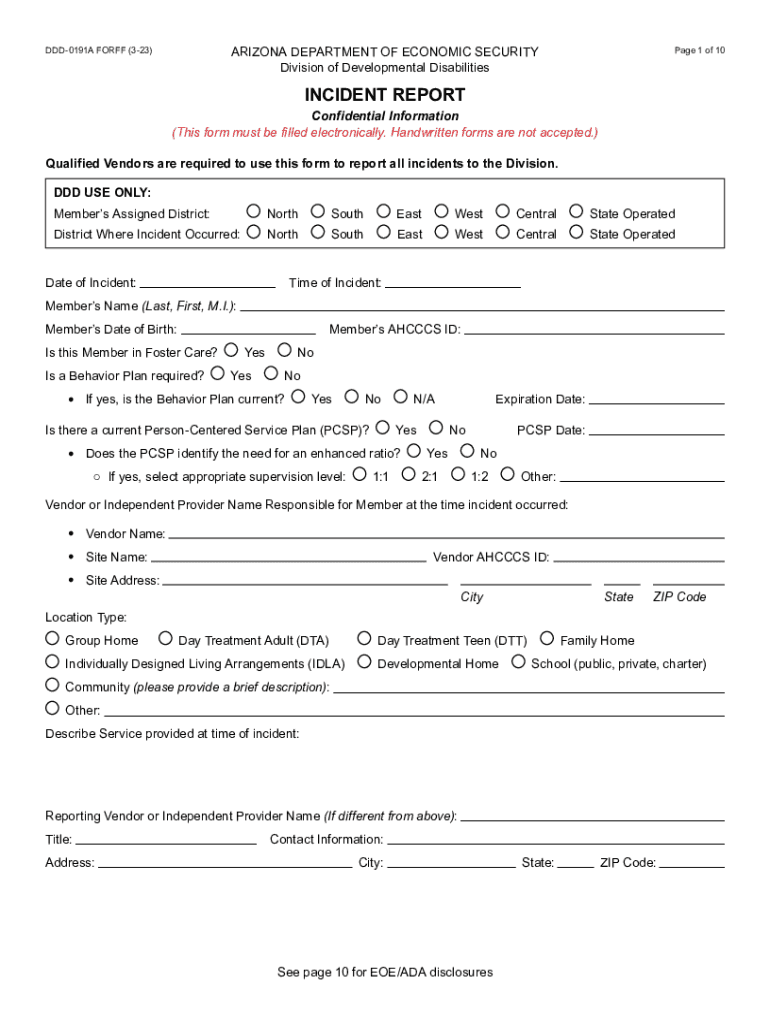
ARIZONA DEPARTMENT OF ECONOMIC SECURITY Division of Developmental Disabilities DDD-0191A FOR FF (3-23) Page 1 of 10 INCIDENT REPORT Confidential Information (This form must be filled electronically.

Open form follow the instructions

Easily sign the form with your finger

Send filled & signed form or save
How to fill out the AZ DDD-0191A online
The AZ DDD-0191A form is a vital tool for reporting incidents within the Arizona Division of Developmental Disabilities. This guide provides clear, step-by-step instructions for completing the form electronically, ensuring that all required details are accurately recorded.
Follow the steps to fill out the AZ DDD-0191A online.
- Press the ‘Get Form’ button to access the AZ DDD-0191A form and open it in the editor.
- Begin filling out the confidential information section, including the member's assigned district and the district where the incident occurred. Be sure to select the correct options from the provided choices.
- Enter the date and time of the incident, along with the member's name, date of birth, and AHCCCS ID. Ensure all personal information is accurate.
- Indicate whether the member is in foster care and whether a behavior plan is required. If a behavior plan is necessary, check if it is current.
- Complete the details regarding the Person-Centered Service Plan (PCSP), including its date and whether it identifies the need for an enhanced supervision ratio.
- Fill in the vendor or independent provider’s name responsible for the member at the time of the incident, along with their contact information and site address.
- Provide detailed descriptions of the service provided at the time of the incident and the names of individuals or staff involved in the incident.
- If related to medication, answer the additional questions regarding medication administration, including details about any errors that occurred.
- For incidents unrelated to medication, complete the incident type section with as much detail as possible regarding what occurred before, during, and after the incident.
- Document notifications made to the parent, guardian, support coordinator, protective services, and law enforcement, if applicable.
- Use the corrective action/comments section to summarize measures taken to prevent future incidents and complete the form with your electronic signature and date.
- Once you have completed the form, save the changes, download a copy, print it, or share it as required.
Complete your documents online to ensure accurate reporting and prompt incident management.
Experience a faster way to fill out and sign forms on the web. Access the most extensive library of templates available.
Related content
Serious incidents, as described in the Division's Policy Manual are to be reported and...
Incident. Reporting. The New Jersey Division of. Developmental Disabilities (DDD)...
National Fire Fire Incident Incident National Reporting System System 5.0 ... DDC 0154002...
Get answers to your most pressing questions about US Legal Forms API.
What are the 5 categories of incidents?
The simple model shown in Figure 1 attempts to illustrate that the causes of any incident can be grouped into five categories - task, material, environment, personnel, and management.
What are the different types of incident report?
Some of the most common types of incident reports include: Accident report. Hazard report. Near miss report.
What are the four basic types of incidents?
Another approach would be to have four types: Accident, Notifiable Accident, Incident and Notifiable Incident.
What is the incident reporting process in healthcare?
Incident reporting in healthcare refers to collecting healthcare incident data with the goal to improve patient safety and care quality. Done well, it identifies safety hazards and guides the development of interventions to mitigate risks, thereby reducing harm.
When should serious incidents be reported to the risk manager?
Serious Incidents Must be reported as soon as possible but no later than 24-hours after the incident.
What are the 4 types of incident reports?
The 4 main incident reports that should be on your list are: Near Miss Reports. Near misses are events where no one was injured, but given a slight change in timing or action, someone could have been. ... Injury and Lost Time Incident Report. ... Exposure Incident Report. ... Sentinel Event Report.
What are the 3 types of incidents?
3 Types of Incidents You Must Be Prepared to Deal With Major Incidents. Large-scale incidents may not come up too often, but when they do hit, organizations need to be prepared to deal with them quickly and efficiently. ... Repetitive Incidents. ... Complex Incidents.
What is the procedure for reporting incidents?
An effective incident investigation process involves four key steps: incident description, identification of causes, identification of changes to the organisation and work processes, and learning.
Use professional pre-built templates to fill in and sign documents online faster. Get access to thousands of forms.
If you believe that this page should be taken down, please follow our DMCA take down process here.