Loading
Get Ky Ago 26-12 2021-2026
How it works
-

Open form follow the instructions
-

Easily sign the form with your finger
-

Send filled & signed form or save
How to fill out the KY AGO 26-12 online
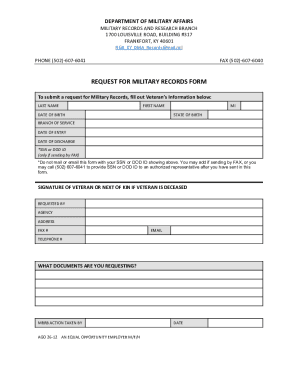
The KY AGO 26-12 form is essential for requesting military records from the Department of Military Affairs. This guide provides clear, step-by-step instructions to help you navigate the online form efficiently.
Follow the steps to successfully complete the KY AGO 26-12 online
- Click ‘Get Form’ button to obtain the form and open it in the online editor.
- Begin filling out the Veteran’s Information section. Provide the last name, first name, middle initial, and date of birth of the veteran. Ensure accuracy in the spelling of names and formatting of dates.
- Indicate the state of birth of the veteran. This information helps in verifying details associated with military records.
- Select the branch of service from which the veteran served. This is a critical field to assist in locating the correct military records.
- Fill in the date of entry into service and date of discharge. This information is vital for processing the record request.
- If sending by fax, include the Social Security Number (SSN) or Department of Defense (DOD) ID, as required. However, do not mail or email this form with the SSN or DOD ID visible.
- Provide the signature of the veteran or the next of kin if the veteran is deceased. This signature authorizes the release of military records.
- Fill out the 'Requested By' section including the agency, address, fax number, email, and telephone number. This information is necessary for correspondence regarding the request.
- Clearly specify the documents you are requesting in the space provided. Be as detailed as possible to ensure accurate processing.
- After you have filled out all sections of the form, review the information for accuracy. Make any necessary corrections.
- You can now save the changes, download the form, print it, or share it depending on your needs.
Complete your military records request form online today!