Loading
Form preview
  • US Legal Forms
  • Other Templates
  • More Forms
  • More Multi-State Forms
  • Ae Etisalat Re-registration/transfer Service Phone Mobile 2012

Get Ae Etisalat Re-registration/transfer Service Phone Mobile 2012-2026

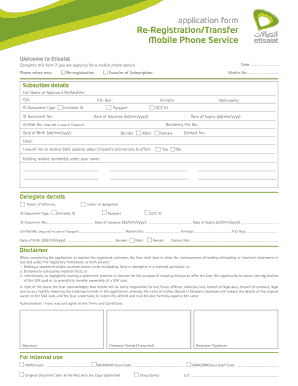
Application form Re-Registration/Transfer Mobile Phone Service Welcome to Tiamat Date: .............................. Complete this form if you are applying for a mobile phone service Please select.

How it works

  1. Open form

    Open form follow the instructions

  2. Easily sign form

    Easily sign the form with your finger

  3. Share form

    Send filled & signed form or save

How to fill out the AE Etisalat Re-Registration/Transfer Service Phone Mobile online

Completing the AE Etisalat Re-Registration/Transfer Service Phone Mobile form is essential for users looking to either re-register their mobile phone service or transfer their subscription. This guide provides detailed, step-by-step instructions to assist you in successfully filling out the form online.

Follow the steps to easily complete your application.

  1. Click ‘Get Form’ button to obtain the form and open it in the editor.
  2. Select whether you are applying for re-registration or transfer of subscription. Make your choice clear by checking the appropriate box.
  3. Enter your mobile number in the provided field.
  4. Complete the subscriber details section by providing your full name. Make sure to indicate your gender by selecting either Male or Female.
  5. Fill in your contact number and email address. Consider opting in for SMS updates about Etisalat’s promotions and offers.
  6. Input your ID document type and provide the necessary document number along with your nationality and the emirate where you reside.
  7. Complete the date issuance and date expiry fields for your ID document using the correct format (dd/mm/yyyy).
  8. Provide your date of birth in the specified format.
  9. If applicable, fill out the delegate details section if you are acting on behalf of someone else. Include their ID document information and contact details.
  10. Read the disclaimer carefully, acknowledging your responsibility for providing correct information. You must also agree to the Terms and Conditions by marking the appropriate option.
  11. Sign the form and, if required, include a company stamp.
  12. After completing the form, it is advisable to review all entered information for accuracy before proceeding.
  13. Save your changes, and then choose to download, print, or share the form as needed.

Complete your AE Etisalat Re-Registration/Transfer Service Phone Mobile form online today!

Get form

Experience a faster way to fill out and sign forms on the web. Access the most extensive library of templates available.
Get form

Related content

DRS/A
#238, Building 16, Dubai Internet City. Dubai, United Arab Emirates. +971-4-587-7388...
Learn more
.ae - Wikipedia
Feb 8, 2023 — ae domain name retail prices ranges from 30 USD to 200 USD depending on...
Learn more
20-F
Indicate the number of outstanding shares of each of the issuer's classes of capital or...
Learn more

Related links form

Farm City Week Scholarship Form Harvest Festival Scholarship Form Teea Of Leon County Scholarship Form Private Applicator Note Taking Worksheet. Private Applicator Note Taking Worksheet

Questions & Answers

Get answers to your most pressing questions about US Legal Forms API.

Contact support

You can log in to your account via My Etisalat UAE app from any mobile device and complete the registration process for all accounts under your primary account Party ID .

calling 125 from your home landline. calling 101 or texting 'EICP' to 1012 from your mobile number that is registered with your eLife account.

How to change the ownership of a SIM card? Step 1: Collect ID from both people. Both new and old account holders will require the correct ID to get started with the process. ... Step 2: Gather the right form. ... Step 3: Submit the right paperwork. ... Step 4: Complete the verification process. ... Step 5: Collect the SIM card.

The donor (previous owner of SIM card) and the receiver (new owner) both have to be present together during transferring ownership. No documents will be required. But these information like NID number, Name of the customers, Date of Birth, customer address will be required for Biometric verification.

In a nutshell, changing ownership of a mobile number requires consent from both the current account holder as well as the person taking ownership. In addition to this, both these parties will require sufficient proof of identity. Then, the transfer of ownership can take place online, in-store, or over the phone.

On your phone keypad type *100*mobilenumber*amount# you want to transfer #. For example, if you want to send AED 5, you have to simply dial *100*05XX*5#.

Via My Etisalat UAE app. By dialling *121*170#

Dial *100*Mobile No. *Amount# Mobile app: Share Credit and Data - Pay & Recharge for friends.

Get This Form Now!

Use professional pre-built templates to fill in and sign documents online faster. Get access to thousands of forms.
Get form
If you believe that this page should be taken down, please follow our DMCA take down processhere.
Get AE Etisalat Re-Registration/Transfer Service Phone Mobile
Get form
  • Adoption
  • Bankruptcy
  • Contractors
  • Divorce
  • Home Sales
  • Employment
  • Identity Theft
  • Incorporation
  • Landlord Tenant
  • Living Trust
  • Name Change
  • Personal Planning
  • Small Business
  • Wills & Estates
  • Packages A-Z
  • Affidavits
  • Bankruptcy
  • Bill of Sale
  • Corporate - LLC
  • Divorce
  • Employment
  • Identity Theft
  • Internet Technology
  • Landlord Tenant
  • Living Wills
  • Name Change
  • Power of Attorney
  • Real Estate
  • Small Estates
  • Wills
  • All Forms
  • Forms A-Z
  • Other Templates
  • Legal Hub
  • About Us
  • Help Portal
  • Legal Resources
  • Blog
  • Affiliates
  • Contact Us
  • Delete My Account
  • Site Map
  • Industries
  • Forms in Spanish
  • Localized Forms
  • State-specific Forms
  • Forms Kit
  • Real Estate Handbook
  • All Guides
  • Notarize
  • Incorporation services
  • For Consumers
  • For Small Business
  • For Attorneys
  • USLegal
  • FormsPass
  • pdfFiller
  • signNow
  • altaFlow
  • DocHub
  • Instapage
Form Packages
  • Adoption
  • Bankruptcy
  • Contractors
  • Divorce
  • Home Sales
  • Employment
  • Identity Theft
  • Incorporation
  • Landlord Tenant
  • Living Trust
  • Name Change
  • Personal Planning
  • Small Business
  • Wills & Estates
  • Packages A-Z
Form Categories
  • Affidavits
  • Bankruptcy
  • Bill of Sale
  • Corporate - LLC
  • Divorce
  • Employment
  • Identity Theft
  • Internet Technology
  • Landlord Tenant
  • Living Wills
  • Name Change
  • Power of Attorney
  • Real Estate
  • Small Estates
  • Wills
  • All Forms
  • Forms A-Z
  • Other Templates
Customer Service
  • Legal Hub
  • About Us
  • Help Portal
  • Legal Resources
  • Blog
  • Affiliates
  • Contact Us
  • Delete My Account
  • Site Map
  • Industries
  • Forms in Spanish
  • Localized Forms
  • State-specific Forms
  • Forms Kit
Legal Guides
  • Real Estate Handbook
  • All Guides
Prepared for you
  • Notarize
  • Incorporation services
Our Customers
  • For Consumers
  • For Small Business
  • For Attorneys
Our Sites
  • USLegal
  • FormsPass
  • pdfFiller
  • signNow
  • altaFlow
  • DocHub
  • Instapage
Social Media
Call us now toll free:
+1 833 426 79 33
As seen in:
© Copyright 1999-2026 airSlate Legal Forms, Inc. 17 Station Street, Ste. 203, Brookline, MA 02445
  • Your Privacy Choices
  • Terms of Service
  • Privacy Notice
  • Content Takedown Policy
  • Bug Bounty Program