Loading
Get Handydart Application
How it works
-

Open form follow the instructions
-

Easily sign the form with your finger
-

Send filled & signed form or save
How to fill out the Handydart Application online
Filling out the Handydart Application online is a straightforward process designed to help you secure accessible transportation services. This guide will lead you through each section of the application to ensure that you provide all necessary information accurately and completely.
Follow the steps to complete your application online.
- Click ‘Get Form’ button to obtain the form and open it in the designated area.
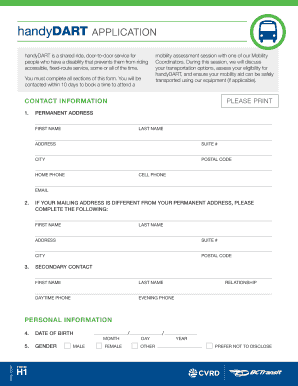
- Begin by entering your contact information. Provide your first name, last name, permanent address, including city and postal code, home and cell phone numbers, and email address. If your mailing address differs from your permanent address, please complete the additional fields for your mailing address.
- Fill in the personal information section. Include your date of birth and select your gender from the options provided.
- In the transportation disability information section, describe why BC Transit’s accessible, fixed-route service is not an option for you. Provide detailed information about your travel abilities and limitations using the options presented.
- Indicate whether your mobility limitation is permanent or temporary, specifying details if it is temporary. Confirm if you can be left alone at your residence and provide any necessary explanations.
- List any mobility aids you use, checking all that apply, and provide additional details about your equipment.
- Answer whether you will be traveling with the assistance of a personal attendant.
- In the travel option information section, indicate if you use fixed-route service for some trips and whether you are interested in training for independent travel.
- Choose the source from which BC Transit can obtain your mobility information and provide their contact details.
- If you are applying for the handyPASS, indicate your choice and prepare to submit two passport-sized photos as per the handyPASS photo specifications.
- Read and agree to the authorization section, certifying that the provided information is true. Sign and date the application.
- Send the completed application to the Client Registrar via the address or fax number provided. Ensure that you have kept a copy for your records.
Complete your Handydart Application online today to ensure you have access to essential transportation services.
You must provide 2 current hard-copy photos or 1 digital photo with your application. Hard-copy photos must be sized to 3.2 cm x 3.2 cm or 1.25 in x 1.25 in. Digital photos must be a minimum 300dpi.
Industry-leading security and compliance
US Legal Forms protects your data by complying with industry-specific security standards.
-
In businnes since 199725+ years providing professional legal documents.
-
Accredited businessGuarantees that a business meets BBB accreditation standards in the US and Canada.
-
Secured by BraintreeValidated Level 1 PCI DSS compliant payment gateway that accepts most major credit and debit card brands from across the globe.