Loading
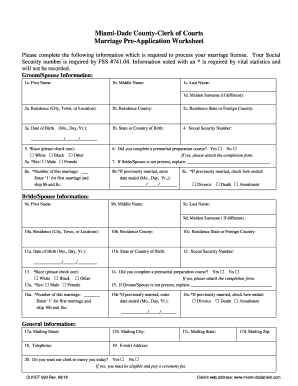
Get Miami Dade Marriage Pre Application
How it works
-

Open form follow the instructions
-

Easily sign the form with your finger
-

Send filled & signed form or save
How to fill out the Miami Dade Marriage Pre Application online
Filling out the Miami Dade Marriage Pre Application is an essential step for couples planning to get married in Miami-Dade County. This guide will provide you with detailed instructions to help you complete the application accurately and efficiently. By following these steps, you can ensure that your application is processed smoothly.
Follow the steps to successfully complete your application
- Click the ‘Get Form’ button to obtain the Miami Dade Marriage Pre Application and access it in your preferred online format.
- Begin by entering the groom or spouse's information. This includes the following fields: 1a for first name, 1b for middle name, 1c for last name, and 1d for maiden surname, if applicable.
- Provide the residence details in sections 2a to 2c, which include the city, county, and state or foreign country where the groom/spouse resides.
- Fill out the date of birth in section 3a and the state or country of birth in section 3b.
- Enter the social security number in section 4. This information is required to process the application.
- In section 5, indicate the groom/spouse's race by checking one of the options: White, Black, or Other, and specify the sex in section 5a by selecting either Male or Female.
- In section 6, indicate whether a premarital preparation course was completed, and if yes, attach the completion form.
- If the bride/spouse is not present, provide an explanation in section 7.
- Complete section 8 regarding the number of this marriage and any relevant information if previously married.
- Proceed to fill out the bride/spouse information in sections 9 through 16, mirroring the information needed for the groom/spouse including all required fields.
- For both parties, provide general information such as mailing address, telephone number, and email address in sections 17-19.
- In section 20, indicate if you wish the clerk to perform the marriage ceremony today. If yes, note the requirement to be eligible and pay a ceremony fee.
- After ensuring all information is correct, you can save your changes, download, print, or share the completed form.
Complete your application online today to begin the process of obtaining your marriage license.
Each party must show a valid driver's license, a valid state identification card, a valid passport or valid military identification. Both parties must provide their Social Security numbers. If either party has been previously married, the party must provide the date his or her last marriage ended.