We use cookies to improve security, personalize the user experience, enhance our marketing activities (including cooperating with our marketing partners) and for other business use.
Click "here" to read our Cookie Policy. By clicking "Accept" you agree to the use of cookies. Read less
Read more
Accept
Loading
Form preview
  • US Legal Forms
  • Form Library
  • More Forms
  • More Multi-State Forms
  • Za Old Mutual Unit Trusts Selling Form 2020

Get Za Old Mutual Unit Trusts Selling Form 2020

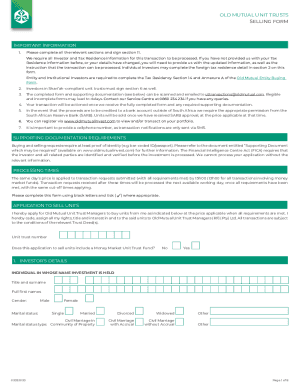
OLD MUTUAL UNIT TRUSTS SELLING FORMIMPORTANT INFORMATION 1. Please complete all the relevant sections and sign section 11. We require all Investor and Tax Residence information for this transaction.

How it works

  1. Open form

    Open form follow the instructions

  2. Easily sign form

    Easily sign the form with your finger

  3. Share form

    Send filled & signed form or save

How to fill out the ZA Old Mutual Unit Trusts Selling Form online

Filling out the ZA Old Mutual Unit Trusts Selling Form online can ensure a streamlined and efficient transaction process. This guide provides step-by-step instructions to help users accurately complete the form and submit it successfully.

Follow the steps to complete the ZA Old Mutual Unit Trusts Selling Form online.

  1. Press the ‘Get Form’ button to access the ZA Old Mutual Unit Trusts Selling Form. This will allow you to acquire the form and open it for editing.
  2. Begin by reviewing the important information section of the form. Ensure you understand that all sections need to be filled out correctly, especially the Investor and Tax Residence details, to avoid delays.
  3. In Section 1, provide the investor’s details. Include the title and surname, full first names, gender, and marital status. Ensure to submit proof of identity, such as a copy of your ID or passport.
  4. Complete the Tax Residency Detail in Section 2. If you are a tax resident outside of South Africa, detail your tax residence information accurately to comply with international regulations.
  5. Proceed to Section 3 to provide selling instructions. Specify either to sell all units, a specified number of units, or units to the value of a certain amount. Be clear in your selection.
  6. Fill out Section 4 with your bank details. It is critical that the payment is directed to your personal bank account, including all relevant account information.
  7. If you want to make changes to your monthly investment plan, fill in Section 5. Indicate if you wish to cancel or amend any existing debit orders.
  8. For investors in Shari’ah-compliant funds, ensure you sign Section 6 to acknowledge your understanding of the fund's compliance requirements.
  9. In Section 7, confirm your acceptance of financial advice, if applicable, by ticking the appropriate box and deciding on your preferred servicing intermediary.
  10. Complete Section 11, which is crucial for finalizing your application. Ensure you review all provided details carefully before your signature.
  11. Once you have filled out the form, save your changes. You can then download a copy, print it, or share it as needed to submit it to Old Mutual.

Complete your ZA Old Mutual Unit Trusts Selling Form online today for a seamless transaction experience.

Get form

Experience a faster way to fill out and sign forms on the web. Access the most extensive library of templates available.
Get form

Related content

BEGIN PRIVACY-ENHANCED MESSAGE----- Proc-Type:...
Dec 31, 2019 · Redemption or Repurchase," the Master Trust does not make distributions to...
Learn more
Mutual Funds and Exchange-Traded Funds (ETFs ......
Jan 26, 2017 — This brochure explains the basics of mutual fund and ETF investing,...
Learn more
Life insurance - Wikipedia
Life insurance is a contract between an insurance policy holder and an insurer or assurer...
Learn more

Related links form

Gardena Valley Landfill No. 6 - Fact Sheet - The Department Of Toxic ... - Dtsc Ca Forever 21 - Consent Order - Dtsc Ca Ascon Landfill Veterinary Doctor Certificate

Questions & Answers

Get answers to your most pressing questions about US Legal Forms API.

Contact support

You request Old Mutual to deposit the withdrawal/surrender proceeds into the bank account, the particulars of which you provided during this claim and declare that the details provided by you are complete and accurate.

We will process your redemption within 10 days. You will receive your payment via mail or direct bank in to your bank account if you instruct us to do so. For Phillip MASTER Money Market Fund payment will be made on the same day if the request is received before 9.45am and the next day if after 9.45am.

Payment will be made within two business days provided we receive your instruction and all supporting documents before the cut-off time. Units purchased via direct debit or debit order (i.e. provisional units) can only be withdrawn 45 days after the purchase date.

The withdrawal will be processed and paid into your bank account within a maximum of 7 days of you accepting these terms, provided all required documents are received. You will not have any claim against Old Mutual if the money is deposited into an incorrect bank account where you supplied the incorrect bank details.

How do unit trusts make money? The trust makes returns by investing in well-performing assets, usually company shares, bonds, property funds, and other assets. The fund will pay out any quarterly or bi-annual returns as either income or growth, and you can usually decide how you want to receive the money.

Because unit trusts are easily liquidated, unitholders may redeem all or part of their units on any business day and the unit trust manager will purchase them. This means that should you need cash, you can easily sell the investment. Most unit trusts will allow you to redeem your investments on any given business day.

You can withdraw your investment from your unit trust fund at any time. Also known as a repurchase or redemption, this is when you sell some or all of the units that you own in a unit trust fund. The proceeds are then paid into your bank account.

You request Old Mutual to deposit the withdrawal/surrender proceeds into the bank account, the particulars of which you provided during this claim and declare that the details provided by you are complete and accurate.

If you would like to have a full termination of all the Unit Trust RSPs, you are required to submit the physical termination form with the assistance from the respective Financial Adviser Representative or visit any of our Phillip Investor Centres.

To make a withdrawal, a unit holder needs to: Complete and sign the Transaction Form – Redemption & Switching. ... Mail or hand deliver the Transaction Form – Redemption & Switching together with all the necessary attachments to Pheim Unit Trusts Berhad at:

Get This Form Now!

Use professional pre-built templates to fill in and sign documents online faster. Get access to thousands of forms.
Get form
If you believe that this page should be taken down, please follow our DMCA take down processhere.

Industry-leading security and compliance

US Legal Forms protects your data by complying with industry-specific security standards.
  • In businnes since 1997
    25+ years providing professional legal documents.
  • Accredited business
    Guarantees that a business meets BBB accreditation standards in the US and Canada.
  • Secured by Braintree
    Validated Level 1 PCI DSS compliant payment gateway that accepts most major credit and debit card brands from across the globe.
Get ZA Old Mutual Unit Trusts Selling Form
Get form
Form Packages
Adoption
Bankruptcy
Contractors
Divorce
Home Sales
Employment
Identity Theft
Incorporation
Landlord Tenant
Living Trust
Name Change
Personal Planning
Small Business
Wills & Estates
Packages A-Z
Form Categories
Affidavits
Bankruptcy
Bill of Sale
Corporate - LLC
Divorce
Employment
Identity Theft
Internet Technology
Landlord Tenant
Living Wills
Name Change
Power of Attorney
Real Estate
Small Estates
Wills
All Forms
Forms A-Z
Form Library
Customer Service
Terms of Service
Privacy Notice
Legal Hub
Content Takedown Policy
Bug Bounty Program
About Us
Help Portal
Legal Resources
Blog
Affiliates
Contact Us
Delete My Account
Site Map
Industries
Forms in Spanish
Localized Forms
State-specific Forms
Forms Kit
Legal Guides
Real Estate Handbook
All Guides
Prepared for You
Notarize
Incorporation services
Our Customers
For Consumers
For Small Business
For Attorneys
Our Sites
US Legal Forms
USLegal
FormsPass
pdfFiller
signNow
airSlate WorkFlow
DocHub
Instapage
Social Media
Call us now toll free:
+1 833 426 79 33
As seen in:
  • USA Today logo picture
  • CBC News logo picture
  • LA Times logo picture
  • The Washington Post logo picture
  • AP logo picture
  • Forbes logo picture
© Copyright 1997-2025
airSlate Legal Forms, Inc.
3720 Flowood Dr, Flowood, Mississippi 39232
Form Packages
Adoption
Bankruptcy
Contractors
Divorce
Home Sales
Employment
Identity Theft
Incorporation
Landlord Tenant
Living Trust
Name Change
Personal Planning
Small Business
Wills & Estates
Packages A-Z
Form Categories
Affidavits
Bankruptcy
Bill of Sale
Corporate - LLC
Divorce
Employment
Identity Theft
Internet Technology
Landlord Tenant
Living Wills
Name Change
Power of Attorney
Real Estate
Small Estates
Wills
All Forms
Forms A-Z
Form Library
Customer Service
Terms of Service
Privacy Notice
Legal Hub
Content Takedown Policy
Bug Bounty Program
About Us
Help Portal
Legal Resources
Blog
Affiliates
Contact Us
Delete My Account
Site Map
Industries
Forms in Spanish
Localized Forms
State-specific Forms
Forms Kit
Legal Guides
Real Estate Handbook
All Guides
Prepared for You
Notarize
Incorporation services
Our Customers
For Consumers
For Small Business
For Attorneys
Our Sites
US Legal Forms
USLegal
FormsPass
pdfFiller
signNow
airSlate WorkFlow
DocHub
Instapage
Social Media
Call us now toll free:
+1 833 426 79 33
As seen in:
  • USA Today logo picture
  • CBC News logo picture
  • LA Times logo picture
  • The Washington Post logo picture
  • AP logo picture
  • Forbes logo picture
© Copyright 1997-2025
airSlate Legal Forms, Inc.
3720 Flowood Dr, Flowood, Mississippi 39232