Loading
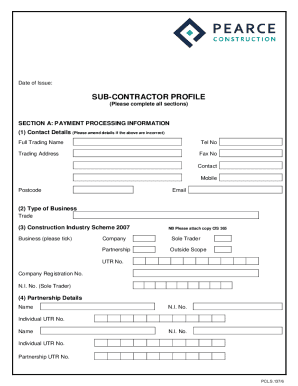
Get Uk Pearce Construction Sub-contractor Profile 2022-2026
How it works
-

Open form follow the instructions
-

Easily sign the form with your finger
-

Send filled & signed form or save
How to fill out the UK Pearce Construction Sub-Contractor Profile online
Filling out the UK Pearce Construction Sub-Contractor Profile online is an essential step towards facilitating your business relationship with Pearce Construction. This guide provides you with clear instructions to help navigate each section of the form effectively.
Follow the steps to complete your Sub-Contractor Profile with ease.
- Click 'Get Form' button to obtain the form and open it in the editor for further completion.
- Input your payment processing information in Section A. Begin with updating your contact details, including your full trading name, telephone number, trading address, and email. Ensure all details are correct.
- Indicate the type of business by selecting from the options—Company, Sole Trader, Partnership, or Outside Scope—and provide the relevant UTR number and Company Registration number if applicable.
- In the partnership details, add the name and N.I. number of each partner and their individual UTR numbers, along with the Partnership UTR number.
- Provide your VAT registration number if applicable and fill in the details for your Public Liability Insurance, Employers Liability Insurance, and Contractors All Risk Insurance. Attach the respective insurance certificates as requested.
- Complete your bank details, including bank name, sort code, account name, and account number. Indicate if remittance advice is required.
- Proceed to Section B to provide contract information. Select the type of work undertaken, your preferred range of contracts, and geographical area of operations.
- List previously completed contracts including client names, contract values, and completion dates, along with the present value of contracts. Provide names and contact information for two references.
- In Section C, confirm whether you have an Equal Opportunities Policy Statement. If yes, attach a copy; if no, indicate your commitment to adopting one within six months.
- Continue to Section D regarding Health and Safety. Indicate if you have ISO 45001 accreditation. If not accredited, provide details of your Safety Policy and health and safety management procedures.
- Complete the remaining fields in Section D regarding health surveillance, training provided, and management of health and safety.
- In Section E, indicate if your company is registered to any of the quality assurance standards (ISO 9001, ISO 14001, OHSAS 18001) and provide copies of certificates or indicate your intentions for future accreditation.
- Fill out general company information in Section F, including names of directors, head office address, average number of employees, and any trade associations you are registered with.
- Complete the declaration in Section G, ensuring that all required signatures are obtained. Ensure accuracy and completeness before submission.
- Once all sections are completed, review your input, save your changes, and make sure to download, print, or share the completed form as needed.
Complete your Sub-Contractor Profile online today to enhance your business prospects with UK Pearce Construction.