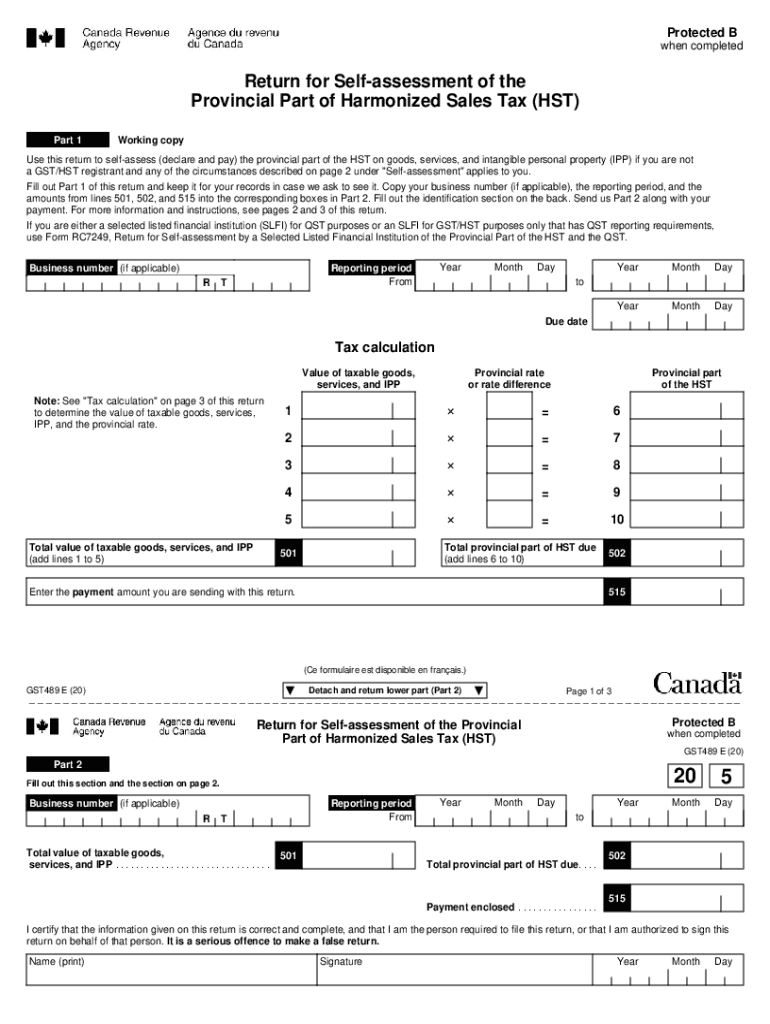
Protected B when completedReturn for Selfassessment of the Provincial Part of Harmonized Sales Tax (HST) Part 1Working copyUse this return to selfassess (declare and pay) the provincial part of the.

Open form follow the instructions

Easily sign the form with your finger

Send filled & signed form or save
How to fill out the Canada GST489 E online
The Canada GST489 E is a return form for self-assessing the provincial part of the Harmonized Sales Tax (HST). This guide provides clear, step-by-step instructions to assist users in accurately completing the form online.
Follow the steps to complete the Canada GST489 E online form.
- Use the 'Get Form' button to obtain the Canada GST489 E form and open it in your preferred online editor.
- Fill out Part 1 with the following details: your business number (if applicable), the reporting period start and end dates, and the total value of taxable goods, services, and intangible personal property (IPP). Make sure to calculate the total value by adding lines 1 to 5.
- For each province, enter the provincial rate or rate difference based on where goods or services were acquired. If applicable, calculate how the provincial rates apply.
- Complete the 'Tax calculation' section by filling in the taxable amounts and their corresponding provincial rates. The total provincial part of HST due will automatically populate based on your entries.
- Input the payment amount you are sending along with this return in the designated field for payment.
- Review your entries for accuracy before proceeding to Part 2. Make sure that all information is correct and complete.
- Fill out Part 2, which requires the same information as in Part 1. Ensure to complete the identification section, print your name, and sign the document.
- Detach Part 2 from the return and send it, along with your payment, to the Prince Edward Island Tax Centre.
- Finally, save changes to your online copy, download or print a copy for your records, and share it as needed.
Complete the Canada GST489 E form online today to ensure compliance with your HST obligations.
Experience a faster way to fill out and sign forms on the web. Access the most extensive library of templates available.
Related content
EX-99.5(D) 4 d299637dex995d.htm FORM OF RETIREMENT CORNERSTONE SERIES E APPLICATION...
Dec 9, 2002 — 4.4.2 Main Form Molecule List browser . . . . . . . . . . . . . . . . ....
Within ASD, both interface models and design models are defined in the form of ... RC158...
Get answers to your most pressing questions about US Legal Forms API.
What is rc158?
Form RC158, Remittance Voucher Payment on Filing Use Form RC158 to send a payment along with a return. Form RC158 will show the tax year-end. You have to enter the amount you are paying in the "Amount paid" box.
How do I order payroll remittance forms?
W1, Payroll and Contract Labour Report, statement of account personalized. W1-B, Statement of Account - non-personalized. W1-RB, Nova Scotia Workers' Compensation Board Remittance Booklet.
How do I get a remittance voucher from CRA?
Order by calling 1-800-959-5525.
How do I order a remittance voucher?
To order additional remittance vouchers, call 1-800-959-5525. If you do not have a remittance voucher, you must still remit on time. Go to Make a payment (remittance) for options.
How do I fill out a payroll remittance form?
Enter the end of remitting period for which you withheld deductions. Enter the gross payroll in remitting period, rounded to the nearest dollar. ... Enter the number of employees in latest pay period. ... Enter the amount paid.
What is CRA benefits and remittance vouchers?
If a recalculation shows you have been overpaid the GST/HST credit, the CRA will send you a notice with a remittance voucher attached to inform you of the balance owing. The CRA will keep all future GST/HST credit payments or income tax refunds until your balance is repaid.
How do I order a CRA form?
order them online at canada.ca/get-cra-forms. order them beginning February 5 by calling us at 1-855-330-3305 (be ready to give your social insurance number)
What is remittance slip?
In short, remittance advice is a proof of payment document sent by a customer to a business. Generally, it's used when a customer wants to let a business know when an invoice has been paid. In a sense, remittance slips are equivalent to cash register receipts.
What is a t100 form?
A principal-business corporation (PBC) that agrees to issue FTSs or prepares a selling instrument for FTSs must file Form T100A, Application For A Selling Instrument T100 Identification Number (SITIN), to obtain an identification number.
Use professional pre-built templates to fill in and sign documents online faster. Get access to thousands of forms.
If you believe that this page should be taken down, please follow our DMCA take down process here.