Loading
Form preview
  • US Legal Forms
  • Other Templates
  • More Forms
  • More Multi-State Forms
  • Nc Gas-1274 2021

Get Nc Gas-1274 2021-2026

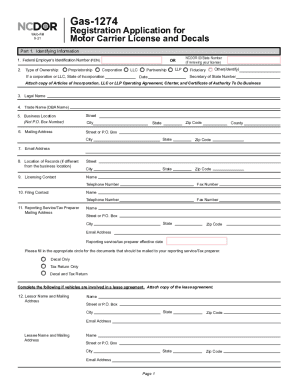
Gas-1274 Registration Application for Motor Carrier License and Decals Web-Fill 9-21 4 PRINT CLEAR Part 1. Identifying Information 1. Federal Employer s Identification Number (VEIN) 2. Type.

How it works

  1. Open form

    Open form follow the instructions

  2. Easily sign form

    Easily sign the form with your finger

  3. Share form

    Send filled & signed form or save

How to fill out the NC Gas-1274 online

The NC Gas-1274 is an essential registration application for obtaining a motor carrier license and decals in North Carolina. This guide provides detailed, step-by-step instructions to assist users in completing this form online efficiently.

Follow the steps to fill out the NC Gas-1274 application online.

  1. Click ‘Get Form’ button to access the form and open it in your editing environment.
  2. In Part 1, provide your identifying information. Start by entering your Federal Employer’s Identification Number (FEIN) and select the type of ownership from the options provided: proprietorship, corporation, LLC, partnership, or fiduciary. If applicable, include the State of Incorporation.
  3. Next, input your legal name, trade name, business location (not a P.O. Box), and mailing address. Ensure all fields are filled out accurately, including city, state, and zip code.
  4. Enter your email address and location of records if different from the business location. Provide the name and contact information of both the licensing and filing contacts.
  5. If you use a reporting service or tax preparer, include their mailing address and select the appropriate option for document mailing (e.g., decal only, tax return only, or both).
  6. For lease agreements, provide details about the lessor and lessee, including names and mailing addresses.
  7. In Part 2, complete ownership information for each corporate officer, principal, manager, or partner. Fill in applicable title circles and provide all required personal information including full name, residence address, and contact numbers.
  8. In Part 3, indicate the business operation details. Specify when your business started, whether you have qualified motor vehicles registered as special mobile equipment, and whether those vehicles travel outside of North Carolina.
  9. Continue through the questions regarding past IFTA licensing, the International Registration Plan (IRP) base state, and the US DOT number. Answer questions related to bulk storage facilities and qualified motor vehicles requiring licenses and decals.
  10. In Part 4, review the certification statement, affirming compliance with tax reporting and recordkeeping requirements. Sign and date the application. Make sure all information is accurate before submission.
  11. Finally, save your completed form changes. You can download, print, or share the form as needed.

Complete your NC Gas-1274 application online today to ensure timely processing of your motor carrier license.

Get form

Experience a faster way to fill out and sign forms on the web. Access the most extensive library of templates available.
Get form

Related content

GAS-1274, Application for Motor Carrier License...
This application must be completed by any business operating as an intrastate or...
Learn more
Forecasting of Highway Revenues Under Various...
by BRDK Agbelie · 2010 · Cited by 8 — motor fuel taxes and vehicle registration fees)...
Learn more
List of UN numbers 1201 to 1300 - Wikipedia
UN NumberClassProper Shipping NameUN 12013Fusel oilUN 12023Gas oil or diesel fuel or...
Learn more

Related links form

ISSN Application (for Posting To The Intranet) - Library Of Congress - Loc Application For Tree Works:works To Trees Subject To A Tree Preservation Order (TPO)- Revised Oct Dual Placement Student Teaching Manual - Grand Canyon University - Gcu March 14, 2008 WN U-60 Attachment B To Schedule 80, Page 1 ...

Questions & Answers

Get answers to your most pressing questions about US Legal Forms API.

Contact support

Licenses and decals expire on December 31st, of each calendar year. Annual renewal period starts in September each year. Complete and submit Form GAS-1274A, Renewal Application for License and Decals. License and Decals cannot be renewed by telephone request.

Your NCDOR ID # and Access Code will be mailed to you. If you did not receive access code letter OR in need of password reset please call (919) 707-7500 or 1-877-308-9092.

Fuel decals are required for any single licensed vehicle having three (3) or more axles (regardless of weight) or any licensed vehicle having a registered weight OR actual weight of over 26,000 pounds, single vehicle or combined (trailer, etc.).

Licenses and decals expire on December 31, of each calendar year. Annual renewal is required. Complete and submit Form GAS- 1274A, Renewal Application for License and Decals.

New North Carolina IFTA Fuel Tax Accounts There is no fee for decals. You will need one set per qualified vehicle. Incomplete applications will be returned, which will delay processing. You should receive your decals within 4-5 business days.

Need Additional Information? If you need assistance, please contact the Excise Tax Division toll-free at 1-877-308-9092 or (919) 707-7500 , Monday through Friday between the hours of 8:00 am to 5:00 pm Eastern Standard Time.

Get This Form Now!

Use professional pre-built templates to fill in and sign documents online faster. Get access to thousands of forms.
Get form
If you believe that this page should be taken down, please follow our DMCA take down processhere.
Get NC Gas-1274
Get form
  • Adoption
  • Bankruptcy
  • Contractors
  • Divorce
  • Home Sales
  • Employment
  • Identity Theft
  • Incorporation
  • Landlord Tenant
  • Living Trust
  • Name Change
  • Personal Planning
  • Small Business
  • Wills & Estates
  • Packages A-Z
  • Affidavits
  • Bankruptcy
  • Bill of Sale
  • Corporate - LLC
  • Divorce
  • Employment
  • Identity Theft
  • Internet Technology
  • Landlord Tenant
  • Living Wills
  • Name Change
  • Power of Attorney
  • Real Estate
  • Small Estates
  • Wills
  • All Forms
  • Forms A-Z
  • Other Templates
  • Legal Hub
  • About Us
  • Help Portal
  • Legal Resources
  • Blog
  • Affiliates
  • Contact Us
  • Delete My Account
  • Site Map
  • Industries
  • Forms in Spanish
  • Localized Forms
  • State-specific Forms
  • Forms Kit
  • Real Estate Handbook
  • All Guides
  • Notarize
  • Incorporation services
  • For Consumers
  • For Small Business
  • For Attorneys
  • USLegal
  • FormsPass
  • pdfFiller
  • signNow
  • altaFlow
  • DocHub
  • Instapage
Form Packages
  • Adoption
  • Bankruptcy
  • Contractors
  • Divorce
  • Home Sales
  • Employment
  • Identity Theft
  • Incorporation
  • Landlord Tenant
  • Living Trust
  • Name Change
  • Personal Planning
  • Small Business
  • Wills & Estates
  • Packages A-Z
Form Categories
  • Affidavits
  • Bankruptcy
  • Bill of Sale
  • Corporate - LLC
  • Divorce
  • Employment
  • Identity Theft
  • Internet Technology
  • Landlord Tenant
  • Living Wills
  • Name Change
  • Power of Attorney
  • Real Estate
  • Small Estates
  • Wills
  • All Forms
  • Forms A-Z
  • Other Templates
Customer Service
  • Legal Hub
  • About Us
  • Help Portal
  • Legal Resources
  • Blog
  • Affiliates
  • Contact Us
  • Delete My Account
  • Site Map
  • Industries
  • Forms in Spanish
  • Localized Forms
  • State-specific Forms
  • Forms Kit
Legal Guides
  • Real Estate Handbook
  • All Guides
Prepared for you
  • Notarize
  • Incorporation services
Our Customers
  • For Consumers
  • For Small Business
  • For Attorneys
Our Sites
  • USLegal
  • FormsPass
  • pdfFiller
  • signNow
  • altaFlow
  • DocHub
  • Instapage
Social Media
Call us now toll free:
+1 833 426 79 33
As seen in:
© Copyright 1999-2026 airSlate Legal Forms, Inc. 17 Station Street, Suite 303, Brookline, MA 02445
  • Your Privacy Choices
  • Terms of Service
  • Privacy Notice
  • Content Takedown Policy
  • Bug Bounty Program