Loading
Get Mo Mo 350-1391 2013
How it works
-

Open form follow the instructions
-

Easily sign the form with your finger
-

Send filled & signed form or save
How to fill out the MO MO 350-1391 online
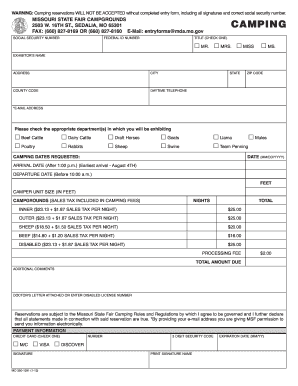
Filling out the MO MO 350-1391 form online is essential for reserving a camping space at the Missouri State Fair. This guide will provide you with step-by-step instructions to ensure your form is completed accurately and efficiently.
Follow the steps to successfully complete your camping reservation form.
- Click ‘Get Form’ button to access the form and open it in the online editor.
- Begin by entering your name in the ‘Exhibitor’s name’ field. Ensure that this matches any identification documents you may have.
- Fill in your address, including the city, county code, state, and zip code. This information is crucial for processing your reservation.
- Enter your daytime telephone number for any follow-up communications regarding your reservation.
- Select your title by ticking the appropriate box (Mr., Ms., Mrs.). Make sure you let them know how to address you properly.
- Provide your email address, which will be used for sending confirmation and any relevant updates. Providing an accurate email is important.
- Indicate the departments where you will be exhibiting by checking the corresponding boxes (e.g., beef cattle, poultry).
- Specify your requested camping dates, ensuring your arrival date is after 1:00 p.m. and departure before 10:00 a.m. Enter these dates in the required format (mm/dd/YYYY).
- State your camper unit size in feet to ensure you are assigned a suitable space.
- Review the camping fee structure based on your selections, noting the total amount due for your reservation.
- Complete the payment information section, including your credit card number, expiration date, and security code. Ensure that you enter this information accurately to avoid processing delays.
- Finally, add any additional comments you feel are necessary for your reservation.
- Once you have filled all the required fields, review your form to confirm all information is correct, and then proceed to save changes. You can choose to download, print, or share the completed form as needed.
Complete your MO MO 350-1391 form online today to secure your camping reservation!
Get form
Experience a faster way to fill out and sign forms on the web. Access the most extensive library of templates available.
Get This Form Now!
Use professional pre-built templates to fill in and sign documents online faster. Get access to thousands of forms.