Loading
Get Work Opportunity Tax Credit Wotc Survey
How it works
-

Open form follow the instructions
-

Easily sign the form with your finger
-

Send filled & signed form or save
How to fill out the WORK OPPORTUNITY TAX CREDIT WOTC SURVEY online
This guide provides clear instructions on completing the Work Opportunity Tax Credit (WOTC) Survey online. By following these steps, users can ensure they accurately provide the necessary information for their eligibility.
Follow the steps to complete the WOTC Survey effectively.
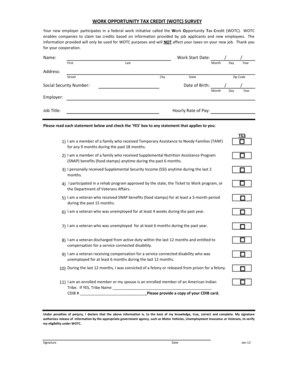
- Click ‘Get Form’ button to access the WOTC Survey and open it in the online editing tool.
- Begin by entering your work start date in the designated field, ensuring the month, day, and year are correct.
- Provide your full name by filling in the first and last name fields accurately.
- Enter your complete address, including street, city, state, and zip code.
- Input your Social Security number in the specified field to comply with verification requirements.
- Fill in your date of birth, ensuring to use the correct format for month, day, and year.
- Specify your employer’s name and the hourly rate of pay in the respective fields.
- Indicate your job title clearly in the job title field.
- Review the statements provided and check the 'YES' box next to any statements that apply to you. This may include your eligibility based on previous benefits or status.
- Under the perjury declaration section, confirm that all information is accurate by providing your signature and the date.
- Once all sections are completed, save the changes, and you may download, print, or share the completed form as needed.
Complete and submit your WOTC Survey online today to ensure your eligibility for tax credits.
New hires may be asked to complete the WOTC questionnaire as part of their onboarding paperwork, or even as part of the employment application in some cases. It is voluntary on the new hire's perspective, an employer cannot require you to complete the forms.