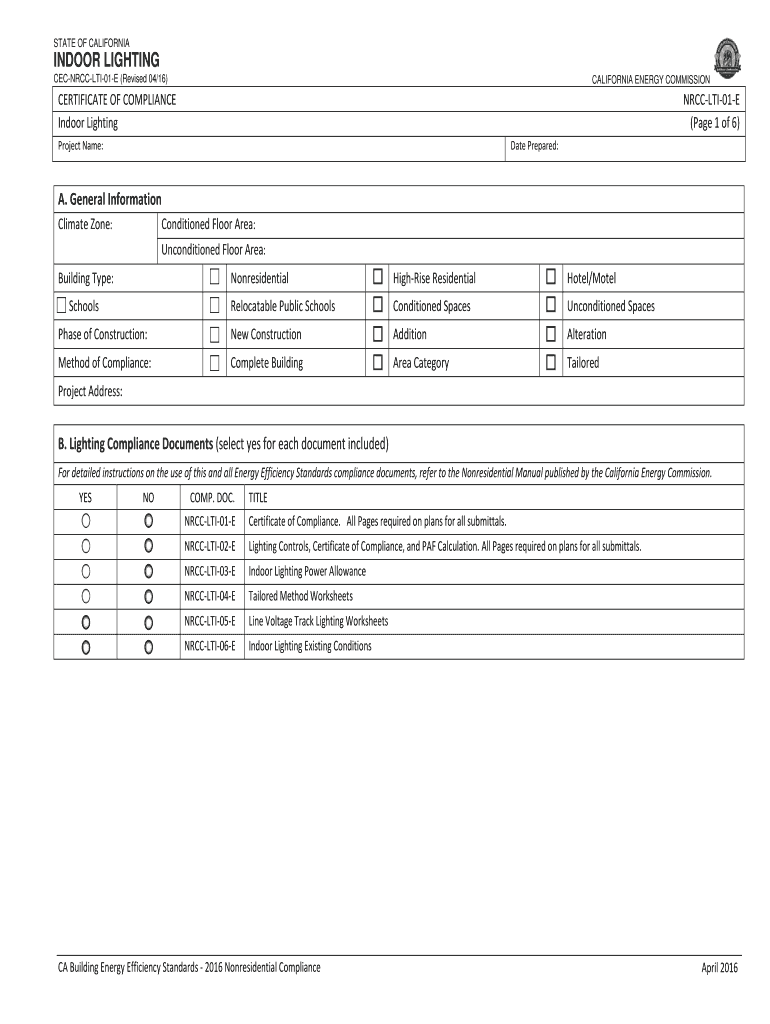
STATE OF CALIFORNIAINDOOR LIGHTING CECNRCCLTI01E (Revised 04/16)CALIFORNIA ENERGY COMMISSIONCERTIFICATE OF COMPLIANCE Indoor LightingNRCCLTI01E (Page 1 of 6)Project Name:Date Prepared:A. General Information Climate.
Loading

Open form follow the instructions

Easily sign the form with your finger

Send filled & signed form or save
How to fill out the CA CEC-NRCI-LTI-01-E online
Filling out the CA CEC-NRCI-LTI-01-E form is essential for compliance with California's energy efficiency standards. This guide provides step-by-step instructions to ensure users can complete the form accurately and effectively, even without prior experience in legal or regulatory documents.
Follow the steps to successfully complete the form online.
- Click ‘Get Form’ button to access the CA CEC-NRCI-LTI-01-E form and open it in your online editor.
- Begin by filling out the general information section. Input the project name and the date prepared. Ensure that you select the appropriate climate zone, conditioned floor area, and unconditioned floor area.
- Choose the building type that applies to your project from the given options such as nonresidential, high-rise residential, hotel/motel, schools, etc. Check the appropriate box for the phase of construction: new construction, addition, or alteration.
- Indicate the method of compliance you are following — whether it is complete building, area category, or tailored method.
- Proceed to the lighting compliance documents section. Here, you will indicate whether you have included the required documents by selecting 'yes' or 'no' for each document listed.
- In the summary of allowed lighting power section, complete the calculations according to the provided tables for conditioned and unconditioned spaces, ensuring compliance by checking the adjusted installed lighting power against allowed limits.
- Complete the declaration sections regarding required certificates of installation and certificates of acceptance by marking 'yes' or 'no' as applicable for the documentation you will submit.
- Fill in the indoor lighting schedule, ensuring to list all the installed lighting components and their wattage, specifying if they are for conditioned or unconditioned spaces.
- For the installed portable luminaires in offices, complete the specific fields for each office. Check if the watts per square foot exceed the limitations outlined.
- Finally, review all sections of the form for accuracy. Once completed, save your changes, and you can also download, print, or share the document as required.
Complete your CA CEC-NRCI-LTI-01-E form online today to ensure compliance with California's energy regulations.
Experience a faster way to fill out and sign forms on the web. Access the most extensive library of templates available.
Related content
Mar 1, 2016 — Document Title: 2016-NRCC-LTI-01-E - Certificate Of Compliance, Indoor...
Mar 5, 2019 · NRCC-LTI-02-E: Indoor Lighting—Lighting Controls. NRCC-LTI-01-E: Indoor...
tion of AGC voltcge unul th? receivffi signal recches o p:e dztermined value ... cr.nse !n...
Use professional pre-built templates to fill in and sign documents online faster. Get access to thousands of forms.
If you believe that this page should be taken down, please follow our DMCA take down process here.
This form is available in several versions. Select the version you need from the drop-down list below.