Loading
Get 16361 2020-2026
How it works
-

Open form follow the instructions
-

Easily sign the form with your finger
-

Send filled & signed form or save
How to fill out the 16361 online
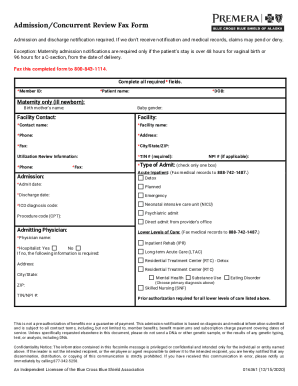
The 16361 form is essential for notifying relevant parties about patient admissions and discharges in healthcare facilities. This guide provides clear instructions for filling out the form online, ensuring you meet all necessary requirements efficiently.
Follow the steps to complete the 16361 form effectively.
- Click ‘Get Form’ button to obtain the form and open it in the appropriate editor.
- Begin by filling out the required fields indicated with an asterisk (*). Start with the member ID, patient name, and date of birth (DOB) for the patient.
- If applicable, for maternity admissions, fill out the birth mother's name and the baby's gender. Ensure these fields are complete to avoid delays.
- Provide the facility contact information, including the facility name, contact person's name, phone number, address, fax number, and city/state/ZIP code of the facility.
- In the utilization review section, input the Tax Identification Number (TIN) and phone number. Select the type of admission by checking one of the available boxes.
- Fill in the admit date and discharge date, ensuring you select whether the admission was planned or emergency.
- Provide the ICD diagnosis code and, if applicable, the procedure code (CPT). Indicate whether it is a direct admit from a provider’s office and include the admitting physician's name.
- Complete the information for lower levels of care if necessary, including your agreement to the hospitalist option. If the option is declined, provide additional required information.
- Once all applicable sections are completed, review the form to ensure all information is accurate and complete. Be mindful of additional notes regarding prior authorizations and confidentiality.
- After verification, you can save changes, download the completed form, print it, or share it as needed.
Complete your admission notifications online with confidence and avoid potential claim denials.