Loading
Form preview
  • US Legal Forms
  • Form Library
  • More Forms
  • More Multi-State Forms
  • Tailgate/toolbox Safety Training - Kdc Construction

Get Tailgate/toolbox Safety Training - Kdc Construction

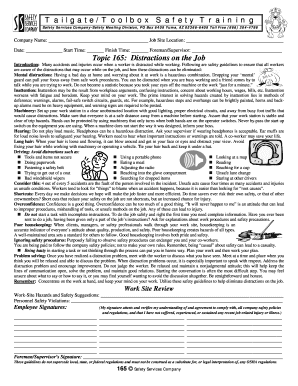
Tailgate/Toolbox Safety Training Safety Services CompanySafety Meeting Division, PO Box 6408 Yuma, AZ 853666408 Toll Free (866) 2044786Company Name: Job Site Location: Date: Start Time: Finish Time:.

How it works

  1. Open form

    Open form follow the instructions

  2. Easily sign form

    Easily sign the form with your finger

  3. Share form

    Send filled & signed form or save

How to fill out the Tailgate/Toolbox Safety Training - KDC Construction online

Filling out the Tailgate/Toolbox Safety Training form is an essential step in ensuring workplace safety. This guide provides clear instructions on how to navigate and complete the online form accurately.

Follow the steps to complete the Tailgate/Toolbox Safety Training form effectively.

  1. Press the ‘Get Form’ button to access the Tailgate/Toolbox Safety Training form and open it for editing.
  2. Begin by entering the company name in the designated field. Ensure that the name is spelled correctly and reflects the current project.
  3. Next, input the job site location, providing the complete address to ensure all personnel are aware of the training context.
  4. Fill in the date of the training in the specified section. This should reflect the actual date the training is conducted.
  5. Indicate the start time and finish time of the training session. Be precise with the times to maintain an accurate log.
  6. In the foreman/supervisor field, provide the name of the individual responsible for overseeing the training. This identifies accountability and contact in case of queries.
  7. Move to the safety topic section. Each participant should sign to acknowledge their understanding of the discussed distractions and safety guidelines.
  8. Complete the work-site review section, noting any hazards observed and safety suggestions discussed during the training.
  9. Next, document any personnel safety violations in the designated area for review and corrective measures.
  10. Gather signatures from all participants in the designated signature fields to confirm their understanding of safety policies.
  11. Lastly, ensure the foreman/supervisor signs at the bottom of the form to validate the training session. Review all entries for completeness before proceeding.
  12. Once the form is fully completed, save your changes, and choose to download, print, or share the document as necessary.

Complete your Tailgate/Toolbox Safety Training form online today to promote a safe working environment.

Get form

Experience a faster way to fill out and sign forms on the web. Access the most extensive library of templates available.
Get form

Related content

Portions of Lots 1, 130, 136, 137, and 155, Block...
Nov 16, 2022 — These hazards and the relevant AHAs for each day's work will be discussed...
Learn more
the 2 of 3 and 4 0 5 to 6 a 7 in 8 1 9 for 10...
... 282 line 283 act 284 make 285 out 286 following 287 safety 288 within 289 ... maintain...
Learn more
FR-2003-01-31.xml
Jan 31, 2003 — Operation Safe Commerce Program, 5071-5072 03-1918 Treasury Treasury...
Learn more

Related links form

Mitsubishi Outlander Sport Forum Ciclomaster Cm 205 Bedienungsanleitung Application Package IRG Travel Award For Short-term Form14a Passport Act No 33 Of 2007

Questions & Answers

Get answers to your most pressing questions about US Legal Forms API.

Contact support

Toolbox talks are a great way to reinforce safety basics, focus on high-risk scenarios and to inform workers about changes to the jobsite and working conditions that may have occurred since their last shift. Be sure to discuss cover any accidents or injuries that have occurred and how they could have been prevented.

A safety talk is a hands-on way to remind workers that health and safety are important on the job. Safety talks deal with specific problems on the job site. They do not replace formal training.

What should be covered in a toolbox talk? Anything related to health and safety that is important to your company and will help your employees recognize potential hazards in the workplace. A crew might have toolbox talks on caught-in hazards, fire safety, cold weather safety or how to use power tools correctly.

A 'toolbox talk' is a short presentation to the workforce on a single aspect of health and safety. We prepare toolbox talks to save you the time and effort of writing them yourself. They may be in PowerPoint, portable document format (pdf) or as video.

Toolbox talk topics Accident Prevention. This toolbox will cover the causes of accidents, accident prevention in the workplace and the costs of accidents to you. ... Accident Reporting. ... Air Quality. ... Alcohol Consumption. ... Angle Grinder Safety. ... Asbestos. ... Bug and Insect Protection. ... Building Shaft and Open Holes.

Toolbox meetings should be run on a regular basis for 10-15 minutes. A weekly or fortnightly meeting is often suitable, however if you are involved in a big project with new workers coming on site regularly or there are particularly hazardous areas of the job, then you might want to increase the frequency to daily.

A basic toolbox meeting structure could include: Maintaining a regular meeting schedule. Ensure the attending workers can hear and participate in the meeting agenda. Keep the talk to a max of 10 -15 minutes. Do not deliver toolbox talks during scheduled meal breaks. Stay positive during the talk.

Safety meetings are more formal than toolbox talks and typically longer. Think of it as a seminar or learning session rather than a quick huddle. These are events used to go over and discuss one or more hazards in the workplace. They may comprise several formats—such as interactive training, activities, and Q&A.

Get This Form Now!

Use professional pre-built templates to fill in and sign documents online faster. Get access to thousands of forms.
Get form
If you believe that this page should be taken down, please follow our DMCA take down processhere.

Industry-leading security and compliance

US Legal Forms protects your data by complying with industry-specific security standards.
  • In businnes since 1997
    25+ years providing professional legal documents.
  • Accredited business
    Guarantees that a business meets BBB accreditation standards in the US and Canada.
  • Secured by Braintree
    Validated Level 1 PCI DSS compliant payment gateway that accepts most major credit and debit card brands from across the globe.
Get Tailgate/Toolbox Safety Training - KDC Construction
Get form
  • Adoption
  • Bankruptcy
  • Contractors
  • Divorce
  • Home Sales
  • Employment
  • Identity Theft
  • Incorporation
  • Landlord Tenant
  • Living Trust
  • Name Change
  • Personal Planning
  • Small Business
  • Wills & Estates
  • Packages A-Z
  • Affidavits
  • Bankruptcy
  • Bill of Sale
  • Corporate - LLC
  • Divorce
  • Employment
  • Identity Theft
  • Internet Technology
  • Landlord Tenant
  • Living Wills
  • Name Change
  • Power of Attorney
  • Real Estate
  • Small Estates
  • Wills
  • All Forms
  • Forms A-Z
  • Form Library
  • Legal Hub
  • About Us
  • Help Portal
  • Legal Resources
  • Blog
  • Affiliates
  • Contact Us
  • Delete My Account
  • Site Map
  • Industries
  • Forms in Spanish
  • Localized Forms
  • State-specific Forms
  • Forms Kit
  • Real Estate Handbook
  • All Guides
  • Notarize
  • Incorporation services
  • For Consumers
  • For Small Business
  • For Attorneys
  • USLegal
  • FormsPass
  • pdfFiller
  • signNow
  • altaFlow
  • DocHub
  • Instapage
Form Packages
  • Adoption
  • Bankruptcy
  • Contractors
  • Divorce
  • Home Sales
  • Employment
  • Identity Theft
  • Incorporation
  • Landlord Tenant
  • Living Trust
  • Name Change
  • Personal Planning
  • Small Business
  • Wills & Estates
  • Packages A-Z
Form Categories
  • Affidavits
  • Bankruptcy
  • Bill of Sale
  • Corporate - LLC
  • Divorce
  • Employment
  • Identity Theft
  • Internet Technology
  • Landlord Tenant
  • Living Wills
  • Name Change
  • Power of Attorney
  • Real Estate
  • Small Estates
  • Wills
  • All Forms
  • Forms A-Z
  • Form Library
Customer Service
  • Legal Hub
  • About Us
  • Help Portal
  • Legal Resources
  • Blog
  • Affiliates
  • Contact Us
  • Delete My Account
  • Site Map
  • Industries
  • Forms in Spanish
  • Localized Forms
  • State-specific Forms
  • Forms Kit
Legal Guides
  • Real Estate Handbook
  • All Guides
Prepared for you
  • Notarize
  • Incorporation services
Our Customers
  • For Consumers
  • For Small Business
  • For Attorneys
Our Sites
  • USLegal
  • FormsPass
  • pdfFiller
  • signNow
  • altaFlow
  • DocHub
  • Instapage
Social Media
Call us now toll free:
+1 833 426 79 33
As seen in:
© Copyright 1999-2026 airSlate Legal Forms, Inc. 3720 Flowood Dr, Flowood, Mississippi 39232
  • Your Privacy Choices
  • Terms of Service
  • Privacy Notice
  • Content Takedown Policy
  • Bug Bounty Program