Loading
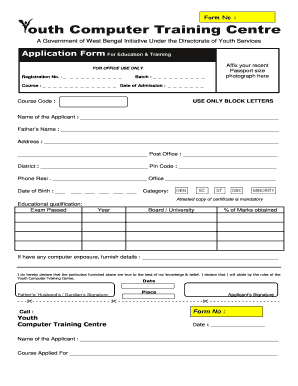
Get Aplication Form For Batch Change Of Youth Computer Center
How it works
-

Open form follow the instructions
-

Easily sign the form with your finger
-

Send filled & signed form or save
How to fill out the application form for batch change of youth computer center online
Filling out the application form for the batch change of the youth computer center online is a straightforward process designed to facilitate your registration for the program. This guide will provide you with detailed, step-by-step instructions to help you complete the application form accurately and efficiently.
Follow the steps to complete the application form online.
- Click ‘Get Form’ button to obtain the form and open it in your editor.
- Begin by affixing your recent passport-sized photograph in the designated area on the form.
- In the 'Name of the Applicant' field, enter your full name using only block letters.
- Fill in the 'Father’s Name' field with your father's or guardian’s name.
- Provide your full address, including the post office, district, and pin code.
- Enter your residential phone number and office phone number, if applicable.
- Input your date of birth in the specified format.
- Select your category and ensure you attach an attested copy of the relevant certificate.
- List your educational qualifications by completing the exam passed, year, board/university, and percentage of marks obtained.
- If applicable, provide details of any previous computer exposure.
- Read the declaration statement and affirm that the information provided is accurate to the best of your knowledge.
- Sign the form in the designated area to validate your application.
- Finally, save your changes, download the final version, print it, or share it as required.
Complete your application form online today to secure your spot in the youth computer training programs.