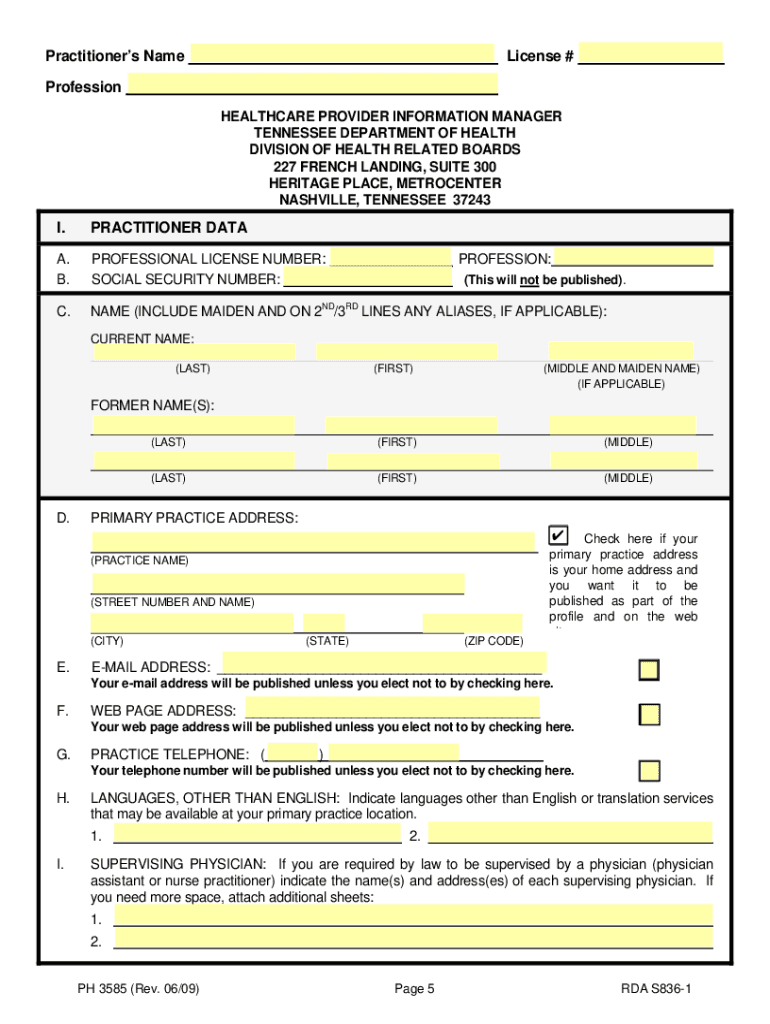
Es designated licensed health professionals to furnish certain information to the Tennessee Department of Health, and is requested in this questionnaire. From the information submitted, the Department compiles practitioner profiles which the law requires to be made available to the public via the World Wide Web and our toll-free telephone line. Each practitioner who has submitted information must update that information in writing by notifying the Department of Health, Healthcare Provider Inform.
Loading

Open form follow the instructions

Easily sign the form with your finger

Send filled & signed form or save
How to fill out the TN PH 3585 online
The TN PH 3585 form is a mandatory questionnaire for licensed health care providers in Tennessee, designed to collect essential information for public health records. This guide provides step-by-step instructions to help you navigate and complete the form online effectively.
Follow the steps to accurately fill out and submit the TN PH 3585.
- Click 'Get Form' button to access the TN PH 3585 form and launch it in the editing interface.
- Begin by filling out Part I, Practitioner Data. Include your professional license number and your social security number; remember, the social security number is for internal tracking and will not be published.
- In Part II, list your graduate and postgraduate medical education and training chronologically, providing the institution name, location, degree obtained, and graduation date.
- In Part IV, answer the yes/no questions related to faculty appointments, including additional details if you responded 'yes.'
- Fill out Part VII, which focuses on any final disciplinary actions within the past ten years, detailing any relevant violations and actions taken.
- Complete Part IX regarding liability claims, indicating any medical malpractice judgments or settlements since May 19, 1998.
- After completing the form, save your changes. You can then download, print, or share the TN PH 3585 as needed.
Ensure your professional documentation is accurate and complete—file your TN PH 3585 online today.
Experience a faster way to fill out and sign forms on the web. Access the most extensive library of templates available.
Related content
PH 3585 (Rev. 10/16). Page 2. RDA 10137. COMPLETING THE QUESTIONNAIRE Complete the...
Zachary McCormick, MD is a board-certified specialist in both Pain Medicine and Physical...
Welcome to the growing family of new NISSAN owners. This vehicle is delivered to you with...
Get answers to your most pressing questions about US Legal Forms API.
Does a power of attorney have to be filed with the court in Tennessee?
No, a power of attorney does not need to be filed with the court in Tennessee to be valid. Once you complete the TN PH 3585 form and have it notarized, it is effective immediately without court intervention. However, it is advisable to keep a copy for your records and ensure your agent has access to it.
Do nurse practitioners need a supervising physician in Tennessee?
In Tennessee, nurse practitioners generally need a supervising physician to practice legally, although specific regulations can apply based on their certification and practice setting. The TN PH 3585 might be relevant for documenting agreements between the nurse practitioner and the supervising physician. Check the state laws for any updates or changes.
How do I file my TN sales tax return?
To file your TN sales tax return, gather your sales information and complete the required forms, like the TN PH 3585 for businesses. You can file online through the Tennessee Department of Revenue's platform or submit a paper return. Remember to adhere to the filing deadlines to avoid penalties.
Does a power of attorney need to be notarized in TN?
Yes, a power of attorney in Tennessee must be notarized to be legally binding. The TN PH 3585 form requires signatures from both the principal and the agent, along with notarization, to ensure authenticity and protection against fraud. Always keep a notarized copy for your records.
How to give someone power of attorney in Tennessee?
To grant someone power of attorney in Tennessee, you must fill out the TN PH 3585 form, detailing the powers you wish to confer. Make sure you and your chosen agent sign the form in front of a notary public. Once notarized, the document becomes effective, allowing your agent to act on your behalf.
How do I file an annual sales report in Tennessee?
Filing an annual sales report in Tennessee requires you to gather your sales data and complete the appropriate forms, specifically the TN PH 3585 for certain businesses. You can submit this report electronically through the Tennessee Department of Revenue's online platform or by mail. Ensure you file before the deadline to avoid penalties.
How do I file a power of attorney in Tennessee?
To file a power of attorney in Tennessee, you must first complete the TN PH 3585 form. Once filled, sign the document in the presence of a notary public. After notarization, you should keep a copy and provide one to the person you appoint as your agent.
How to get a Tennessee certificate of immunization?
To obtain a Tennessee certificate of immunization, you need to contact your healthcare provider or local health department. They can provide you with a copy of your immunization records, which may be required for your nursing license application. Using USLegalForms can also help you locate the appropriate forms and understand the requirements necessary for your immunization certification. This resource can simplify the process and ensure you have everything you need.
How long does it take for nursing license to show up?
Once your nursing license application has been submitted and approved in Tennessee, you can expect it to be issued within 2 to 4 weeks. However, it’s essential to ensure that all paperwork is correctly completed to avoid delays. To facilitate a timely approval, consider checking the resources available at USLegalForms, which can guide you in preparing the required documents accurately. This preparation can make a significant difference in your waiting time.
Can I get a temporary nursing license in Tennessee?
Yes, Tennessee allows certain applicants to obtain a temporary nursing license while their full license is being processed. This temporary license is typically valid for 90 days but can provide you with the ability to start working sooner. You can use USLegalForms to find the application forms needed for a temporary license and to ensure you have all the required documents for a smooth application process. This way, you can begin gaining experience while waiting for your official license.
Use professional pre-built templates to fill in and sign documents online faster. Get access to thousands of forms.
If you believe that this page should be taken down, please follow our DMCA take down process here.
This form is available in several versions. Select the version you need from the drop-down list below.