Loading
Get Mn Patterson Dental Patient Registration 2014-2026
How it works
-

Open form follow the instructions
-

Easily sign the form with your finger
-

Send filled & signed form or save
How to fill out the MN Patterson Dental Patient Registration online
Completing the MN Patterson Dental Patient Registration is an important step in ensuring a smooth dental visit. This guide provides clear, step-by-step instructions to help you fill out the registration form accurately and efficiently.
Follow the steps to complete your patient registration form.
- Press the ‘Get Form’ button to access the MN Patterson Dental Patient Registration form and open it for editing.
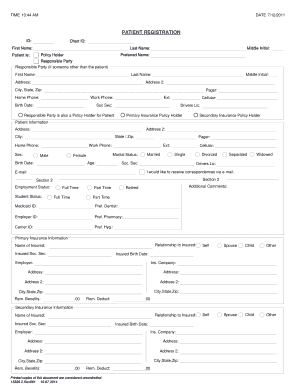
- Begin by filling in your basic personal information. Enter your last name, first name, middle initial, and preferred name in the respective fields.
- In the section labeled 'Patient is:', specify whether you are the responsible party or if someone else is acting on your behalf.
- Input the responsible party's details if applicable, including their first name, last name, and address. Ensure you also complete the city, state, and zip code fields.
- Provide your contact information, including home phone, work phone, and cellular phone numbers. Remember to include the area code.
- Fill in your birth date, social security number, and driver's license number in the required fields.
- Indicate your preferred method of correspondence. If you would like to receive emails, check the option to receive correspondences via e-mail and enter your email address.
- Complete the employment status and student status sections, selecting the appropriate status from the options provided.
- For insurance information, enter details for primary and secondary insurance, including the name of the insured, relationship to insured, and relevant information concerning their policy.
- Finally, review all the information for accuracy before saving your changes. You can choose to download, print, or share the completed form.
Complete your MN Patterson Dental Patient Registration form online today for a streamlined dental visit.