Loading
Get Za Sars It77c 2017
How it works
-

Open form follow the instructions
-

Easily sign the form with your finger
-

Send filled & signed form or save
How to fill out the ZA SARS IT77C online
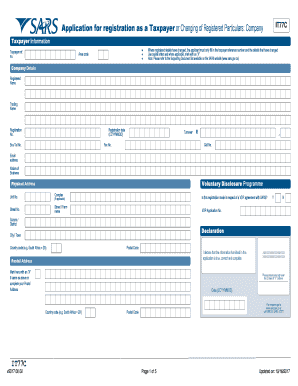
The ZA SARS IT77C form is essential for registering as a taxpayer or updating registered particulars. Properly completing this form ensures that your tax information is accurate and up to date, facilitating smoother interactions with the tax authorities.
Follow the steps to successfully complete the form.
- Press the ‘Get Form’ button to obtain the IT77C form and open it for editing.
- In the 'Taxpayer Information' section, enter your taxpayer reference number and area code. If any registered details have changed, only fill in the changed information. Use capital letters and mark applicable boxes with an 'X'.
- Move to the 'Company Details' section. Fill in the registered name and trading name of the company, along with the registration number and registration date in the format CCYYMMDD. Provide contact numbers, email address, business nature, turnover, and whether this registration pertains to a Voluntary Disclosure Programme.
- Complete the 'Physical Address' section with your company's physical location, including unit number (if applicable), street number, street or farm name, suburb, city or town, country code, and postal code.
- In the 'Postal Address' section, mark if it is the same as the physical address or provide a separate postal address.
- Fill in the 'Public Officer Details' section, providing the officer's surname, initials, taxpayer ref number, date of birth, ID number, and contact numbers.
- If applicable, complete the 'Tax Practitioner Details' by including the practitioner's surname, registration number, initials, contact number, and email address.
- In the 'Trading Details' section, indicate if the company is trading and provide the financial year-end month. If not trading, provide reasons.
- If the company has partners, fill in the details for up to three main partners in the respective fields, including taxpayer reference number, surname, initials, ID number, and passport information.
- Provide the details of three main directors, shareholders, or members following a similar structure as the partners' information.
- If applicable, complete the 'Estate Details', including the type of estate and meeting dates for liquidations.
- For the 'Representative Taxpayer Details' section, input the representative's information similarly as previously described.
- Finally, review all filled information for accuracy, then save the changes, and you may choose to download, print, or share the form as needed.
Complete your documents online to ensure timely compliance with tax regulations.
Get form
Experience a faster way to fill out and sign forms on the web. Access the most extensive library of templates available.
If you have forgotten your tax number you can request it from SARS in various ways: Send us a query. ... You can get it on eFiling if you are registered as an eFiler. ... You can also request your notice of registration via the MobiApp if you are a registered eFiler.
Get This Form Now!
Use professional pre-built templates to fill in and sign documents online faster. Get access to thousands of forms.
Industry-leading security and compliance
US Legal Forms protects your data by complying with industry-specific security standards.
-
In businnes since 199725+ years providing professional legal documents.
-
Accredited businessGuarantees that a business meets BBB accreditation standards in the US and Canada.
-
Secured by BraintreeValidated Level 1 PCI DSS compliant payment gateway that accepts most major credit and debit card brands from across the globe.