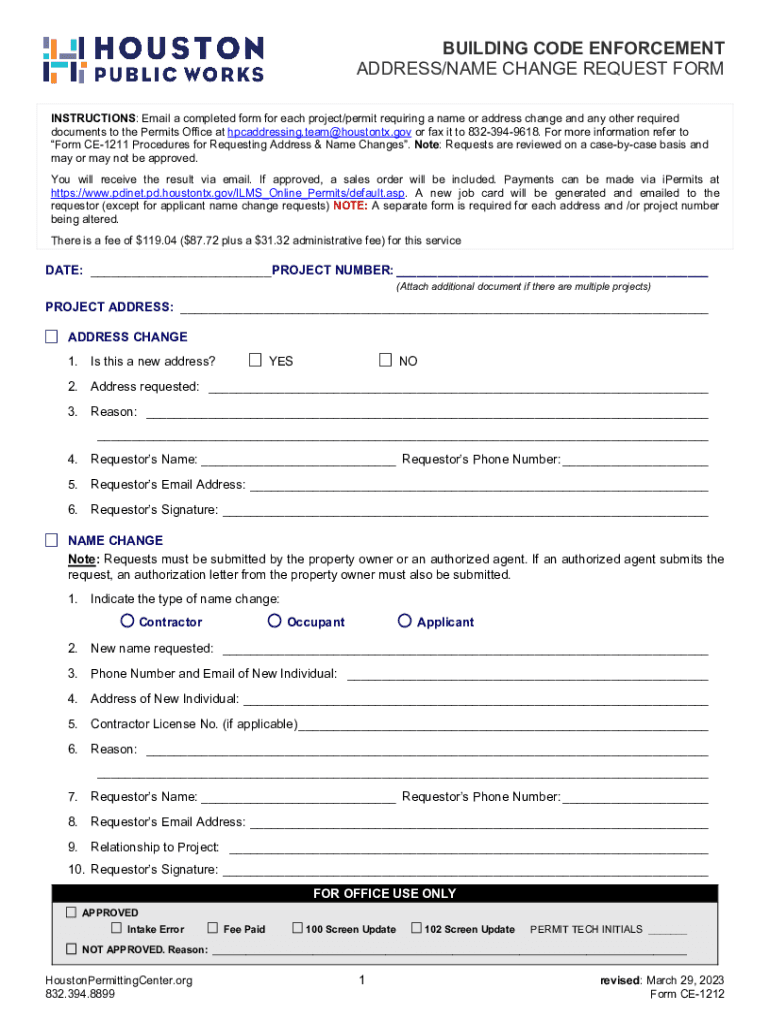
Office at hpcaddressing.team houstontx.gov or fax it to 832-394-9618. For more information refer to Form CE-1211 Procedures for Requesting Address & Name Changes . Note: Requests are reviewed on a case-by-case basis and may or may not be approved. You will receive the result via email. If approved, a sales order will be included. Payments can be made via iPermits at https://www.pdinet.pd.houstontx.gov/ILMS Online Permits/default.asp. A new job card will be generated and emailed to the requ.
Loading

Open form follow the instructions

Easily sign the form with your finger

Send filled & signed form or save
How to fill out the TX CE-1212 - Houston City online
The TX CE-1212 form, also known as the Houston City address and name change request form, is essential for facilitating updates to project details in a clear manner. This guide will provide you with comprehensive instructions to complete the form online effectively.
Follow the steps to complete the form accurately.
- Click the ‘Get Form’ button to access the document and open it in your preferred online editor.
- Begin by filling out the date and project number at the top of the form. If you have multiple projects, attach additional documents as necessary.
- Provide the project address in the designated section. Mark the checkbox indicating if you are requesting an address change. Answer the question regarding whether this is a new address by selecting 'Yes' or 'No'.
- If applicable, fill in the new address being requested and include your reason for the change in the space provided.
- Complete the requestor's information by entering their name, phone number, and email address.
- The requestor must provide their signature at the end of this section to validate the request.
- If you are submitting a name change request, indicate this section by selecting the type of name change (Contractor, Occupant, or Applicant).
- Identify the new name requested and provide the contact information of the new individual, including phone number and email address.
- Fill in the address of the new individual and provide the contractor license number if applicable.
- Explain the reason for the name change in the designated area and include the requestor's information again (name, phone number, email, and their relationship to the project).
- The requestor must sign this section as well, ensuring all provided information is accurate.
- Lastly, save your changes. You can download, print, or share the completed form as required.
Complete your TX CE-1212 form online today and ensure your project details are up-to-date!
Experience a faster way to fill out and sign forms on the web. Access the most extensive library of templates available.
Related content
Contact Us. Planning & Development (P&D) Dept. 611 Walker Street, 6th Floor Houston, TX...
Continuing Education Toggle Dropdown · General Information ... It is a database of...
Feb 26, 2011 — NEW CONSTRUCTION OF A 911 CALL CE. $11,513,258.00 ... 1687197. San...
Use professional pre-built templates to fill in and sign documents online faster. Get access to thousands of forms.
If you believe that this page should be taken down, please follow our DMCA take down process here.
This form is available in several versions. Select the version you need from the drop-down list below.