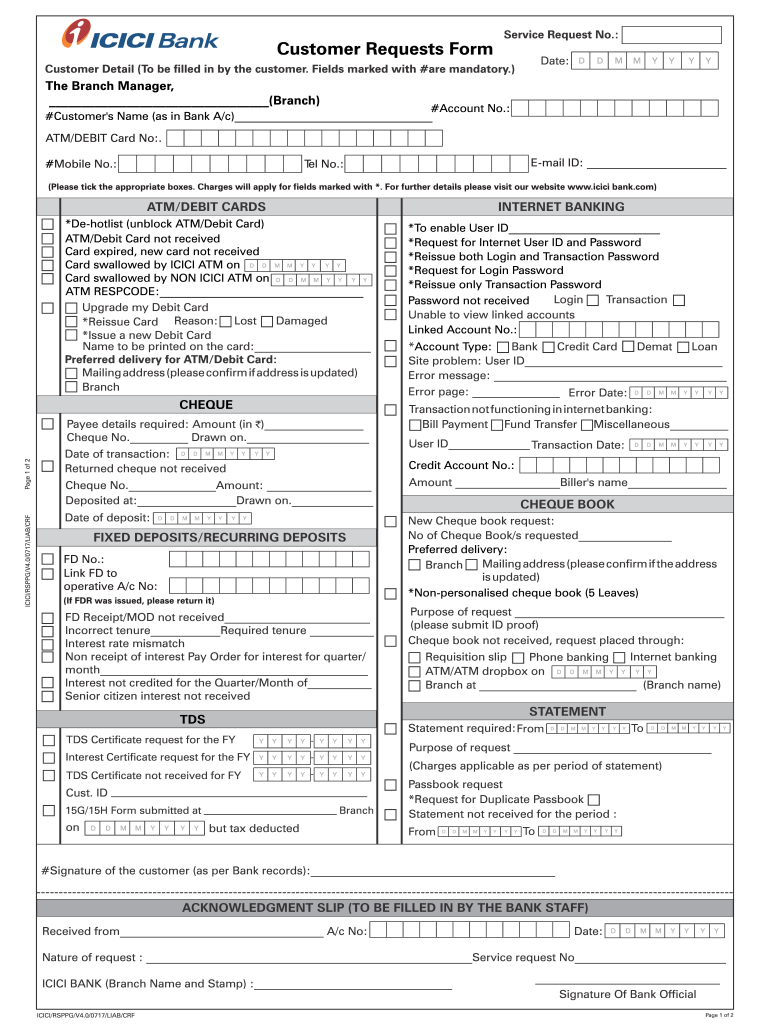
Service Request No.:Customer Requests Format:Customer Detail (To be filled in by the customer. Fields marked with #are mandatory.) The Branch Manager, (Branch)#Account No.: #Customer's Name (as in.
Loading

Open form follow the instructions

Easily sign the form with your finger

Send filled & signed form or save
How to fill out the Customer Requests Form - ICICI Bank online
Filling out the Customer Requests Form for ICICI Bank online is a straightforward process. This guide provides clear instructions for each section of the form to ensure that users can complete their requests efficiently and effectively.
Follow the steps to complete the form accurately.
- Press the ‘Get Form’ button to access the Customer Requests Form and open it for editing.
- Begin with the 'Customer Detail' section. Fill in the mandatory fields marked with #, including your Account Number and Customer's Name as it appears on your bank account.
- Provide additional contact information, including your Email ID and Mobile Number, to ensure prompt communication from the bank.
- In the ATM/Debit Card section, indicate your request by ticking the appropriate options. Specify details such as the card number or the reason for the request if necessary.
- For the CHEQUE section, fill in the payee details and amount as needed. Include the cheque number and the date of the transaction if applicable.
- Moving to INTERNET BANKING, mark the requests required, such as enabling the User ID or requesting a new password. Include any specific details as instructed.
- Continue to fill out sections relating to fixed deposits or recurring deposits, specifying any requests such as linking to an account or requesting a receipt.
- If applicable, complete the TDS and CHEQUE BOOK sections, providing reasons for requests and confirming mailing addresses where necessary.
- In the STATEMENT section, indicate the period for which the statement is required and specify the purpose of the request.
- At the bottom of the form, ensure to sign as per bank records, confirming the accuracy of the information provided.
- Finally, review all inputs for accuracy before saving changes, then proceed to download, print, or share the form as needed.
Complete your Customer Requests Form online today and ensure your banking needs are met efficiently.
Experience a faster way to fill out and sign forms on the web. Access the most extensive library of templates available.
Related content
Indicate the number of outstanding shares of each of the issuer's classes of capital or...
Thank you certainly much for downloading Remittance Request Form Icici Bank. Pdf.Most...
Overview. Banks need to periodically update customer identification documents in their...
Get answers to your most pressing questions about US Legal Forms API.
How can I contact ICICI Bank from abroad?
ICICI Bank's Silver debit card (Smart Shopper debit card) is debit-cum-ATM card, which can be used for transactions at merchant establishments and to operate your account at bank ATMs as well; both in India and abroad.
How can I call Icici customer care from USA?
ICICI account. Loan. Home Loan. Loans against Fixed Deposits. View More. USA18664242448. UK08081314151. Singapore8001012553. Canada18664242448. Australia1800936189. European countries:00-800-0424-2448. Web Chat (For existing customers) ... Help & support. Help & support. Download iMobile. DEMO Videos. Form Center. View MORE. ... About Us.
What is service request in banking?
The Service Request feature enables the bank administrator to view the details of each service request initiated and hence, enables the administrator to take an informed decision regarding the approval or rejection of the service request.
How can I talk to ICICI customer care directly?
ICICI Bank Customer Care Number - Toll Free No. 1800 1080.
How can I call Icici customer care from outside India?
+91-22-33667777 This is a toll number and call charges will be applicable as per the mobile operator.
How can I call ICICI customer care from abroad?
+91-22-33667777 This is a toll number and call charges will be applicable as per the mobile operator.
How can I raise my ICICI Bank dispute form?
The best way to edit Icici dispute form online Register and log in to your account. Log in to the editor with your credentials or click on Create free account to evaluate the tool's capabilities. Add the Icici dispute form for redacting. ... Alter your file. ... Finish redacting the form.
Use professional pre-built templates to fill in and sign documents online faster. Get access to thousands of forms.
If you believe that this page should be taken down, please follow our DMCA take down process here.