Loading
Get Batvisa
How it works
-

Open form follow the instructions
-

Easily sign the form with your finger
-

Send filled & signed form or save
How to fill out the Batvisa online
Filling out the Batvisa online can streamline your visa procurement process. This guide provides comprehensive, step-by-step instructions on how to complete each section of the form effectively, ensuring a smooth application experience.
Follow the steps to successfully complete the Batvisa form.
- Click the ‘Get Form’ button to access the Batvisa form and open it in the online editor.
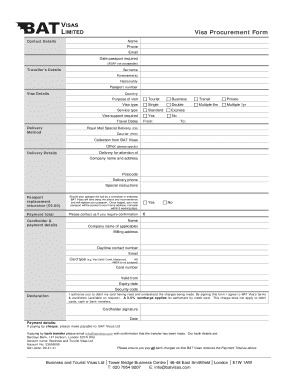
- Input your contact details in the designated fields. Include your name, phone number, email address, and specify the date by which your passport is required, noting that 'ASAP' is not acceptable.
- Provide the traveller's details by filling in the traveller’s surname, forenames, nationality, and passport number.
- In the visa details section, select the country of your visit, then mark the purpose of your visit by choosing one of the following options: Tourist, Business, Transit, or Private.
- Choose the visa type you require: Single, Double, Multiple (6 months), or Multiple (1 year).
- Indicate if visa support is required by selecting 'Yes' or 'No.' Fill out your travel dates and choose your preferred delivery method, with options for Royal Mail Special Delivery or courier services.
- Fill out the delivery details, including the name of the person receiving the delivery, the company name and address, postcode, and delivery phone number. Add any special instructions if needed.
- If applicable, check the box for passport replacement insurance to cover any loss of your passport by the consulate or embassy.
- Calculate the payment total for your visa services. Enter this amount in the designated field.
- Provide cardholder and payment details, ensuring to enter the correct name, billing address, daytime contact number, and email. Specify the card type, enter the card number, valid from date, expiry date, and security code.
- Read and understand the declaration regarding charges, and sign to authorize the debit of your card. Include the date of your signature.
- If paying by cheque or bank transfer, follow the instructions provided in this section to ensure your payment method accommodates the requirements.
- Once all fields are completed, review your entries for accuracy. Save changes and download, print, or share the completed form as needed.
Complete your Batvisa document online today for a seamless visa application process.