Loading
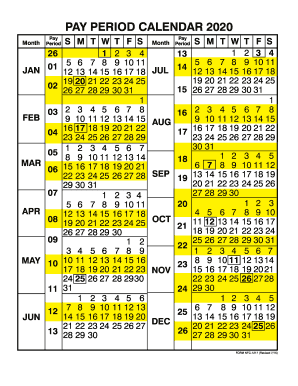
Get Gsa Pay Calendar
How it works
-

Open form follow the instructions
-

Easily sign the form with your finger
-

Send filled & signed form or save
How to fill out the Gsa Pay Calendar online
The Gsa Pay Calendar is an essential tool for managing pay periods effectively. This guide provides clear instructions on how to fill out the form online, ensuring users can navigate each component with confidence.
Follow the steps to complete the Gsa Pay Calendar online.
- Press the ‘Get Form’ button to acquire the Gsa Pay Calendar form and open it in your preferred editing tool.
- Review the calendar layout. The pay periods are typically structured by month, with specific dates highlighting the start and end of each pay period.
- Identify your pay period by locating the corresponding month. Mark the relevant dates according to your pay schedule.
- Ensure to double-check any additional notes or instructions that may appear on the form, as these will provide context or changes pertinent to the current year.
- After filling out all necessary sections, save the changes you made to the document.
- You may download, print, or share the completed Gsa Pay Calendar for your records or further distribution.
Complete your Gsa Pay Calendar online today for efficient pay period management.
Pay periods begin on a Sunday and end 2 weeks later on a Saturday. There are usually 26 pay periods in a year.
Industry-leading security and compliance
US Legal Forms protects your data by complying with industry-specific security standards.
-
In businnes since 199725+ years providing professional legal documents.
-
Accredited businessGuarantees that a business meets BBB accreditation standards in the US and Canada.
-
Secured by BraintreeValidated Level 1 PCI DSS compliant payment gateway that accepts most major credit and debit card brands from across the globe.