Loading
Form preview
  • US Legal Forms
  • Other Templates
  • Social Forms
  • Oregon Social Forms
  • Or Form 45-21 Instructions

Get Or Form 45-21 Instructions

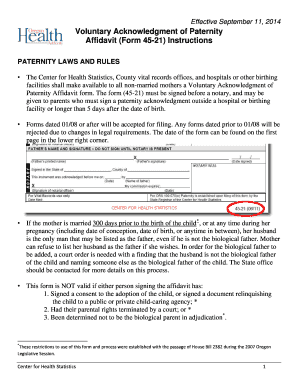
Can go to their local county health department, child support program office, or call the State Vital Records office (Center for Health Statistics) to obtain this form. There is a $30.00 amendment fee for adding the father’s name to the birth record after the birth record is filed, unless the Affidavit is filed with either the local County health department or with the State Center for Health Statistics within 14 days of the birth. According to federal law, parents must hear the “Statement o.

How it works

  1. Open form

    Open form follow the instructions

  2. Easily sign form

    Easily sign the form with your finger

  3. Share form

    Send filled & signed form or save

How to use or fill out the OR Form 45-21 Instructions online

Filling out the OR Form 45-21 Instructions is an important step in acknowledging paternity. This guide offers clear and actionable steps to assist users in completing the form online, ensuring that all necessary information is accurately provided.

Follow the steps to successfully complete the OR Form 45-21 online.

  1. Press the ‘Get Form’ button to access the OR Form 45-21 and open it in the editor.
  2. Begin by reading the instructions carefully to understand the legal significance of the document. Ensure you are prepared to provide all required information about the child, mother, and father.
  3. Complete Sections 1, 2, and 3 with the necessary details. Verify that the names match those found on the birth certificate to avoid any discrepancies.
  4. If the mother’s maiden surname is required and unknown, explain that it refers to her last name on her birth certificate.
  5. If parents are signing at different times, the first parent should fill out the Child’s New Last Name to prevent any changes by the second parent later.
  6. Once filling out the form, ensure that all spaces are filled. If certain information is not available, use 'None' or 'Unknown' instead of leaving it blank.
  7. Have both parents sign in the presence of a notary public. Avoid any alterations to the document; corrections are only acceptable when initialed by the person providing the information.
  8. After filling out the form, remove the first page of instructions. Send the second page to the State Vital Records office and keep the last two pages for your records.
  9. Finally, review your form to ensure all information is correct before saving changes, downloading, printing, or sharing the document.

Complete your OR Form 45-21 online today to simplify the paternity acknowledgment process.

Get form

Experience a faster way to fill out and sign forms on the web. Access the most extensive library of templates available.
Get form

Related content

Voluntary Acknowledgment of Paternity Affidavit...
2) The Voluntary Acknowledgment of Paternity Affidavit form (45-21) is used after the...
Learn more
Or. Admin. Code § 471-070-1110 - Benefits:...
If issued before the date of birth, the form must be dated and signed within 60 calendar...
Learn more
Orange Book Questions and Answers Guidance for...
Comments and suggestions regarding this draft document should be submitted within 90 days...
Learn more

Related links form

Metlife Dc Tca5 Form 2003 Companion Life Claim Form 2008 New York Life Claim Form 2004 Pension Form Paec 2013

Questions & Answers

Get answers to your most pressing questions about US Legal Forms API.

Contact support

An affidavit of acknowledgment of paternity is a document signed by both parents that declares the child’s father. For example, if a mother and father agree on paternity, they would fill out and sign the affidavit. To make sure you comply with legal requirements, refer to the OR Form 45-21 Instructions, which will guide you through the necessary steps.

A voluntary acknowledgment of paternity in Oregon is a formal agreement where both parents recognize the father of a child. This acknowledgment can provide benefits like establishing legal rights and responsibilities for the father. Completing this acknowledgment correctly involves following the OR Form 45-21 Instructions to ensure its validity.

A voluntary acknowledgment of paternity affidavit in Oregon is a legal document that parents can sign to affirm paternity without going to court. It is often used when couples are sure of the father’s identity. Following the OR Form 45-21 Instructions carefully will help you complete this process smoothly and efficiently.

In Oregon, you can establish paternity through a voluntary acknowledgment of paternity or by court determination. If both parents agree, they can sign a paternity affidavit, typically using the OR Form 45-21 Instructions, to confirm the father’s legal status. This process helps ensure that both parents assume their rights and responsibilities.

No, a paternity affidavit is not the same as a birth certificate. The affidavit identifies the father of a child, while the birth certificate records the birth details, including the child's name, date of birth, and parents’ names. If you are looking to establish paternity, understanding the OR Form 45-21 Instructions is essential. This ensures that you complete the required forms correctly.

A voluntary acknowledgment of paternity in Oregon is an option for parents to declare paternity without a court order. This declaration occurs when both parents agree and sign the affidavit. It provides legal recognition of the father’s role and is essential for establishing parental rights. For more information, consult the OR Form 45-21 Instructions.

An affidavit of acknowledgment of paternity typically includes information about both parents and the child. For instance, it will include names, addresses, and dates of birth. This document becomes part of the official records and is vital for child support and custody matters. You can find a sample and details on how to complete it in the OR Form 45-21 Instructions.

Any employer who pays wages to employees in New York State is required to file the NYS-45. This includes businesses of all sizes that withhold state income tax from their employees' paychecks. Ensure you stay informed about these obligations by consulting the OR Form 45-21 Instructions for accurate and timely reporting.

The NYS-45 AT&T form is a specific version of the NYS-45 that is tailored for employees of AT&T, often reflecting additional details necessary for compliance. This form must also comply with all relevant state tax regulations. For a comprehensive understanding of various form types, including NYS-45, refer to the OR Form 45-21 Instructions.

The main distinction lies in their purposes: NYS 1 reports the withholding tax for individual payroll periods, while NYS-45 provides a summary of total wages and withholdings for a quarter. Understanding these forms ensures correct reporting and compliance with New York state tax laws. For a deeper dive into these forms, explore the OR Form 45-21 Instructions.

Get This Form Now!

Use professional pre-built templates to fill in and sign documents online faster. Get access to thousands of forms.
Get form
If you believe that this page should be taken down, please follow our DMCA take down processhere.
Get OR Form 45-21 Instructions
Get form
  • Adoption
  • Bankruptcy
  • Contractors
  • Divorce
  • Home Sales
  • Employment
  • Identity Theft
  • Incorporation
  • Landlord Tenant
  • Living Trust
  • Name Change
  • Personal Planning
  • Small Business
  • Wills & Estates
  • Packages A-Z
  • Affidavits
  • Bankruptcy
  • Bill of Sale
  • Corporate - LLC
  • Divorce
  • Employment
  • Identity Theft
  • Internet Technology
  • Landlord Tenant
  • Living Wills
  • Name Change
  • Power of Attorney
  • Real Estate
  • Small Estates
  • Wills
  • All Forms
  • Forms A-Z
  • Other Templates
  • Legal Hub
  • About Us
  • Help Portal
  • Legal Resources
  • Blog
  • Affiliates
  • Contact Us
  • Delete My Account
  • Site Map
  • Industries
  • Forms in Spanish
  • Localized Forms
  • State-specific Forms
  • Forms Kit
  • Real Estate Handbook
  • All Guides
  • Notarize
  • Incorporation services
  • For Consumers
  • For Small Business
  • For Attorneys
  • USLegal
  • FormsPass
  • pdfFiller
  • signNow
  • altaFlow
  • DocHub
  • Instapage
Form Packages
  • Adoption
  • Bankruptcy
  • Contractors
  • Divorce
  • Home Sales
  • Employment
  • Identity Theft
  • Incorporation
  • Landlord Tenant
  • Living Trust
  • Name Change
  • Personal Planning
  • Small Business
  • Wills & Estates
  • Packages A-Z
Form Categories
  • Affidavits
  • Bankruptcy
  • Bill of Sale
  • Corporate - LLC
  • Divorce
  • Employment
  • Identity Theft
  • Internet Technology
  • Landlord Tenant
  • Living Wills
  • Name Change
  • Power of Attorney
  • Real Estate
  • Small Estates
  • Wills
  • All Forms
  • Forms A-Z
  • Other Templates
Customer Service
  • Legal Hub
  • About Us
  • Help Portal
  • Legal Resources
  • Blog
  • Affiliates
  • Contact Us
  • Delete My Account
  • Site Map
  • Industries
  • Forms in Spanish
  • Localized Forms
  • State-specific Forms
  • Forms Kit
Legal Guides
  • Real Estate Handbook
  • All Guides
Prepared for you
  • Notarize
  • Incorporation services
Our Customers
  • For Consumers
  • For Small Business
  • For Attorneys
Our Sites
  • USLegal
  • FormsPass
  • pdfFiller
  • signNow
  • altaFlow
  • DocHub
  • Instapage
Social Media
Call us now toll free:
+1 833 426 79 33
As seen in:
© Copyright 1999-2026 airSlate Legal Forms, Inc. 17 Station Street, Suite 303, Brookline, MA 02445
  • Your Privacy Choices
  • Terms of Service
  • Privacy Notice
  • Content Takedown Policy
  • Bug Bounty Program