Loading
Get Section 504 Notification Letter To Parents
How it works
-

Open form follow the instructions
-

Easily sign the form with your finger
-

Send filled & signed form or save
How to fill out the Section 504 Notification Letter to Parents online
Filling out the Section 504 Notification Letter to Parents is an important step in ensuring that students with disabilities receive the appropriate support and accommodations they need. This guide will provide you with clear, step-by-step instructions to complete the form effectively online.
Follow the steps to complete the Section 504 Notification Letter to Parents online.
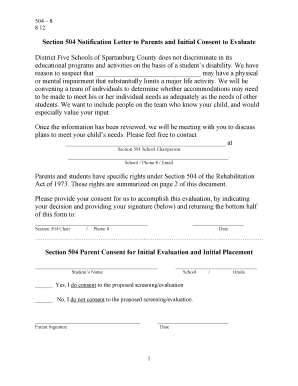
- Press the ‘Get Form’ button to access the Section 504 Notification Letter to Parents form and open it in your preferred editing tool.
- In the first section, you will need to fill in the name of the student who is suspected of having a disability. Make sure to provide accurate information.
- Next, you will indicate your preferred method of contact by adding the school chairperson’s name, school, phone number, and email address.
- Review the information provided about your rights as a parent and ensure you understand the implications of giving consent for the evaluation.
- At the bottom of the form, you will find a section for consent. Clearly mark 'Yes' or 'No' to indicate whether you consent to the proposed evaluation.
- Sign and date the form in the designated space to confirm your decision and provide your signature.
- Finally, save your changes, and you may choose to download, print, or share the completed form as necessary.
Complete your Section 504 Notification Letter to Parents online today to ensure your child receives the support they need.
To be protected under Section 504, a student must be determined to: (1) have a physical or mental impairment that substantially limits one or more major life activities; or (2) have a record of such an impairment; or (3) be regarded as having such an impairment.