Loading
Get Kaiser Permanente 0002-1966 2010-2026
How it works
-

Open form follow the instructions
-

Easily sign the form with your finger
-

Send filled & signed form or save
How to fill out the Kaiser Permanente 0002-1966 online
Filling out the Kaiser Permanente 0002-1966 authorization form online is a straightforward process. This guide will provide you with comprehensive, step-by-step instructions to ensure that you fill out the form accurately and efficiently.
Follow the steps to fill out the form seamlessly.
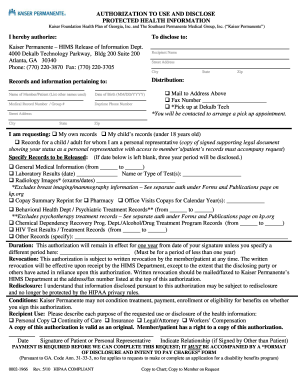
- Click ‘Get Form’ button to obtain the form and open it in the editor.
- Enter the name of the member or patient in the designated field, including any other names they may have used.
- Fill in the date of birth using the format MM/DD/YYYY.
- Provide the medical record number or group number as applicable.
- Complete the daytime phone number field to ensure easy communication.
- Fill in the street address, city, state, and zip code of the member or patient.
- Indicate the records and information you wish to disclose by checking the appropriate sections or filling in requested specifics.
- Specify the recipient's name and mailing address. If applicable, provide a fax number for direct transmission.
- Detail the duration for which this authorization will remain in effect; default to one year unless you specify differently.
- Select the purpose for the requested use or disclosure of health information from the available options.
- Sign and date the form, indicating your relationship if you are signing on behalf of another individual.
- Once completed, save your changes, and you may choose to download, print, or share the form as needed.
Start completing your Kaiser Permanente 0002-1966 form online today!