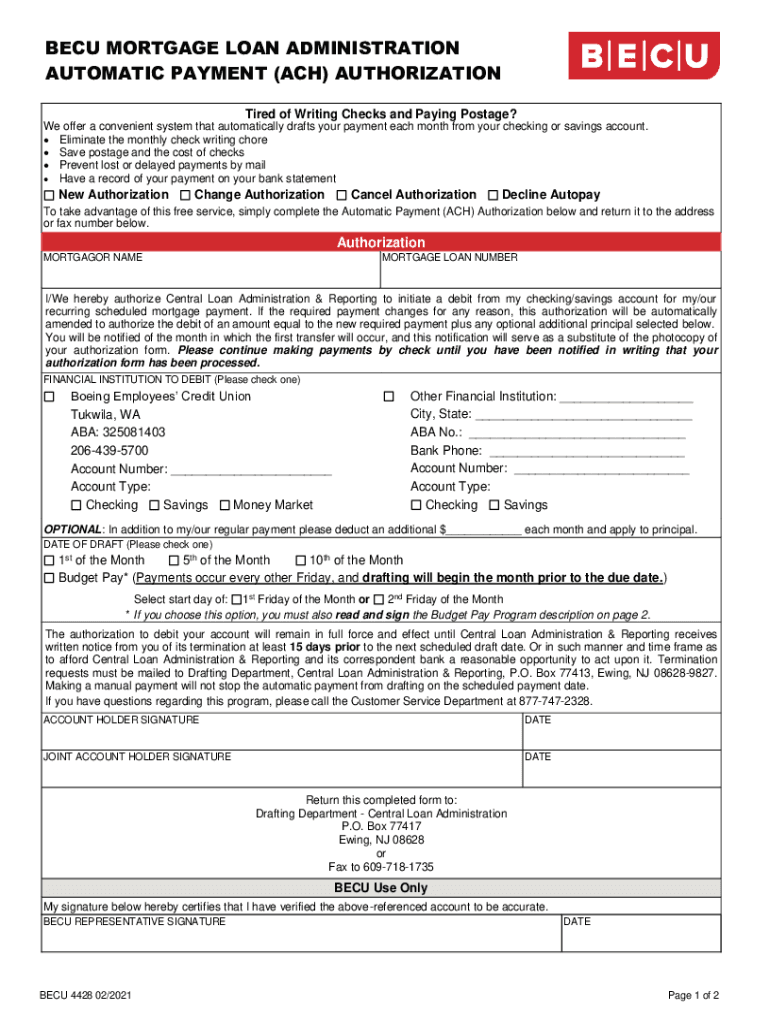
BEAU Mortgage Loan Administration Automatic Payment (ACH) Authorization Tired of Writing Checks and Paying Postage? We offer a convenient system that automatically drafts your payment each month from.

Open form follow the instructions

Easily sign the form with your finger

Send filled & signed form or save
How to fill out the BECU 4428 online
The BECU 4428 form is designed to facilitate automatic mortgage loan payments through an ACH authorization. This guide provides clear instructions for completing the form online, ensuring a smooth process for users.
Follow the steps to complete the BECU 4428 form efficiently.
- Click ‘Get Form’ button to obtain the form and open it in the editor.
- Begin by entering the mortgagor name in the designated field. Provide your full legal name as it appears on your mortgage documents.
- Next, input your mortgage loan number. This number can be found on your mortgage statement or loan documents.
- Authorize the Central Loan Administration & Reporting by indicating your agreement to allow them to debit your checking or savings account. Read through the terms regarding the changes in payment amounts.
- Select your financial institution from the options provided. If you choose Boeing Employees’ Credit Union, confirm the account number and type. For other institutions, fill in all relevant information.
- If you wish to contribute additional principal payments, specify the amount in the designated field.
- Determine the date you would like the drafting to occur each month. Check the appropriate box for either the 1st, 5th, or 10th of the month, or choose the Budget Pay option.
- Sign and date the form with the account holder's signature. If there is a joint account holder, ensure they sign and date as well.
- After completing the form, review all entries for accuracy, then save changes. Once satisfied, you can download, print, or share the completed form.
Complete your BECU 4428 form online today for hassle-free mortgage payments.
Experience a faster way to fill out and sign forms on the web. Access the most extensive library of templates available.
Related content
1st Ave Auto Transport. 2. 1st Class ... AAG Reverse Mortgage aka HECM Home. Equity...
Corporation, the National Credit Union Administration, and the Office of the...
Auto Resource Center ... jpeach@westcommunitycu.org · linkedin.com ... Community Bank...
Get answers to your most pressing questions about US Legal Forms API.
Can you make mortgage payments in advance?
Yes! Make sure you tell your lender that you want your payment to go toward your principal if you do make advance payments on your mortgage. Some mortgage lenders apply any extra payment you make toward your next monthly minimum.
How do I set up automatic payments on BECU?
To set up automatic payments for your credit card account, call us at 800-233-2328, send us a secure message in Online Banking or the BECU mobile app, or visit any of our locations.
How do I stop automatic payments on BECU?
If you'd like to opt out, you can do so by requesting this at a Neighborhood Financial Center, calling us at 800.233. 2328, or sending us a message through the Secure Message Center in Online or Mobile Banking.
How do I setup AutoPay?
0:11 1:51 How to Set Up Automatic Payments - YouTube YouTube Start of suggested clip End of suggested clip Look for the phone number for online help normally on the same page. Step. 4 provide the payees nameMoreLook for the phone number for online help normally on the same page. Step. 4 provide the payees name address. And account number that you will find on your bill.
Does BECU have bill pay?
You can use Bill Payment to pay bills outside and loan payments to other financial institutions. Learn about BECU Online Banking and the BECU mobile app.
Can you set up automatic payments on boa?
Log in, select Bill Pay and locate the credit card account you'd like to set automatic payments up on. Select Add AutoPay in the AutoPay section then select Based on eBill's amount and due date. Select your Pay From account, Amount, and Deliver by date on which you'd like the payment sent then select Save.
Use professional pre-built templates to fill in and sign documents online faster. Get access to thousands of forms.
If you believe that this page should be taken down, please follow our DMCA take down process here.