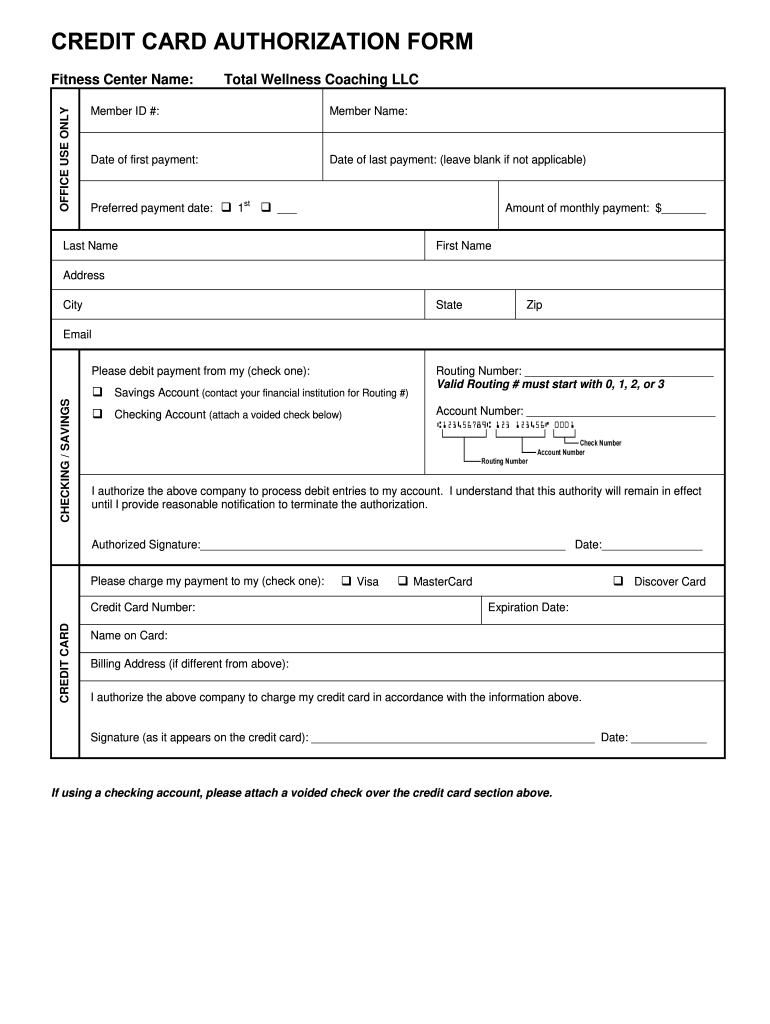
CREDIT CARD AUTHORIZATION FORM OFFICE USE ONLY Fitness Center Name: Total Wellness Coaching LLC Member ID #: Member Name: Date of first payment: Date of last payment: (leave blank if not applicable).
Loading

Open form follow the instructions

Easily sign the form with your finger

Send filled & signed form or save
How to fill out the Total Wellness Coaching Credit Card Authorization Form online
Filling out the Total Wellness Coaching Credit Card Authorization Form online ensures a secure and streamlined process for your payment authorization. This guide will walk you through each section of the form, providing you with clear, step-by-step instructions.
Follow the steps to complete the form accurately and efficiently.
- Click ‘Get Form’ button to access the Total Wellness Coaching Credit Card Authorization Form and open it in your preferred document editor.
- Enter the Member ID number in the designated field; this is unique to your account and necessary for processing your payment authorization.
- Fill in your full name, including Last Name and First Name, ensuring it matches your membership details.
- Specify the date of your first payment. If unsure, reach out to Total Wellness Coaching for clarification.
- If applicable, indicate the date of your last payment. If this does not apply to you, leave the field blank.
- Select your preferred payment date by checking either the 1st or writing another date in the provided space.
- Enter the amount you wish to pay monthly in the specified field; this is critical for your payment plan.
- Input your complete address, including City, State, and Zip code to ensure accurate billing.
- Provide your email address for communication regarding your payments.
- Choose whether you want to debit your payment from a Checking or Savings Account and follow the accompanying instructions to provide the routing and account number.
- If using a checking account, do not forget to attach a voided check to this form.
- Authorize the company by signing your name in the designated area for the debit authorization section, and include the date.
- Select your credit card type from the options provided: Visa, MasterCard, or Discover Card.
- Input your credit card number, expiration date, and name as it appears on the card.
- If your billing address differs from your main address, fill in the billing address field.
- Sign the form where indicated as it appears on the credit card and date the signature.
- Review your entries for accuracy. Once complete, save changes to your form, and proceed to download, print, or share it as needed.
Start completing your documents online today to ensure a hassle-free payment experience.
Experience a faster way to fill out and sign forms on the web. Access the most extensive library of templates available.
Related content
This form may be used by the client to mail in a complaint or used by Ombudsman's Office...
If you are unable to pay by either method, please complete this form and fax to...
Authorization must be obtained prior to the delivery of certain elective and scheduled...
Get answers to your most pressing questions about US Legal Forms API.
What should be on a credit card authorization form?
The cardholder's credit card information: Card type, Name on card, Card number, Expiration date. The merchant's business information. Cardholder's billing address. Language authorizing the merchant to charge the customer's card on file.
What does a credit card authorization form do?
A credit card authorization form is a document that customers (or cardholders) fill out to grant businesses the permission to charge their credit card. Credit card authorization forms are more often used for larger purchases (think cars, computers, etc.)
Is a credit card authorization form safe?
Credit card authorization forms are beneficial for both the consumer and the business. The main benefit for businesses is protecting them from fraud and chargebacks. A chargeback is a tool to help consumers get their money back from purchases that were never rendered or unauthorized transactions.
Is it safe to email a credit card authorization form?
You should never send your credit card info by email. Of all the ways you can transfer information to another person on the internet, email is the most likely to be compromised. The recipient can forward your credit card info to another person, or somebody can access their email account.
Should you fill out a credit card authorization form?
Are credit card authorization forms safe? Credit card authorization forms can help prevent credit card fraud, but make sure you thoroughly read and understand the agreement and only sign a form from a business you trust.
How to create credit card authorization form?
The information on such a form must include: Cardholder's name. Card number. Card network (Visa, Mastercard, American Express, Discover, etc.) Card expiration date. Cardholder's billing zip code. Business name. Statement authorizing charges. Cardholder's signature and the date they signed.
Is a credit card authorization form safe for hotels?
A credit card authorization form is a secure way to gather credit card information to minimize the risk of fraud or a security breach and to protect guests' personal data.
Use professional pre-built templates to fill in and sign documents online faster. Get access to thousands of forms.
If you believe that this page should be taken down, please follow our DMCA take down process here.