Loading
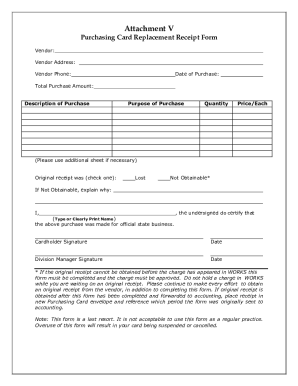
Get Vt Attachment V Purchasing Card Replacement Receipt Form 2017-2026
How it works
-

Open form follow the instructions
-

Easily sign the form with your finger
-

Send filled & signed form or save
How to fill out the VT Attachment V Purchasing Card Replacement Receipt Form online
Filling out the VT Attachment V Purchasing Card Replacement Receipt Form online can streamline the process of documenting purchases made for official state business. This guide will walk you through each section of the form, ensuring you provide all necessary details accurately.
Follow the steps to complete the form effectively.
- Click ‘Get Form’ button to obtain the form and open it in the editor.
- Begin by entering the vendor information, which includes the vendor name, address, and phone number. Be thorough to ensure clarity.
- Next, fill in the date of purchase. Make sure to use the correct format for consistency.
- Provide the total purchase amount. This should reflect the full cost of the item or service purchased.
- Describe the purchase in the designated section. Include specifics that could help in identifying the item or service.
- State the purpose of the purchase clearly, explaining how it relates to your official responsibilities.
- Indicate the quantity purchased, as well as the price per item in the respective fields.
- If more space is needed, utilize an additional sheet and reference it as necessary.
- Check the box next to the appropriate option to indicate if the original receipt was lost or not obtainable. If not obtainable, provide an explanation in the space provided.
- Type or clearly print your name in the designated area and ensure it matches your official paperwork.
- Provide your signature and the current date, confirming the purchase was made for official state business.
- Finally, obtain the signature of your division manager and include the current date.
- Review all filled sections for accuracy before saving your changes. Once complete, you can download, print, or share the form as necessary.
Complete your documents online today for a smoother experience.