Loading
Form preview
  • US Legal Forms
  • Other Templates
  • More Forms
  • More Uncategorized Forms
  • Oh Toledo Electrical Welfare Fund Automatic Reimbursement Form 2015

Get Oh Toledo Electrical Welfare Fund Automatic Reimbursement Form 2015-2026

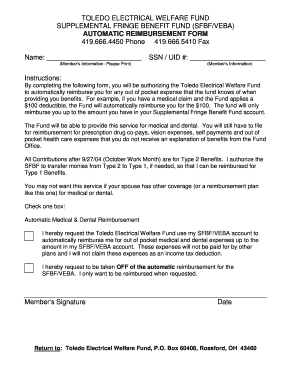
TOLEDO ELECTRICAL WELFARE FUND SUPPLEMENTAL FRINGE BENEFIT FUND (FBF/VEGA) AUTOMATIC REIMBURSEMENT FORM 419.666.4450 Phone 419.666.5410 Fax Name: (Members Information Please Print) SSN / UID #: (Members.

How it works

  1. Open form

    Open form follow the instructions

  2. Easily sign form

    Easily sign the form with your finger

  3. Share form

    Send filled & signed form or save

How to fill out the OH Toledo Electrical Welfare Fund Automatic Reimbursement Form online

Filling out the OH Toledo Electrical Welfare Fund Automatic Reimbursement Form online is a straightforward process aimed at facilitating reimbursement for eligible medical and dental expenses. This guide will assist you in completing the form accurately and efficiently.

Follow the steps to fill out the form effectively.

  1. Press the ‘Get Form’ button to obtain the reimbursement form and open it in the designated editor.
  2. Begin by entering your name in the provided space. Ensure that you print your name clearly.
  3. Input your Social Security Number (SSN) or unique identification number (UID) in the specified field. This is essential for identifying your account.
  4. Review the instructions that outline how the automatic reimbursement process operates. Be aware that this service is applicable for out-of-pocket expenses eligible for reimbursement.
  5. Select one box to indicate your preference for reimbursement. You may choose to enroll in automatic medical and dental reimbursement or opt out of this service.
  6. If you choose the automatic reimbursement option, confirm that you agree not to claim these expenses as an income tax deduction. This acknowledgment is critical.
  7. Sign the form in the designated area to authorize the Toledo Electrical Welfare Fund to proceed with the reimbursement process.
  8. Date the form in the appropriate section, providing the date you completed the form.
  9. Once you have filled out all required sections, review your entries for accuracy, then save any changes you have made to the form.
  10. Download, print, or share the completed form as needed. Ensure that you return the form to the Toledo Electrical Welfare Fund at the provided address.

Complete your reimbursement form online today to ensure timely processing of your expenses.

Get form

Experience a faster way to fill out and sign forms on the web. Access the most extensive library of templates available.
Get form

Related content

04-7722 - Toledo Electrical Welfare Fund v. N. W...
... LLC, Defendant N.W. Ohio Buckeye Electric, LTD., Defendant Jamie Sorosiak, Defendant...
Learn more
ERRP All Approved Applications (PDF) - CMS
Alaska Electrical Health and Welfare Fund. 99503- ... Board of Trustees Canton Electrical...
Learn more
Air National Guard - Wikipedia
The Air National Guard (ANG), also known as the Air Guard, is a federal military reserve...
Learn more

Related links form

Tm 16 Form Maryland State Inspection Book Pdf Arunachal Pradesh Lottery Claim Form PurrInn Cats Hostelry - Cat Hotel Boarding Forms And Contracts

Get This Form Now!

Use professional pre-built templates to fill in and sign documents online faster. Get access to thousands of forms.
Get form
If you believe that this page should be taken down, please follow our DMCA take down processhere.
Get OH Toledo Electrical Welfare Fund Automatic Reimbursement Form
Get form
  • Adoption
  • Bankruptcy
  • Contractors
  • Divorce
  • Home Sales
  • Employment
  • Identity Theft
  • Incorporation
  • Landlord Tenant
  • Living Trust
  • Name Change
  • Personal Planning
  • Small Business
  • Wills & Estates
  • Packages A-Z
  • Affidavits
  • Bankruptcy
  • Bill of Sale
  • Corporate - LLC
  • Divorce
  • Employment
  • Identity Theft
  • Internet Technology
  • Landlord Tenant
  • Living Wills
  • Name Change
  • Power of Attorney
  • Real Estate
  • Small Estates
  • Wills
  • All Forms
  • Forms A-Z
  • Other Templates
  • Legal Hub
  • About Us
  • Help Portal
  • Legal Resources
  • Blog
  • Affiliates
  • Contact Us
  • Delete My Account
  • Site Map
  • Industries
  • Forms in Spanish
  • Localized Forms
  • State-specific Forms
  • Forms Kit
  • Real Estate Handbook
  • All Guides
  • Notarize
  • Incorporation services
  • For Consumers
  • For Small Business
  • For Attorneys
  • USLegal
  • FormsPass
  • pdfFiller
  • signNow
  • altaFlow
  • DocHub
  • Instapage
Form Packages
  • Adoption
  • Bankruptcy
  • Contractors
  • Divorce
  • Home Sales
  • Employment
  • Identity Theft
  • Incorporation
  • Landlord Tenant
  • Living Trust
  • Name Change
  • Personal Planning
  • Small Business
  • Wills & Estates
  • Packages A-Z
Form Categories
  • Affidavits
  • Bankruptcy
  • Bill of Sale
  • Corporate - LLC
  • Divorce
  • Employment
  • Identity Theft
  • Internet Technology
  • Landlord Tenant
  • Living Wills
  • Name Change
  • Power of Attorney
  • Real Estate
  • Small Estates
  • Wills
  • All Forms
  • Forms A-Z
  • Other Templates
Customer Service
  • Legal Hub
  • About Us
  • Help Portal
  • Legal Resources
  • Blog
  • Affiliates
  • Contact Us
  • Delete My Account
  • Site Map
  • Industries
  • Forms in Spanish
  • Localized Forms
  • State-specific Forms
  • Forms Kit
Legal Guides
  • Real Estate Handbook
  • All Guides
Prepared for you
  • Notarize
  • Incorporation services
Our Customers
  • For Consumers
  • For Small Business
  • For Attorneys
Our Sites
  • USLegal
  • FormsPass
  • pdfFiller
  • signNow
  • altaFlow
  • DocHub
  • Instapage
Social Media
Call us now toll free:
+1 833 426 79 33
As seen in:
© Copyright 1999-2026 airSlate Legal Forms, Inc. 17 Station Street, Ste. 203, Brookline, MA 02445
  • Your Privacy Choices
  • Terms of Service
  • Privacy Notice
  • Content Takedown Policy
  • Bug Bounty Program