Loading
Get My Telekom Malaysia Berhad Business Application Form 2016-2025
How it works
-

Open form follow the instructions
-

Easily sign the form with your finger
-

Send filled & signed form or save
How to fill out the MY Telekom Malaysia Berhad Business Application Form online
Filling out the MY Telekom Malaysia Berhad Business Application Form online is an important step to access the services offered by Telekom Malaysia. This guide provides clear instructions for a smooth and efficient application process.
Follow the steps to successfully complete your application.
- Click ‘Get Form’ button to obtain the online application form and open it in your browser.
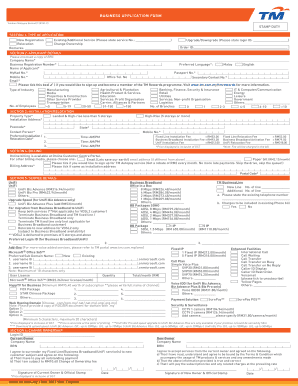
- Begin by selecting the type of application in Section 1, indicating whether you are making a new registration, requesting an existing or additional service, relocation, change of ownership, upgrade, or downgrade. Provide any necessary remarks in the designated field.
- In Section 2, fill out the applicant details. Provide the company name, business registration number, preferred language, and personal details of the applicant including name, identification number, contact numbers, and email address. Don't forget to tick the box if you wish to enroll in the TM Rewards programme.
- Proceed to Section 3 to provide details regarding installation or relocation. Specify the property type, installation address, postcode, contact person, and the preferred installation or relocation date and time.
- In Section 4, select your billing preferences. Indicate if you prefer paper bills or email billing. Provide billing address details and indicate if it is the same as the installation address.
- Section 5 requires you to detail the service you are applying for. Choose from options like UniFi, TM BusinessLine, Business Broadband, and provide any additional requested details.
- If applicable, fill out Section 6 for change of ownership, ensuring you provide both the current and new owner's details.
- Review Section 7, which contains important acknowledgements. Make sure to read through these conditions carefully as your acceptance is necessary for processing your application.
- Section 8 requests your consent regarding the privacy notice. Please ensure you understand how your personal information will be processed.
- Complete the declaration in Section 9 and ensure all mandatory fields are filled out correctly. After confirming that all information is accurate, you may submit the form.
- Finally, save changes to your application, and download, print, or share the form as needed.
Complete your application online today to enjoy the services offered by MY Telekom Malaysia Berhad.
We provide fixed-network/broadband, mobile communications, Internet, and IPTV products and services for consumers, and information and communication technology (ICT) solutions for business and corporate customers.
Industry-leading security and compliance
US Legal Forms protects your data by complying with industry-specific security standards.
-
In businnes since 199725+ years providing professional legal documents.
-
Accredited businessGuarantees that a business meets BBB accreditation standards in the US and Canada.
-
Secured by BraintreeValidated Level 1 PCI DSS compliant payment gateway that accepts most major credit and debit card brands from across the globe.