Loading
Get Hi Dot Bb-1 2001
How it works
-

Open form follow the instructions
-

Easily sign the form with your finger
-

Send filled & signed form or save
How to fill out the HI DoT BB-1 online
The HI DoT BB-1 form is essential for registering a business in Hawaii. Completing it accurately is crucial for ensuring compliance with state tax laws and obtaining necessary licenses. This guide offers a step-by-step approach to filling out the form online, ensuring users can navigate the process with ease.
Follow the steps to successfully complete the HI DoT BB-1 online.
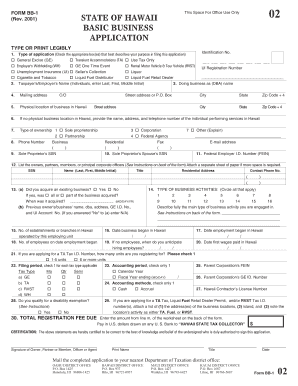
- Press the 'Get Form' button to access the HI DoT BB-1 form, allowing you to begin the online filling process.
- In section 1, select the type of application by checking the appropriate box(es) that describe your purpose for filing this application, such as General Excise (GE) or Transient Accommodations (TA).
- In section 2, provide your Taxpayer's or Employer's Name. For individuals, enter your Last name, First name, and Middle Initial.
- Section 3 requires you to state your Doing Business As (DBA) name if different from your legal name.
- Fill in section 4 with your mailing address, and section 5 with the physical location of your business in Hawaii.
- If you do not have a physical business location in Hawaii, provide the contact information of the individual performing services in Hawaii in section 6.
- Indicate the type of ownership in section 7 by checking the appropriate box for Sole proprietorship, Partnership, Corporation, or Other.
- Complete section 11 with your Federal Employer Identification Number (FEIN), which is required if you have employees.
- In section 12, list the owners, partners, members, or principal corporate officers of your business, including their details as requested.
- For section 13, answer whether you have acquired an existing business and provide the necessary details if applicable.
- In section 14, circle all applicable business activities and describe your main business activity in detail.
- Complete sections 15 through 20 with details about the number of establishments, date business began, anticipated hiring dates, and the date first wages were paid.
- Fill out sections 21 to 30, related to filing periods, accounting methods, any disability exemptions, and the total registration fee due.
- Ensure you have signed the certification at the end of the application, dating it appropriately.
- Finally, review your completed form and make any necessary corrections. After ensuring all information is accurate, save your changes, download, print, or share the form as needed.
Start your online application today to ensure your business is properly registered and compliant.
Get form
Experience a faster way to fill out and sign forms on the web. Access the most extensive library of templates available.
PURPOSE OF FORM Use this form to: 1. Register for various tax licenses and permits with the Department of Taxation (DOTAX) and to obtain a corresponding Hawaii Tax Identification Number (Hawaii Tax I.D. No.).
Get This Form Now!
Use professional pre-built templates to fill in and sign documents online faster. Get access to thousands of forms.