Loading
Get Magistrate Court
How it works
-

Open form follow the instructions
-

Easily sign the form with your finger
-

Send filled & signed form or save
How to fill out the Magistrate Court online
This guide provides clear instructions on how to complete the Magistrate Court form online. Whether you are a first-time user or have some experience, these steps will help you navigate the process with ease.
Follow the steps to successfully fill out the Magistrate Court form online.
- Press the ‘Get Form’ button to retrieve the form and open it in your preferred editor.
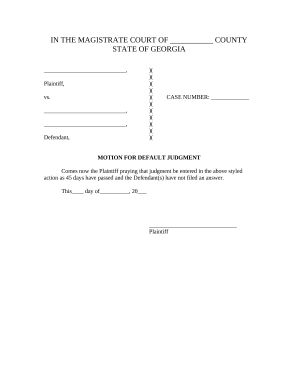
- Begin by entering the case number in the designated field, which is located at the top of the form.
- Next, fill in the name of the Plaintiff in the appropriate section, ensuring you provide the full legal name.
- Proceed to enter the names of the Defendants in the sections provided, ensuring that they are accurately spelled and formatted.
- In the area for the motion, indicate the relief sought by clearly stating that you are requesting a default judgment due to the absence of a response from the Defendant(s) after 45 days.
- Date the document by filling in the current day and month in the corresponding fields, followed by the year.
- Lastly, sign the form in the designated field where it states ‘Plaintiff’ to authenticate your request.
- Once all sections are completed, save your changes, and choose to download or print the form for your records.
Complete your documents online today to ensure a smooth filing process.
District Judges are elected for six-year terms and may appoint magistrates. Magistrates may set bail and accept bonds in criminal matters, accept guilty pleas, impose sentences for dog, game, traffic, motor carrier, snowmobile and boat law violations. They may also issue arrest and search warrants.