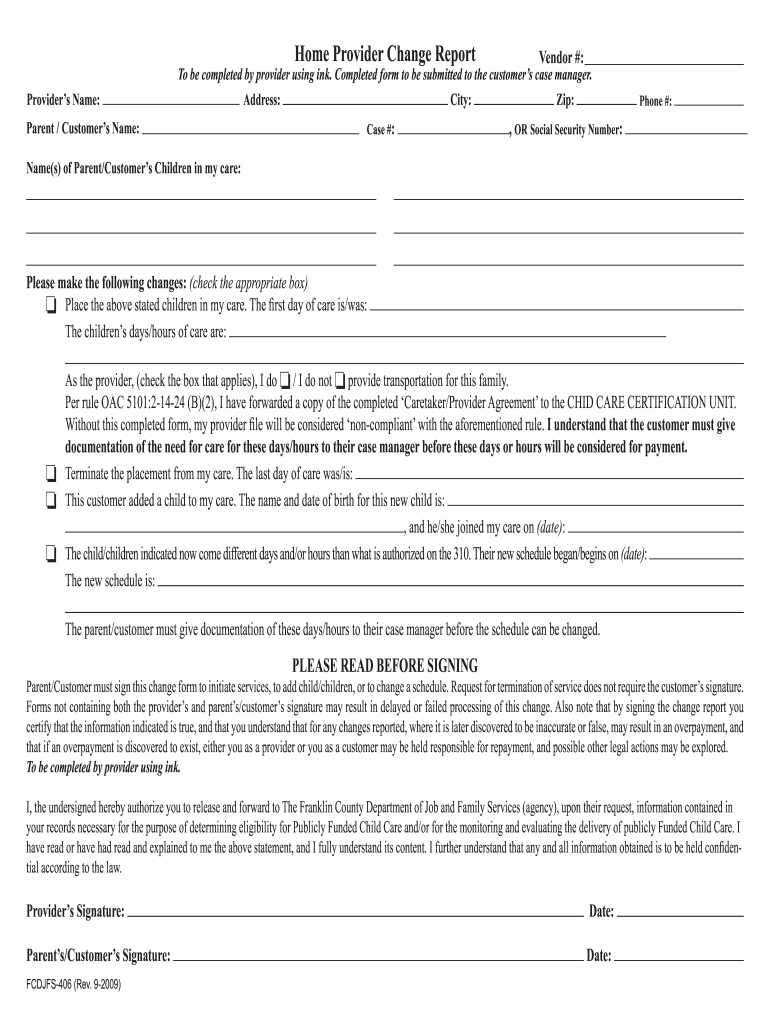
Ress: City: Case #: Zip: Phone #: , OR Social Security Number: Name(s) of Parent/Customer’s Children in my care: Please make the following changes: (check the appropriate box) o Place the above stated children in my care. The first day of care is/was: The children’s days/hours of care are: As the provider, (check the box that applies), I do o / I do not o provide transportation for this family. Per rule OAC 5101:2-14-24 (B)(2), I have forwarded a copy of the complet.

Open form follow the instructions

Easily sign the form with your finger

Send filled & signed form or save
How to fill out the OH FCDJFS-406 online
The OH FCDJFS-406 form is a Home Provider Change Report designed to facilitate updates regarding child care arrangements. This guide will assist users in successfully completing the form online with clear, step-by-step instructions.
Follow the steps to accurately complete your form online.
- Click the ‘Get Form’ button to obtain the OH FCDJFS-406 and open it in your browser.
- Begin by filling in the provider's name, which is required for identification.
- Next, enter the parent or customer's name associated with the child/children in care.
- Provide the complete address, including city, zip code, and phone number. Alternatively, you can enter the social security number if preferred.
- List the names of the children currently in your care.
- Indicate any changes you are making by checking the appropriate boxes. For example, specify if you are adding or terminating care for any children.
- If you are adding a child, include their name and date of birth, along with the date they joined your care.
- For changes in schedule, provide the new days and hours along with the effective date of these changes.
- Ensure the form is signed by both the provider and the parent/customer. Without these signatures, processing may be delayed.
- Review the completed form for accuracy before proceeding to save changes, download, print, or share your form as necessary.
Complete your OH FCDJFS-406 form online today to ensure timely processing of your child care changes.
Experience a faster way to fill out and sign forms on the web. Access the most extensive library of templates available.
Related content
Similarly, Mother had “off and on” contact with the FCDJFS, which she blamed on...
Get answers to your most pressing questions about US Legal Forms API.
How do I upload documents to my Snap account?
You can upload documents to your SNAP account by logging into your account on the Ohio Benefits portal. Look for the document upload feature, then follow the steps to attach your files. This process is crucial in validating your SNAP eligibility, adhering to the OH FCDJFS-406 standards, and ensures your application stays on track.
How to upload documents on dhs website?
To upload documents on the DHS website, start by navigating to the appropriate subsection that caters to your needs. Follow the instructions provided for document submission, ensuring that your files meet the specified requirements. Utilizing this method supports the OH FCDJFS-406 framework and helps to facilitate a smooth document handling process.
How to upload documents for Medicaid ohio?
You can upload documents for Medicaid in Ohio through the Ohio Benefits portal. After logging in, navigate to the document upload section and follow the prompts to add your documents securely. Completing this task helps streamline your Medicaid application and aligns with the OH FCDJFS-406 requirements, making the process easier for you.
How do I send documents to JFS ohio?
To send documents to JFS Ohio, you can utilize their online portal or mail them directly to your local JFS office. If you choose to send documents via mail, make sure to include your case number and any relevant information for proper processing. By following the OH FCDJFS-406 guidelines, you can ensure your documents reach the right department swiftly.
How do I email ohio JFS?
To email Ohio JFS, you need to visit their official website and find the appropriate contact section. Look for the email address related to your specific inquiry, such as customer service or program assistance. After composing your email, provide all necessary details to help them assist you efficiently. This approach aligns with the OH FCDJFS-406 process, ensuring a streamlined communication channel.
What school district is Franklin County, Columbus, Ohio?
The South-Western City School District (SWCSD) is Ohio's sixth largest public school district located southwest of the city of Columbus.
How do I email Franklin County Job and Family Services?
Contact Us Phone: 1-844-640-OHIO (6446) Phone: 1-844-640-OHIO (6446) - Option 2. Fax: 614-233-2749. Email: franklin-cdjfs-franklincountychildcare@jfs.ohio.gov. Phone: 614-233-2381. Phone: 614-212-1800. Phone: 1-800-324-8680. Phone: 614-233-2095.
What is the back to school grant in Franklin County Ohio?
This special grant program, which is made possible by the Franklin County Board of Commissioners, offers $750 in financial assistance for TANF-eligible families with school-age children to help cover costs like backpacks, school supplies, clothes and more.
Use professional pre-built templates to fill in and sign documents online faster. Get access to thousands of forms.
If you believe that this page should be taken down, please follow our DMCA take down process here.