Loading
Get 824 Application Advice
How it works
-

Open form follow the instructions
-

Easily sign the form with your finger
-

Send filled & signed form or save
How to fill out the 824 Application Advice online
Filling out the 824 Application Advice form online can seem daunting at first, but this guide will provide you with a clear and structured approach. The form serves as a vital component in reporting the results of data content edits within an Electronic Data Interchange environment.
Follow the steps to successfully complete the 824 Application Advice form.
- Press the ‘Get Form’ button to access the 824 Application Advice form and open it in your preferred online editor.
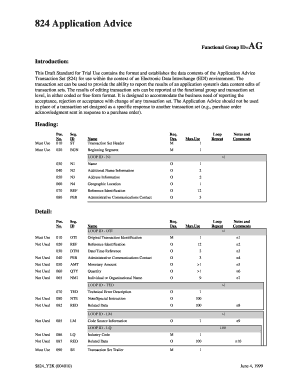
- Begin by completing the Transaction Set Header (ST segment). This includes entering the transaction set identifier code and assigning a unique control number to the transaction set.
- Proceed to the Beginning Segment (BGN segment). Here you will specify the purpose of the transaction set and provide the transaction type code, reference identification, date, and time as needed.
- Fill in the Name segment (N1 segment). You will need to identify the party by providing their type, name, and possibly an identification code.
- If applicable, add additional details in the Additional Name Information (N2 segment) and Address Information segments (N3 segment) to specify more about the named party.
- Include the Geographic Location (N4 segment) to specify the geographical details of the party you are addressing.
- Complete the Reference Identification (REF segment) to provide necessary identifying information related to the transaction.
- If needed, provide contact information in the Administrative Communications Contact (PER segment) to direct any inquiries.
- For detailing the original transaction identification (OTI segment), include references to previous transactions as this is crucial for tracking.
- In the Date/Time Reference (DTM segment), input any relevant dates or times related to the transaction for clarity.
- Finally, indicate any Technical Error Description (TED segment) if applicable, to describe any errors in the transaction.
- Conclude your form by filling out the Transaction Set Trailer (SE segment), which indicates the end of the transaction set and includes a count of the segments.
Complete your 824 Application Advice form online now!
The EDI 824 Application Advice message provides notification that your EDI 404 bill of lading has been Accepted, Accepted with Errors, or Rejected. The following documentation provides examples of EDI 824 responses and information describing the format and data contents.
Industry-leading security and compliance
US Legal Forms protects your data by complying with industry-specific security standards.
-
In businnes since 199725+ years providing professional legal documents.
-
Accredited businessGuarantees that a business meets BBB accreditation standards in the US and Canada.
-
Secured by BraintreeValidated Level 1 PCI DSS compliant payment gateway that accepts most major credit and debit card brands from across the globe.