Loading
Form preview
  • US Legal Forms
  • Other Templates
  • More Forms
  • More Multi-State Forms
  • Fake Doctor Release Form To Return To Work ...

Get Fake Doctor Release Form To Return To Work ...

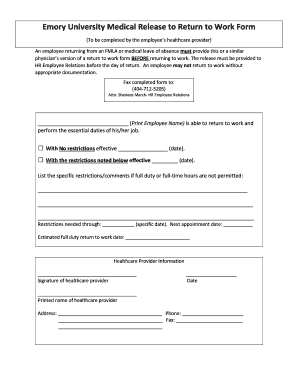
Or a similar physician s version of a return to work form BEFORE returning to work. The release must be provided to HR Employee Relations before the day of return. An employee may not return to work without appropriate documentation. Fax completed form to: (404-712-5205) Attn: Sheriece March- HR Employee Relations (Print Employee Name) is able to return to work and perform the essential duties of his/her job. With No restrictions effective.

How it works

  1. Open form

    Open form follow the instructions

  2. Easily sign form

    Easily sign the form with your finger

  3. Share form

    Send filled & signed form or save

How to fill out the Fake Doctor Release Form To Return To Work online

Filling out the Fake Doctor Release Form To Return To Work is a crucial step for employees returning to work after medical leave. This guide provides clear, step-by-step instructions to ensure the form is completed accurately and efficiently.

Follow the steps to complete the form online

  1. Click ‘Get Form’ button to obtain the form and open it in your preferred editor.
  2. Enter the employee's full name in the designated section where it states 'Print Employee Name'. This identifies the individual returning to work.
  3. Indicate whether the employee can return with or without restrictions by checking the appropriate box. Fill in the effective date next to the option selected.
  4. If returning with restrictions, use the space provided to list specific limitations or comments regarding the employee's capability to perform their job duties.
  5. Fill in the date until which the restrictions will apply, as well as the date for the next medical appointment. This information helps HR monitor the employee's condition.
  6. Complete the section for the estimated full-duty return to work date, which provides clarity on when the employee will be able to perform all job functions.
  7. Healthcare providers must sign the form. Ensure they also fill in their name, address, phone number, and fax number to validate the documentation.
  8. Once all sections are complete, save your changes. You may choose to download, print, or share the form as needed. Make sure to send the completed form to HR Employee Relations at the provided fax number before the return date.

Take the next step in your return to work by completing the necessary documents online today.

Get form

Experience a faster way to fill out and sign forms on the web. Access the most extensive library of templates available.
Get form

Related content

Self Attested Return to Work Letter
Self Attested Return to Work Letter. By signing this document, I verify that I have...
Learn more
Return to Work Form Patient Name
ONE OF THE FOLLOWING THREE BOXES MUST BE COMPLETED ON RETURN TO WORK STATUS: ... (form...
Learn more
2016 Publication 535
Jan 19, 2017 — This publication discusses common business expenses and explains what is...
Learn more

Related links form

Radiology Declaration Of Pregnancy Template Petition For Paternity Form Oklahoma DS-4042. CERTIFICATION OF IDENTITY - Foia State Krazydad Kakuro

Questions & Answers

Get answers to your most pressing questions about US Legal Forms API.

Contact support

If an employee is not providing a sick note after more than seven days of sick leave, then you may have the right to withhold contractual sick pay—or statutory sick pay (SSP). You can write a letter to your employee requesting a sick note. In this, you can outline the legal requirements.

Return-to-work letter template I am writing to inform you that I am able to return to work from [illness or care responsibilities] on [date]. As you already know, I had to take time from work to [reasoning for your leave of absence, such as to regain your health or care for a loved one].

Privacy laws and HIPAA Normally, it is not a violation under HIPAA for your employer to ask for a note from your doctor as long as the employer needs information for health insurance, worker's compensation, or sick leave.

The basic elements of a doctor's note should include the following: The doctor's contact details; should include their full name, hospital or clinic address, and contact details (e.g., phone number, email, etc.) The date and time of generating the doctor's note. The patient's name, date of birth, and contact details.

Filling out a doctor's note template with false information or forging a doctor's signature is unethical and illegal. Think twice before forging a doctor's note, there are serious consequences. PlushCare makes getting a real doctor's note even more convenient than faking a note, while eliminating the risks.

Your doctor will only give you a fit note if your health affects your fitness for work. Can I get a fit note without seeing my GP? A fit note must be signed by a doctor, but you do not always need to see a GP in person to get one.

A doctor's note should include the date you saw the doctor, that you had a valid reason for missing work, any work limitations and if a period of absence from work is needed. The doctor's note cannot violate the employee's privacy.

Get This Form Now!

Use professional pre-built templates to fill in and sign documents online faster. Get access to thousands of forms.
Get form
If you believe that this page should be taken down, please follow our DMCA take down processhere.
Get Fake Doctor Release Form To Return To Work ...
Get form
  • Adoption
  • Bankruptcy
  • Contractors
  • Divorce
  • Home Sales
  • Employment
  • Identity Theft
  • Incorporation
  • Landlord Tenant
  • Living Trust
  • Name Change
  • Personal Planning
  • Small Business
  • Wills & Estates
  • Packages A-Z
  • Affidavits
  • Bankruptcy
  • Bill of Sale
  • Corporate - LLC
  • Divorce
  • Employment
  • Identity Theft
  • Internet Technology
  • Landlord Tenant
  • Living Wills
  • Name Change
  • Power of Attorney
  • Real Estate
  • Small Estates
  • Wills
  • All Forms
  • Forms A-Z
  • Other Templates
  • Legal Hub
  • About Us
  • Help Portal
  • Legal Resources
  • Blog
  • Affiliates
  • Contact Us
  • Delete My Account
  • Site Map
  • Industries
  • Forms in Spanish
  • Localized Forms
  • State-specific Forms
  • Forms Kit
  • Real Estate Handbook
  • All Guides
  • Notarize
  • Incorporation services
  • For Consumers
  • For Small Business
  • For Attorneys
  • USLegal
  • FormsPass
  • pdfFiller
  • signNow
  • altaFlow
  • DocHub
  • Instapage
Form Packages
  • Adoption
  • Bankruptcy
  • Contractors
  • Divorce
  • Home Sales
  • Employment
  • Identity Theft
  • Incorporation
  • Landlord Tenant
  • Living Trust
  • Name Change
  • Personal Planning
  • Small Business
  • Wills & Estates
  • Packages A-Z
Form Categories
  • Affidavits
  • Bankruptcy
  • Bill of Sale
  • Corporate - LLC
  • Divorce
  • Employment
  • Identity Theft
  • Internet Technology
  • Landlord Tenant
  • Living Wills
  • Name Change
  • Power of Attorney
  • Real Estate
  • Small Estates
  • Wills
  • All Forms
  • Forms A-Z
  • Other Templates
Customer Service
  • Legal Hub
  • About Us
  • Help Portal
  • Legal Resources
  • Blog
  • Affiliates
  • Contact Us
  • Delete My Account
  • Site Map
  • Industries
  • Forms in Spanish
  • Localized Forms
  • State-specific Forms
  • Forms Kit
Legal Guides
  • Real Estate Handbook
  • All Guides
Prepared for you
  • Notarize
  • Incorporation services
Our Customers
  • For Consumers
  • For Small Business
  • For Attorneys
Our Sites
  • USLegal
  • FormsPass
  • pdfFiller
  • signNow
  • altaFlow
  • DocHub
  • Instapage
Social Media
Call us now toll free:
+1 833 426 79 33
As seen in:
© Copyright 1999-2026 airSlate Legal Forms, Inc. 17 Station Street, Ste. 203, Brookline, MA 02445
  • Your Privacy Choices
  • Terms of Service
  • Privacy Notice
  • Content Takedown Policy
  • Bug Bounty Program