T: Date of Birth Address (if different) Sex M D V M D V M D V M D V Social Security Number ENTER ANNUAL OPTION TRANSFER REQUEST(S) BELOW 14. Change NYSHIP Option Change to: Elect Opt-out Empire Plan Individual Opt-out (NYS Medical only) Change Pre-Tax Status Change to: Pre-Tax HMO Code HMO Name: Family Opt-out If choosing Opt-out, you must also complete the PS-409 Opt-out Attestation Form. After-Tax Submit during the Pre-Tax Contribution Selection Period (November 1-30) Pers.
Loading

Open form follow the instructions

Easily sign the form with your finger

Send filled & signed form or save
How to fill out the NY PS-404 online
This guide provides detailed instructions for completing the NY PS-404 health insurance transaction form online. By following these steps, users will ensure that they properly fill out the required information and make informed choices regarding their health insurance coverage.
Follow the steps to successfully complete the NY PS-404 form.
- Click ‘Get Form’ button to acquire the NY PS-404 form and open it in your preferred online editor.
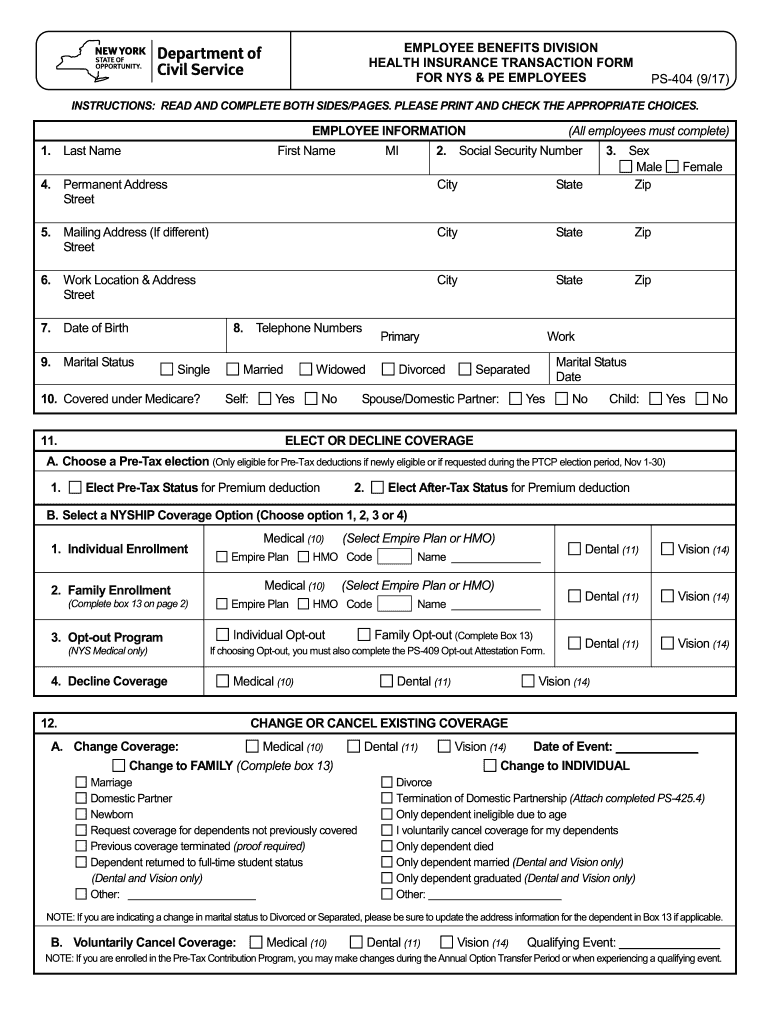
- Begin by filling out the employee information section (Boxes 1-10) with your last name, first name, social security number, sex, permanent address, mailing address, work location, date of birth, marital status, and telephone numbers.
- In the ‘Elect or Decline Coverage’ section (Boxes 11 A-B), choose between Pre-Tax or After-Tax status for premium deductions and select your desired NYSHIP coverage option. Make sure to check the appropriate boxes for Individual Enrollment, Family Enrollment, Opt-out Program, or Declining Coverage.
- If you are changing or canceling existing coverage (Box 12), indicate the nature of the change and provide the date of the relevant event. Be sure to check the coverage type (Medical, Dental, Vision) that applies to the change.
- In the Dependent Information section (Box 13), provide necessary details if enrolling or opting out of family coverage. Indicate whether you are adding, deleting, or changing dependent information and fill in the required details.
- If you are making an Annual Option Transfer request (Box 14), complete the details based on the current plan year and any applicable qualifying events.
- Finally, review all the information you have entered for accuracy. Ensure to sign and date the authorization section to validate the form before submission.
- Once completed, you can save your changes, download the form, print it, or share it according to your needs.
Start filling out your NY PS-404 form online today to manage your health insurance options effectively.
Experience a faster way to fill out and sign forms on the web. Access the most extensive library of templates available.
Related content
This outlines the documentation that must be collected as proof of eligibility before...
NYS Department of Civil Service. Health Insurance Transaction Form. Albany, NY 12239. Page...
Get answers to your most pressing questions about US Legal Forms API.
What is the opt out program for Nyship?
The opt-out program for NYSHIP allows employees to decline health insurance coverage if they have alternative qualifying coverage. This can provide employees flexibility while still complying with NY PS-404 regulations. Ensure that you understand the terms of the program, as it can affect your future health insurance options.
Do small businesses have to offer health insurance in NY?
Small businesses in New York are not mandated to provide health insurance unless they have 50 or more full-time employees. However, many small businesses choose to offer insurance to attract and retain talent. Using resources like uslegalforms can simplify the process of understanding and navigating health insurance requirements under NY PS-404.
Can you offer health insurance to some employees and not others?
Yes, under certain conditions, employers can offer health insurance to some employees and not others in New York. However, this practice must comply with NY PS-404 regulations, which require that any offered plans meet specific standards of coverage. It's essential to approach this carefully to avoid any potential discrimination.
How many hours do you have to work in NYS to get health insurance?
In New York State, to qualify for health insurance, employees need to average at least 30 hours of work per week. This requirement aligns with the guidelines provided by NY PS-404. Employers may offer different plans, so it's important for employees to explore their options and understand the benefits available.
What is the new health law in NY?
The new health law in New York, often associated with NY PS-404, focuses on expanding coverage and improving access to healthcare services. These changes aim to ensure that more residents can obtain necessary health insurance. The law emphasizes transparency and mandates that employers provide clear information about available health plans.
What are the rules for offering health insurance to employees in NY?
In New York, employers must comply with several rules when offering health insurance to employees. According to NY PS-404, businesses with more than 50 employees are required to provide affordable health insurance. Additionally, employers should inform employees about their options and help them understand the benefits available.
How to fill out NY ST 120 form?
Filling out the NY ST 120 form requires accurate information about your employment and tax status. First, gather your payroll records, as you will need to report wages and benefits clearly. You can easily complete this form online via legal platforms like uslegalforms, which guide you through every step to ensure compliance with NY PS-404.
What is the minimum hours to qualify for health insurance in NYC?
In New York City, employees typically need to work at least 30 hours per week to qualify for health insurance under the Affordable Care Act. This is crucial for employers following NY PS-404 regulations. Keep in mind that coverage may vary based on the specific employer plan and the terms they set.
Is NYSHIP the same as UnitedHealthcare?
NYSHIP is a broader health insurance program that covers several plans, including those offered by UnitedHealthcare. While UnitedHealthcare provides certain benefits and services under the NYSHIP umbrella, they are not synonymous. Navigating through NY PS-404 and grasping how these systems interlink is key to making the right choice for your health needs. For additional information, uslegalforms can guide you through these options.
Is Nyship under UnitedHealthcare?
NYSHIP is not exclusively under UnitedHealthcare; rather, it includes UnitedHealthcare as one of its insurance partners. Various plans within NYSHIP may utilize UnitedHealthcare for service provision, depending on your selected plan. If you're examining your options under NY PS-404, understanding these relationships can help you make informed decisions. For further assistance, platforms like uslegalforms can streamline your selection process.
Use professional pre-built templates to fill in and sign documents online faster. Get access to thousands of forms.
If you believe that this page should be taken down, please follow our DMCA take down process here.
This form is available in several versions. Select the version you need from the drop-down list below.