Loading
Get Building Notice
How it works
-

Open form follow the instructions
-

Easily sign the form with your finger
-

Send filled & signed form or save
How to fill out the Building Notice online
This guide provides a comprehensive overview of how to fill out the Building Notice application online. Designed for small domestic works, this guide will support users in successfully completing each section of the form with ease.
Follow the steps to complete your Building Notice application.
- Press the ‘Get Form’ button to acquire the application form and open it for editing.
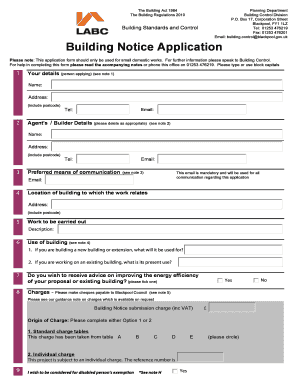
- Begin by entering the applicant's details in section 1, including their name, address, telephone number, and email.
- In section 2, provide the agent's or builder's details, if applicable, and include their contact information. If not, leave this section blank.
- Select your preferred means of communication in section 3 by entering a valid email address, ensuring it is mandatory for all correspondence.
- In section 4, specify the location of the building where the work will take place, including the complete address and postcode.
- For section 5, describe the work that will be carried out in clear and concise terms.
- Complete section 6 regarding the intended use of the building. Indicate whether it is for a new structure or an alteration to an existing one.
- In section 7, indicate whether you wish to receive advice on improving the energy efficiency of your proposal or existing building by ticking the appropriate box.
- Fill in section 8 regarding charges. Specify the appropriate fee based on the type of work being performed. Select either the standard charge tables or indicate if an individual charge applies.
- If applicable, indicate in section 9 whether you wish to be considered for a disabled person’s exemption and circle Yes or No.
- Provide the expected commencement date of the works in section 10 and be sure to notify Building Control prior to starting.
- In section 11, choose one method to demonstrate compliance with electrical safety regulations by ticking the appropriate box.
- Sign and date the declaration in section 12, confirming the accuracy of the information provided and that additional charges may apply if certain boxes are ticked.
- Once all sections are completed, save your changes. You will then have the option to download, print, or share the completed form.
Complete your Building Notice application online today for a smooth process.
Can I obtain a copy of Building Regulation Full Plans Approval Notice and/or the Completion certificate? Yes. Copies can be obtained by written request via post, e-mail or fax. Details of the charge for this service can be found on our Archive Information Charges page.
Industry-leading security and compliance
US Legal Forms protects your data by complying with industry-specific security standards.
-
In businnes since 199725+ years providing professional legal documents.
-
Accredited businessGuarantees that a business meets BBB accreditation standards in the US and Canada.
-
Secured by BraintreeValidated Level 1 PCI DSS compliant payment gateway that accepts most major credit and debit card brands from across the globe.