Loading
Get Au Nomination Statement - Moreland City Council 2020-2026
How it works
-

Open form follow the instructions
-

Easily sign the form with your finger
-

Send filled & signed form or save
How to fill out the AU Nomination Statement - Moreland City Council online
Filling out the AU Nomination Statement with Moreland City Council is a straightforward process designed to streamline the submission of your nomination. This guide offers clear instructions on how to complete this form online, ensuring you provide all necessary information accurately and efficiently.
Follow the steps to complete your form effectively.
- Click ‘Get Form’ button to obtain the form and open it in your preferred editor.
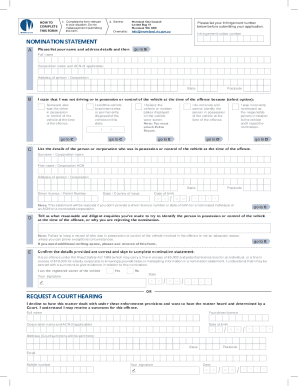
- Begin filling out the form by entering your personal information. You will need to provide your full name, address, and any relevant corporation name and ACN if applicable. Ensure all details are accurate and up to date.
- In section B, indicate why you were not in possession or control of the vehicle at the time of the offence by selecting the appropriate option. Provide supporting information as required, such as the date of sale if you sold the vehicle or any relevant details if it was stolen.
- If you selected to list the individual in control of the vehicle, move to section C and provide their details, including their surname, first name, address, driver licence number, and date of birth. Ensure that all information is complete and accurate.
- In section D, describe the inquiries you conducted to identify the person in control of the vehicle. Document any exceptional circumstances that prevent you from providing this information.
- Before submitting, review the important notice regarding the penalties associated with providing false information. Make sure you understand the implications of your statements.
- Complete section E by signing and dating the nomination statement, confirming that you are the registered owner of the vehicle.
- Finally, after completing all sections, you can save your changes, download, print, or share the filled form as required.
Complete your AU Nomination Statement online today to ensure a smooth processing experience.